PostgreSQL 大表改字段卡死的问题解决了吗? 解决了方案在此

PostgreSQL 大表改字段卡死的问题解决了吗? 解决了方案在此

AustinDatabases
发布于 2026-06-02 13:18:25
发布于 2026-06-02 13:18:25
上周我们提出了问题,本周我们解决问题,问题是什么,问题是你会不锁表进行 int - bigint ,bigint - int varchar - timestamp 的方案吗? 这对PG非常重要尤其大表,如果你alter table修改了字段类型,你的表会直接锁死,无法访问,业务中断,截止PG18 目前也是这样。
那么我们怎么解决这个问题,对的通过pg_roll来解决,我们先进行方案的解决,再说原理。
pg_roll是go语言编写的,一般数据库上都没有装GO,那么我们需要下载编译好的pg_roll来进行工作,这里我们假设你的机器是Rocky linux 8.10 PG18的状态。
[root@postgresql18 ~]# curl -LO https://github.com/xataio/pgroll/releases/download/v0.16.2/pgroll.linux.amd64
  % Total    % Received % Xferd  Average Speed   Time    Time     Time  Current
                                 Dload  Upload   Total   Spent    Left  Speed
  0     0    0     0    0     0      0      0 --:--:--  0:00:03 --:--:--     0
100 25.4M  100 25.4M    0     0  1853k      0  0:00:14  0:00:14 --:--:-- 4360k
[root@postgresql18 ~]# chmod +x pgroll.linux.amd64
[root@postgresql18 ~]# mv pgroll.linux.amd64 /usr/local/bin/pgroll
[root@postgresql18 ~]# pg
pg_archivecleanup  pg_dumpall         pg_restore         pg_test_fsync      pg_waldump
pgbench            pg_isready         pgroll             pg_test_timing
pg_dump            pgrep              pg_standby         pg_upgrade
[root@postgresql18 ~]# pgr
pgrep   pgroll
我们先现在,在安装,后面我们验证一下是否获得pgroll命令
[root@postgresql18 ~]# pgroll
For more information, visit http://pgroll.com/docs

Usage:
  pgroll [command]

Available Commands:
  baseline    Create a baseline migration for an existing database schema
  complete    Complete an ongoing migration with the operations present in the given file
  completion  Generate the autocompletion script for the specified shell
  convert     Convert SQL statements to a pgroll migration
  create      Create a new migration interactively
help        Help about any command
  init        Initialize pgroll in the target database
  latest      Print the name of the latest schema version or migration
  migrate     Apply outstanding migrations from a directory to a database
  pull        Pull migration history from the target database and write it to disk
  rollback    Roll back an ongoing migration
  start       Start a migration for the operations present in the given file
  status      Show pgroll status
  update      Update outdated migrations in a directory
  validate    Validate a migration file

Flags:
  -h, --help                   helpfor pgroll
      --lock-timeout int       Postgres lock timeout in milliseconds for pgroll DDL operations (default 500)
      --pgroll-schema string   Postgres schema to use for pgroll internal state (default "pgroll")
      --postgres-url string    Postgres URL (default "postgres://postgres:postgres@localhost?sslmode=disable")
      --role string            Optional postgres role to set when executing migrations
      --schema string          Postgres schema to use for the migration (default "public")
      --use-version-schema     Create version schemas for each migration (default true)
      --verbose                Enable verbose logging
  -v, --version                version for pgroll

Use "pgroll [command] --help"for more information about a command.
这里有一个问题,需要注意请在POSTGRESQL的数据库账号下,也就是postgres账号下去初始化,pgroll
[postgres@postgresql18 ~]$ pgroll init \
>   --postgres-url "postgres://postgres@localhost:5432/postgres?sslmode=disable"
 SUCCESS  Initialization complete
[postgres@postgresql18 ~]$ ls

pgroll 初始化
pgroll 初始化
postgres=# exit
[postgres@postgresql18 ~]$ psql
psql (18.4)
Type "help"forhelp.

postgres=# \dt pgroll.*
               List of tables
 Schema |      Name      | Type  |  Owner
--------+----------------+-------+----------
 pgroll | migrations     | table | postgres
 pgroll | pgroll_version | table | postgres
(2 rows)

postgres=#
初始化后,我们会发现在我们的PG数据库中已经有了pgroll的表。
下面我们做一个实验,一个100万数据的表,中的INT 修改成 BIGINT 同时 另一个字段BIGINT 改成 INT ,然后我们持续的往这个表里面进行数据的更新 1秒一次 。我们看看是不锁表,不影响业务。
下面我们开始测试
postgres=# \dt pgroll.*
               List of tables
 Schema |      Name      | Type  |  Owner
--------+----------------+-------+----------
 pgroll | migrations     | table | postgres
 pgroll | pgroll_version | table | postgres
(2 rows)

postgres=# CREATE TABLE users (
postgres(#     id SERIAL PRIMARY KEY,
postgres(#     c1 INT NOT NULL,
postgres(#     c2 BIGINT NOT NULL,
postgres(#     updated_at TIMESTAMP DEFAULT NOW()
postgres(# );
CREATE TABLE
postgres=#
postgres=# -- 2. 快速生成 100 万条测试数据
postgres=# INSERT INTO users (c1, c2)
postgres-# SELECT
postgres-#     (random() * 100000)::INT,
postgres-#     (random() * 1000000000)::BIGINT
postgres-# FROM generate_series(1, 1000000);
INSERT 0 1000000
postgres=# \d+ users
                                                                   Table "public.users"
   Column   |            Type             | Collation | Nullable |              Default              | Storage | Com
pression | Stats target | Description
------------+-----------------------------+-----------+----------+-----------------------------------+---------+----
---------+--------------+-------------
 id         | integer                     |           | not null | nextval('users_id_seq'::regclass) | plain   |
         |              |
 c1         | integer                     |           | not null |                                   | plain   |
         |              |
 c2         | bigint                      |           | not null |                                   | plain   |
         |              |
 updated_at | timestamp without time zone |           |          | now()                             | plain   |
         |              |
Indexes:
    "users_pkey" PRIMARY KEY, btree (id)
Not-null constraints:
    "users_id_not_null" NOT NULL "id"
    "users_c1_not_null" NOT NULL "c1"
    "users_c2_not_null" NOT NULL "c2"
Access method: heap
我们创建一个表 C1 int c2 bigint 针对这100万的数据我们要进行切换 把 C1改成BIGINT 把 C2改成INT
然后我们使用PGROLL来进行操作,注意网上大部分都是老版本,咱们这边使用的是最新版本的 PGROLL方法和原来的版本有一些不同。
1 你要初始化,这里要自己建立migrations的目录
2 你要初始化他
[postgres@postgresql18 migrations]$ pgroll init --postgres-url "$DATABASE_URL"
 SUCCESS  Initialization complete
[postgres@postgresql18 migrations]$ pgroll baseline 0001_initial_schema . \
>   --postgres-url "$DATABASE_URL"
Creating a baseline migration will restart the migration history.
Please confirm [y/N]: Yes
 SUCCESS  Baseline created successfully. Placeholder migration "0001_initial_schema.yaml" written

[postgres@postgresql18 migrations]$ pgroll migrate .
Database is up to date; no migrations to apply
上面我们先尝试运行命令看是否可以运行,命令结果给我database is up to date;
oK 说明我们可以运行,下面我们编辑文件,进行字段的修改,编辑完文件后,我们进行融合结果成功。
[postgres@postgresql18 migrations]$ vi 0002_users_swap_type.yaml
[postgres@postgresql18 migrations]$ pgroll migrate .
 SUCCESS  New version of the schema available under the postgres "public_0002_users_swap_type" schema
[postgres@postgresql18 migrations]$
下面是 我们编辑的0002的文件内容,注意必须这个格式
operations:
  - sql:
      up: |
        ALTER TABLE users
          ALTER COLUMN c1 TYPE bigint;

        ALTER TABLE users
          ALTER COLUMN c2 TYPE integer;

      down: |
        ALTER TABLE users
          ALTER COLUMN c1 TYPE integer;

        ALTER TABLE users
          ALTER COLUMN c2 TYPE bigint;
image
image
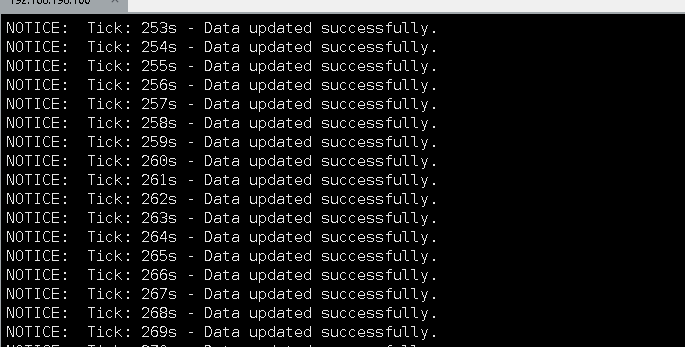
在整体的过程中,编写了一个不断UPDATE数据的程序,在整体切换的过程中,没有发现中断和错误,(1秒更新一行数据)
结论作为当前PG中修改字段类型锁表的问题,通过pgroll在测试中可以完全解决问题。

本文参与 腾讯云自媒体同步曝光计划,分享自微信公众号。
原始发表:2026-06-01,如有侵权请联系 cloudcommunity@tencent.com 删除
腾讯云开发者

Copyright © 2013 - 2026 Tencent Cloud. All Rights Reserved. 腾讯云 版权所有
深圳市腾讯计算机系统有限公司 ICP备案/许可证号:粤B2-20090059  粤公网安备44030502008569号
腾讯云计算(北京)有限责任公司 京ICP证150476号 | 京ICP备11018762号