【译】轻松评估 AI 应用程序的质量

【译】轻松评估 AI 应用程序的质量

郑子铭
发布于 2025-02-03 14:24:37
发布于 2025-02-03 14:24:37
学习分享 丨作者 / 郑 子 铭
原文 | Wendy Breiding
翻译 | 郑子铭
在构建利用 AI 的应用程序时,能够有效地评估 SLM(小型语言模型)或 LLM(大型语言模型)的响应从未如此重要。
评估是指评估 AI 模型(例如 SLM 或 LLM)生成的响应的质量和准确性的过程。这涉及使用各种指标来衡量 AI 生成的响应的相关性、真实性、连贯性和完整性等方面。评估在测试中至关重要,因为它们有助于确保 AI 模型按预期运行,提供可靠和准确的结果,从而增强用户体验和满意度。
介绍 Microsoft.Extensions.AI.Evaluation,现在处于预览阶段
我们很高兴地宣布 Microsoft.Extensions.AI.Evaluation 库的预览版本。.NET 生态系统的这一新增功能旨在为开发人员提供高级工具来评估智能应用程序的有效性。这些库由以下 NuGet 包组成:
- Microsoft.Extensions.AI.Evaluation – 定义支持评估的核心抽象和类型。
- Microsoft.Extensions.AI.Evaluation.Quality – 包含可用于评估项目中 LLM 响应质量的评估器,包括相关性、真实性、完整性、流畅性、连贯性、等效性和扎实性。 Microsoft.Extensions.AI.Evaluation.Reporting – 包含对缓存 LLM 响应、存储评估结果和根据该数据生成报告的支持。
- Microsoft.Extensions.AI.Evaluation.Console – 用于生成报告和管理评估数据的命令行 dotnet 工具。
为什么要使用 Microsoft.Extensions.AI.Evaluation?
Microsoft.Extensions.AI.Evaluation 库建立在最近发布的 Microsoft.Extensions.AI 抽象之上,旨在简化评估 .NET 智能应用程序质量和准确性的过程。
主要功能
无缝集成:这些库旨在与现有的 .NET 应用程序顺利集成,使您能够利用现有的测试基础架构和熟悉的语法来评估您的智能应用程序。使用您最喜欢的测试框架(例如 MSTest、xUnit 或 NUnit)和测试工作流(Test Explorer、dotnet test、CI/CD 管道)来评估您的应用程序。该库还通过将评估分数发布到遥测和监控仪表板,提供了对您的应用程序进行在线评估的简便方法。
全面的评估指标:这些库是与来自 Microsoft 和 GitHub 的数据科学研究人员合作构建的,并在流行的 Microsoft Copilot 体验上进行了测试,它们提供了针对相关性、真实性、完整性、流畅性、连贯性、等效性和扎实性的内置评估。它还为您提供了自定义添加您自己的评估的能力。
节省成本:借助库的响应缓存功能,AI 模型的响应将保留在缓存中。在后续运行中,只要请求参数(例如提示和模型端点)保持不变,响应就会从此缓存中提供,从而实现更快的执行速度和更低的成本。
可扩展且可配置:库在构建时考虑到了灵活性,允许您选择所需的组件。例如,如果您不想要响应缓存,则可以不用,并且可以定制报告以使其在您的环境中发挥最佳作用。库还允许进行广泛的自定义和配置,例如添加自定义指标和报告选项,确保可以根据项目的特定需求进行定制。
入门
- 将 Microsoft.Extensions.AI.Evaluation 集成到 .NET 应用程序的测试项目中非常简单。这里有一份快速入门指南。您可以在 eShopSupport 网站上查看此操作的完整示例。
将 Microsoft.Extensions.AI.Evaluation NuGet 包添加到您的测试项目中。
dotnet add package Microsoft.Extensions.AI.Evaluation
dotnet add package Microsoft.Extensions.AI.Evaluation.Quality
dotnet add package Microsoft.Extensions.AI.Evaluation.Reporting
- 为您的评估设置报告配置:
- 报告配置定义了应作为每次评估的一部分包含的评估器集。以下示例包括五个评估器,其中四个(
RelevanceTruthAndCompletenessEvaluator、CoherenceEvaluator、FluencyEvaluator、GroundednessEvaluator)在 Microsoft.Extensions.AI.Evaluation.Quality NuGet 包中定义。第五个AnswerScoringEvaluator是一个自定义评估器,在测试项目本身中定义。 - 报告配置还定义了应该用于评估的 LLM 聊天完成端点(即
IChatClient)。 - 想要获得一份关于所有最新更改如何影响应用程序功效的详细报告吗?报告配置还定义了应如何保留评估结果,以便您可以生成完整的 HTML 报告来查看回归和改进。
- 最后,为了帮助降低成本,您还可以在报告配置中启用评估缓存。启用响应缓存后,只要请求参数不变,您的评估就会使用来自 LLM 的缓存响应,而不是每次都访问 LLM。
以下示例使用 DiskBasedReportingConfiguration,默认情况下启用响应缓存,并使用磁盘上的目录 (StoragePath) 来保存评估结果以及缓存的 LLM 响应。
static ReportingConfiguration GetReportingConfiguration()
{
    // Setup and configure the evaluators you would like to utilize for each AI chat.
    // AnswerScoringEvaluator is an example of a custom evaluator that can be added, while the others
    // are included in the evaluation library.

    // Measures the extent to which the model's generated responses are pertinent and directly related to the given queries.
    IEvaluatorrtcEvaluator=
        newRelevanceTruthAndCompletenessEvaluator(
            newRelevanceTruthAndCompletenessEvaluator.Options(includeReasoning: true));
    // Measures how well the language model can produce output that flows smoothly, reads naturally, and resembles human-like language.
    IEvaluatorcoherenceEvaluator=newCoherenceEvaluator();
    // Measures the grammatical proficiency of a generative AI's predicted answer.
    IEvaluatorfluencyEvaluator=newFluencyEvaluator();
    // Measures how well the model's generated answers align with information from the source data
    IEvaluatorgroundednessEvaluator=newGroundednessEvaluator();
    // Measures the extent to which the model's retrieved documents are pertinent and directly related to the given queries.
    IEvaluatoranswerScoringEvaluator=newAnswerScoringEvaluator();

    varendpoint=newUri(AzureOpenAIEndpoint);
    varoaioptions=newAzureOpenAIClientOptions();
    varazureClient=newAzureOpenAIClient(endpoint, newDefaultAzureCredential(), oaioptions);

    // Setup the chat client that is used to perform the evaluations
    IChatClientchatClient= azureClient.AsChatClient(AzureOpenAIDeploymentName);
    Tokenizertokenizer= TiktokenTokenizer.CreateForModel(AzureOpenAIModelName);

    varchatConfig=newChatConfiguration(chatClient, tokenizer.ToTokenCounter(inputTokenLimit: ));

    // The DiskBasedReportingConfiguration caches LLM responses to reduce costs and
    // increase test run performance.
    return DiskBasedReportingConfiguration.Create(
            storageRootPath: StorageRootPath,
            chatConfiguration: chatConfig,
            evaluators: [
                rtcEvaluator,
                coherenceEvaluator,
                fluencyEvaluator,
                groundednessEvaluator,
                answerScoringEvaluator],
            executionName: ExecutionName);
}
- 您要评估的应用程序中使用的提示由评估库中的场景表示。每个评估都由一个测试方法表示。接下来,您将要评估的场景和测试方法添加到测试项目中。请注意,场景通常会运行多次以从应用程序中收集多个响应的样本。“场景运行”是指这些样本之一。
private static async Task EvaluateQuestion(EvalQuestion question, ReportingConfiguration reportingConfiguration, CancellationToken cancellationToken)
{
    // Create a new ScenarioRun to represent each evaluation run.
    awaitusing ScenarioRun scenario = await reportingConfiguration.CreateScenarioRunAsync($"Question_{question.QuestionId}", cancellationToken: cancellationToken);

    // Run the sample through the assistant to generate a response.
    var responseItems = await backend!.AssistantChatAsync(new AssistantChatRequest(
        question.ProductId,
        null,
        null,
        null,
        [new() { IsAssistant = true, Text = question.Question }]),
        cancellationToken);

    var answerBuilder = new StringBuilder();
    awaitforeach (var item in responseItems)
    {
        if (item.Type == AssistantChatReplyItemType.AnswerChunk)
        {
            answerBuilder.Append(item.Text);
        }
    }

    var finalAnswer = answerBuilder.ToString();

    // Invoke the evaluators
    EvaluationResult evalResult = await scenario.EvaluateAsync(
        [new ChatMessage(ChatRole.User, question.Question)],
        new ChatMessage(ChatRole.Assistant, finalAnswer),
        additionalContext: [new AnswerScoringEvaluator.Context(question.Answer)],
        cancellationToken);

    // Assert that the evaluator was able to successfully generate an analysis
    Assert.False(evalResult.Metrics.Values.Any(m => m.Interpretation?.Rating == EvaluationRating.Inconclusive), "Model response was inconclusive");

    // Assert that the evaluators did not report any diagnostic errors
    Assert.False(evalResult.ContainsDiagnostics(d => d.Severity == EvaluationDiagnosticSeverity.Error), "Evaluation had errors.");

}
[Fact]
public async Task EvaluateQuestion_Summit3000TrekkingBackpackStrapAdjustment()
{
    // This is the example question and answer that will be evaluated.
    var question = new EvalQuestion
    {
        QuestionId = ,
        ProductId = ,
        Question = "Hi there, I recently purchased the Summit 3000 Trekking Backpack and I\u0027m having issues with the strap adjustment. Can you provide me with the specified torque value for the strap adjustment bolts?",
        Answer = "15-20 Nm"
    };

    // Construct a reporting configuration to support the evaluation
    var reportingConfiguration = GetReportingConfiguration();

    // Run an evaluation pass and record the results to the cache folder
    await EvaluateQuestion(question, reportingConfiguration, , CancellationToken.None);
}
查看结果
设置完成后,您可以在测试资源管理器中运行测试以查看本地环境中的结果。
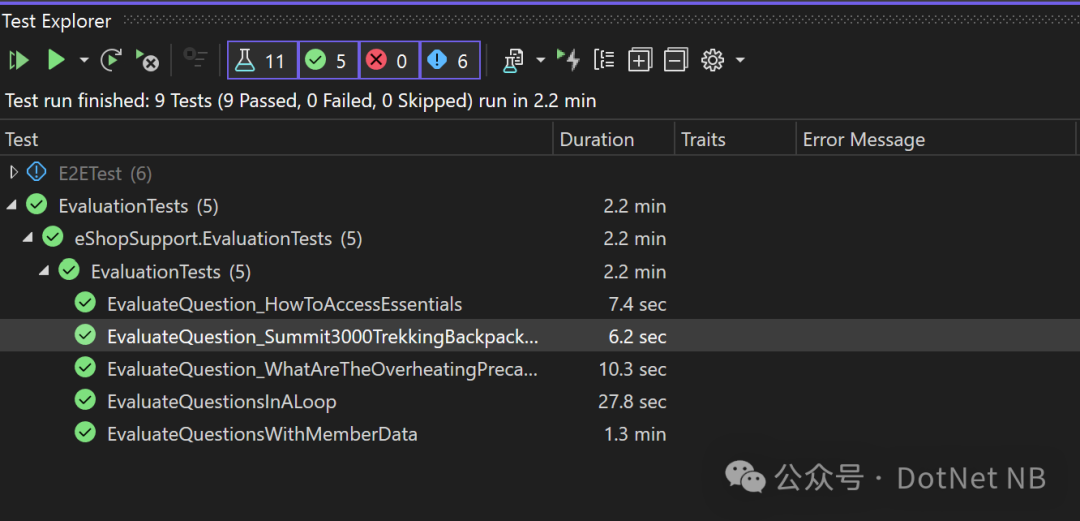
您还可以使用 dotnet 工具设置在 CLI 中运行的测试项目。
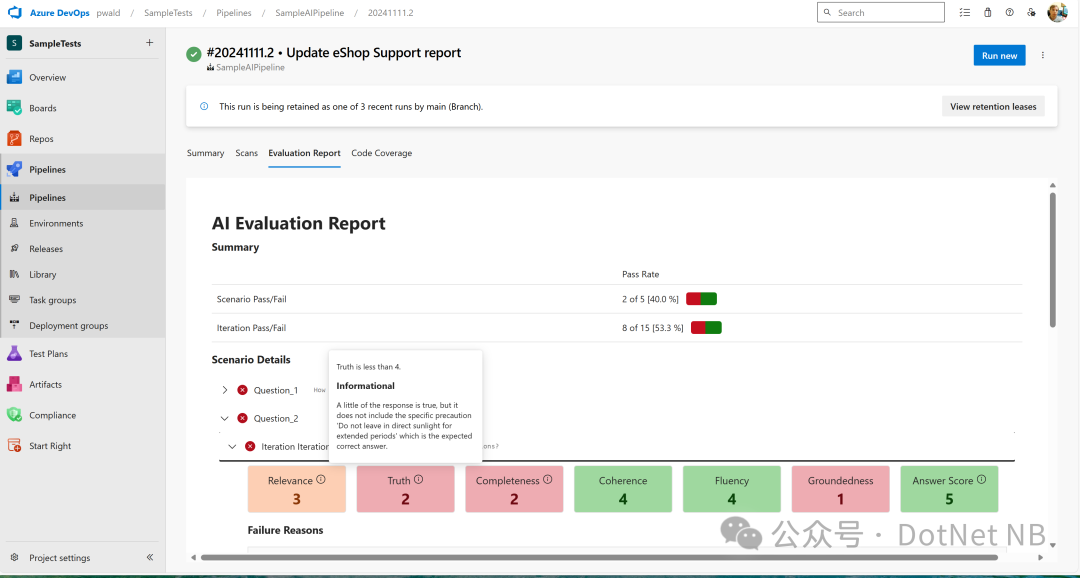
要为上次评估运行生成报告,请在命令行上使用以下 dotnet 工具。
dotnet tool install Microsoft.Extensions.AI.Evaluation.Console
dotnet aieval report --path <path\to\my\cache\storage> --output report.html
更多示例
要全面了解 Microsoft.Extensions.AI.Evaluation 库中提供的所有功能、概念和 API,请查看 dotnet/ai-samples 存储库中提供的 API 使用示例。这些示例被构建为单元测试的集合。每个单元测试都展示了一个特定的概念或 API,并以之前的单元测试中展示的概念和 API 为基础。
加入预览
我们相信这些库将为将 AI 集成到您的应用程序中、推动创新和提供有影响力的解决方案开辟新的可能性。
我们邀请您探索新的 Microsoft.Extensions.AI.Evaluation 预览库。如果您遇到任何困难或发现体验中缺少某些内容,请分享您的反馈。在我们继续完善和增强这些工具的过程中,您的见解非常宝贵。加入我们这一激动人心的旅程,帮助塑造 .NET 中 AI 的未来。
原文链接
Evaluate the quality of your AI applications with ease
本文参与 腾讯云自媒体同步曝光计划,分享自微信公众号。
原始发表:2025-01-28,如有侵权请联系 cloudcommunity@tencent.com 删除
目录
腾讯云开发者

Copyright © 2013 - 2026 Tencent Cloud. All Rights Reserved. 腾讯云 版权所有
深圳市腾讯计算机系统有限公司 ICP备案/许可证号:粤B2-20090059  粤公网安备44030502008569号
腾讯云计算(北京)有限责任公司 京ICP证150476号 | 京ICP备11018762号