TypeScript类型系统最佳实践

TypeScript类型系统最佳实践

架构师部落
发布于 2026-06-22 13:35:24
发布于 2026-06-22 13:35:24
第3篇:TypeScript类型系统最佳实践
用类型系统保障AI应用的可靠性
Claude Code 大量使用 TypeScript 和 Zod 来构建类型安全的系统。本篇将深入剖析其类型系统设计,展示如何利用现代 TypeScript 特性构建可靠的 AI 应用。
1. 类型系统架构概览
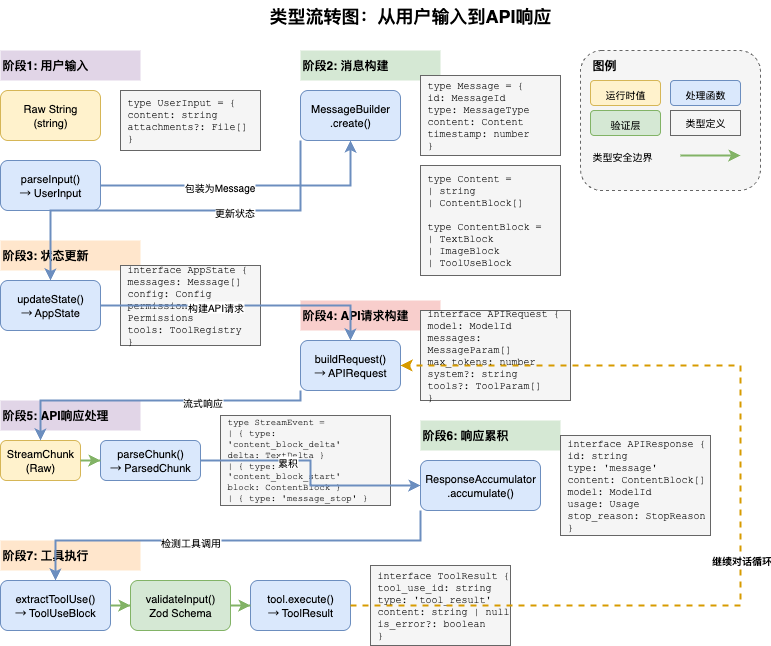
1.1 设计原则
Claude Code 的类型系统围绕以下核心原则设计:
原则 | 描述 | 实现方式 |
|---|---|---|
类型推导 | 最大化类型推导,减少手动标注 | Zod Schema → TypeScript |
运行时验证 | 边界处进行运行时验证 | Zod safeParse |
不可变性 | 优先使用不可变数据结构 | readonly、ReadonlyArray |
精确性 | 使用精确类型而非宽泛类型 | 字面量类型、联合类型 |
组合性 | 通过组合构建复杂类型 | 泛型、条件类型 |
1.2 类型层次结构
类型层次
├── 基础类型 (Primitive Types)
│   ├── ID 类型: SessionId, MessageId, ToolId
│   ├── 枚举类型: PermissionMode, MessageType
│   └── 字面量类型: 'user' | 'assistant' | 'system'
│
├── 核心抽象类型 (Core Types)
│   ├── Tool<T> - 工具抽象
│   ├── Agent - Agent抽象
│   ├── Message - 消息抽象
│   └── Result<T, E> - 结果类型
│
├── Schema类型 (Schema Types)
│   ├── SettingsJson - 配置Schema
│   ├── PermissionRule - 权限规则
│   └── ToolInputSchema - 工具输入
│
└── 工具类型 (Utility Types)
    ├── DeepPartial<T>
    ├── ReadonlyExcept<T, K>
    └── Brand<T, B>
2. 核心类型定义
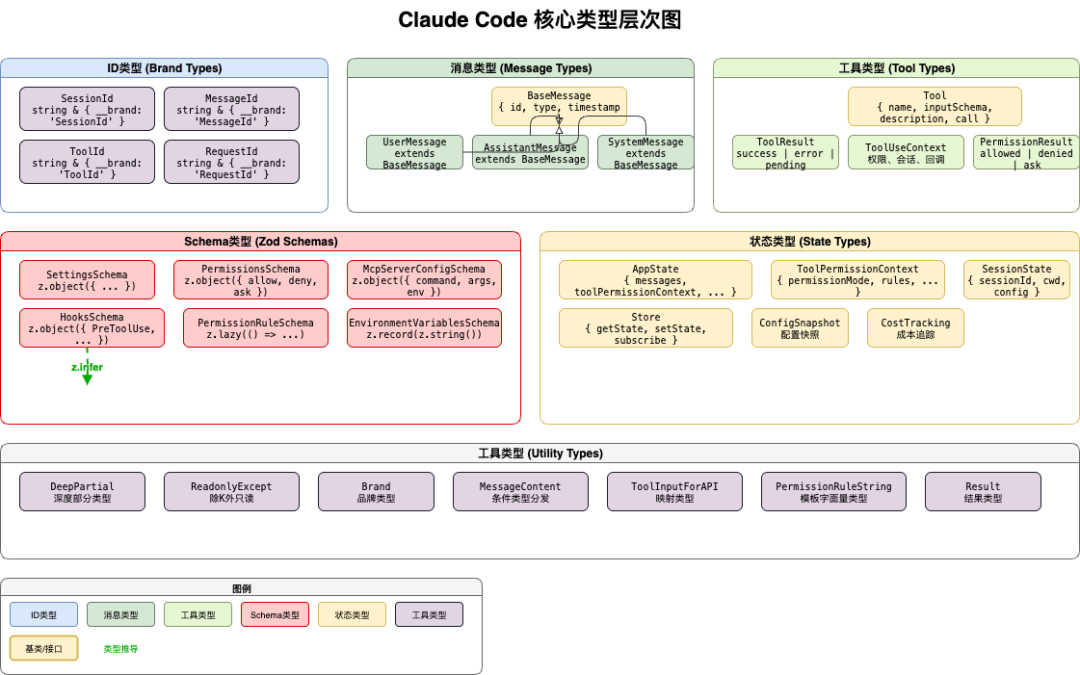
2.1 ID类型与Brand模式
Claude Code 使用 Brand 模式创建强类型 ID:
// types/ids.ts - ID类型定义
export type SessionId = string & { readonly __brand: 'SessionId' }
export type MessageId = string & { readonly __brand: 'MessageId' }
export type ToolId = string & { readonly __brand: 'ToolId' }

// 创建函数(类型守卫)
export function asSessionId(id: string): SessionId {
  return id as SessionId
}

export function asMessageId(id: string): MessageId {
  return id as MessageId
}

// 使用示例
const sessionId = asSessionId('session-123')
const messageId = asMessageId('msg-456')

// 编译时错误:不能混用不同ID类型
// const wrong: SessionId = messageId  // Error!
设计优势:
- • 编译时防止ID类型混用
- • 运行时零开销(只是string)
- • 代码更自文档化
2.2 消息类型系统
消息类型是 Claude Code 的核心类型之一:
// types/messages.ts - 消息类型定义
export type MessageType = 'user' | 'assistant' | 'system'

// 基础消息接口
interface BaseMessage {
  id: MessageId
  type: MessageType
  timestamp: number
}

// 用户消息
export interface UserMessage extends BaseMessage {
  type: 'user'
  content: string | ContentBlock[]
  attachments?: Attachment[]
}

// 助手消息
export interface AssistantMessage extends BaseMessage {
  type: 'assistant'
  content: ContentBlock[]
  toolUse?: ToolUseBlock[]
  thinking?: ThinkingBlock
}

// 系统消息
export type SystemMessage =
  | ToolResultMessage
  | PermissionMessage
  | StatusMessage

// 联合类型
export type Message = UserMessage | AssistantMessage | SystemMessage
2.3 工具类型定义
工具类型展示了泛型的强大应用:
// types/tool.ts - 工具类型定义
export interface Tool<TInput = unknown> {
  // 工具名称
  name: string

  // 输入Schema(Zod)
  inputSchema: z.ZodType<TInput>

  // 描述生成(用于AI理解)
  description: (input: TInput, options?: ToolOptions) => Promise<string>

  // 执行函数
  call: (input: TInput, context: ToolUseContext) => Promise<ToolResult>

  // 可选:权限检查
  checkPermissions?: (
    input: TInput,
    context: ToolUseContext
  ) => Promise<PermissionResult>

  // 可选:并发安全性
  isConcurrencySafe?: (input: TInput) => boolean

  // 可选:渲染
  renderToolUseMessage?: (input: TInput) => string
  renderToolResultMessage?: (result: ToolResult) => string
}

// 工具结果类型
export type ToolResult =
  | { type: 'success'; value: unknown }
  | { type: 'error'; error: Error }
  | { type: 'pending'; promise: Promise<unknown> }
3. Zod Schema 与 TypeScript 结合
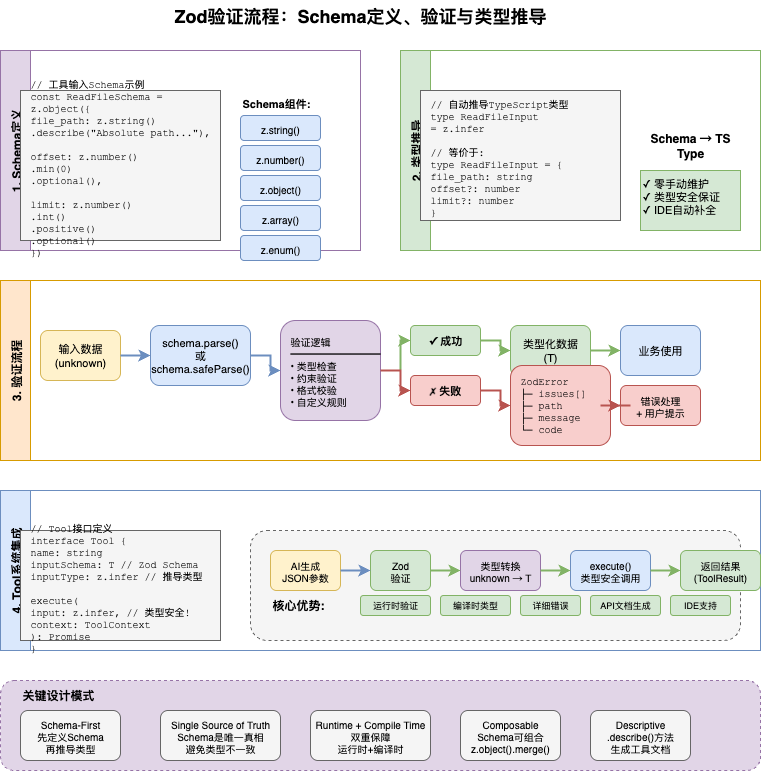
3.1 Schema定义与类型推导
Claude Code 使用 Zod 定义 Schema 并自动推导 TypeScript 类型:
// settings/types.ts - Schema定义
export const SettingsSchema = z.object({
  // API配置
  apiKeyHelper: z.string().optional(),
  model: z.string().optional(),

  // 权限配置
  permissions: PermissionsSchema.optional(),

  // MCP服务器
  mcpServers: z.record(z.string(), McpServerConfigSchema).optional(),

  // Hooks
  hooks: HooksSchema.optional(),

  // 环境变量
  env: z.record(z.string(), z.string()).optional(),
}).passthrough()

// 自动推导类型
export type SettingsJson = z.infer<typeof SettingsSchema>

// 使用推导的类型
function updateSettings(settings: Partial<SettingsJson>): void {
  // TypeScript 知道 settings 的所有字段
}
3.2 嵌套Schema与递归类型
处理复杂的嵌套结构:
// 权限规则Schema(递归定义)
export const PermissionRuleSchema: z.ZodType<PermissionRule> = z.lazy(() =>
  z.union([
    // 简单规则:字符串
    z.string(),

    // 复杂规则:对象
    z.object({
      rule: z.string(),
      source: z.string().optional(),
      conditions: z.array(PermissionConditionSchema).optional(),
    }),
  ])
)

// 权限条件Schema
const PermissionConditionSchema = z.object({
  type: z.enum(['path', 'command', 'tool']),
  pattern: z.string(),
  negate: z.boolean().optional(),
})

// 推导的类型
type PermissionRule = string | {
  rule: string
  source?: string
  conditions?: Array<{
    type: 'path' | 'command' | 'tool'
    pattern: string
    negate?: boolean
  }>
}
3.3 运行时验证
在边界处进行运行时验证:
// settings/validation.ts - 验证逻辑
export function validateSettings(
  settings: unknown,
  source: SettingSource
): SettingsWithErrors {
  // 使用 safeParse 安全验证
  const result = SettingsSchema.safeParse(settings)

  if (result.success) {
    return { settings: result.data, errors: [] }
  }

  // 格式化错误
  const errors = formatZodError(result.error, source)
  return { settings: null, errors }
}

// 在API边界使用
export function handleSettingsUpdate(
  request: Request
): Response {
  const body = request.json()

  // 验证输入
  const { settings, errors } = validateSettings(body, 'userSettings')

  if (errors.length > 0) {
    return Response.json({ errors }, { status: 400 })
  }

  // 使用验证后的数据(类型安全)
  return saveSettings(settings)
}
4. 高级类型模式
4.1 条件类型
使用条件类型实现类型分发:
// 根据消息类型分发内容类型
export type MessageContent<T extends MessageType> =
  T extends 'user' ? string | ContentBlock[] :
  T extends 'assistant' ? ContentBlock[] :
  T extends 'system' ? SystemContent :
  never

// 使用示例
function getContent<T extends MessageType>(
  message: Message & { type: T }
): MessageContent<T> {
  // TypeScript 知道返回类型
  return message.content as MessageContent<T>
}
4.2 映射类型
使用映射类型转换类型:
// 将工具输入类型转换为API格式
export type ToolInputForAPI<T extends Tool> =
  T extends Tool<infer I> ? z.input<z.ZodType<I>> : never

// 将工具结果转换为UI格式
export type ToolResultForUI<T extends Tool> =
  T extends Tool<any>
    ? { name: T['name']; result: Awaited<ReturnType<T['call']>> }
    : never
4.3 模板字面量类型
使用模板字面量类型定义精确的字符串模式:
// 权限规则字符串模式
export type PermissionRuleString =
  | `${ToolName}`                    // "Bash"
  | `${ToolName}(${Pattern})`        // "Bash(npm:*)"
  | `${ToolName}(${Pattern}:${Pattern})`  // "Read(**):Write(src/**)"

type ToolName = 'Read' | 'Write' | 'Bash' | 'Glob' | 'Grep' | 'Edit'
type Pattern = string  // 实际中可以更精确

// 类型安全的规则解析
function parseRule(rule: PermissionRuleString): ParsedRule {
  // TypeScript 知道 rule 的格式
}
4.4 品牌类型与类型守卫
// 品牌类型定义
type Brand<T, B> = T & { readonly __brand: B }

// 使用品牌类型确保类型安全
type PositiveNumber = Brand<number, 'Positive'>

function makePositive(n: number): PositiveNumber {
  if (n < 0) throw new Error('Number must be positive')
  return n as PositiveNumber
}

// 类型守卫
function isUserMessage(message: Message): message is UserMessage {
  return message.type === 'user'
}

// 使用类型守卫
function processMessage(message: Message) {
  if (isUserMessage(message)) {
    // message 是 UserMessage 类型
    console.log(message.content)
  }
}
5. 类型安全的状态管理
5.1 状态类型定义
// state/AppStateStore.ts - 状态类型
export interface AppState {
  // 消息
  messages: Message[]
  pendingMessage: Message | null

  // 工具权限
  toolPermissionContext: ToolPermissionContext

  // UI状态
  isProcessing: boolean
  currentSpinnerMode: SpinnerMode

  // 会话
  sessionId: SessionId
  cwd: string

  // 成本
  totalCost: number
  totalInputTokens: number
  totalOutputTokens: number
}

// 默认状态
export const getDefaultAppState = (): AppState => ({
  messages: [],
  pendingMessage: null,
  toolPermissionContext: {
    isBypassPermissionsModeAvailable: false,
    permissionMode: 'default',
  },
  isProcessing: false,
  currentSpinnerMode: 'idle',
  sessionId: asSessionId(generateId()),
  cwd: process.cwd(),
  totalCost: 0,
  totalInputTokens: 0,
  totalOutputTokens: 0,
})
5.2 类型安全的状态更新
// state/store.ts - 类型安全的Store
export interface Store<T> {
  getState: () => T
  setState: (updater: T | ((state: T) => T)) => void
  subscribe: (listener: (state: T) => void) => () => void
}

// 使用类型安全的更新
function updateAppState(
  store: Store<AppState>,
  updater: Partial<AppState> | ((state: AppState) => Partial<AppState>)
): void {
  store.setState(state => ({
    ...state,
    ...(typeof updater === 'function' ? updater(state) : updater),
  }))
}

// 使用示例
updateAppState(store, { isProcessing: true })
updateAppState(store, state => ({
  totalCost: state.totalCost + newCost,
}))
6. 实践模式总结
6.1 类型设计检查清单
- •使用
readonly标记不可变字段 - •使用字面量类型而非
string - •使用联合类型表达互斥状态
- •使用 Brand 类型区分同构类型
- •边界处进行运行时验证
- •从 Zod Schema 推导类型
6.2 常见陷阱
- 1. 过度使用
any- 破坏类型安全 - 2. 忽略
null/undefined- 导致运行时错误 - 3. 滥用类型断言 - 绕过类型检查
- 4. Schema 与类型不同步 - 运行时与编译时不一致
6.3 最佳实践
// ❌ 避免
function process(data: any) {
  return data.value
}

// ✅ 推荐
interface Data {
  value: string
}

function process(data: Data): string {
  return data.value
}

// ❌ 避免
const result = response as UserMessage

// ✅ 推荐
if (isUserMessage(response)) {
  const result = response
}

// ❌ 避免
interface Config {
  type: string
  mode: string
}

// ✅ 推荐
interface Config {
  type: 'cli' | 'desktop' | 'web'
  mode: 'interactive' | 'print' | 'plan'
}
实践练习
- 1. 定义ID类型 - 使用Brand模式创建强类型ID
- 2. 实现Schema验证 - 创建Zod Schema并推导类型
- 3. 使用条件类型 - 实现消息类型分发
- 4. 类型守卫实践 - 实现运行时类型检查
下一篇预告
第4篇:Tool系统设计精要 - 深入理解 Claude Code 的工具系统架构,学习如何构建可扩展的 AI 工具调用系统。
本文参与 腾讯云自媒体同步曝光计划,分享自微信公众号。
原始发表:2026-04-02,如有侵权请联系 cloudcommunity@tencent.com 删除
评论
登录后参与评论
推荐阅读
目录
腾讯云开发者

Copyright © 2013 - 2026 Tencent Cloud. All Rights Reserved. 腾讯云 版权所有
深圳市腾讯计算机系统有限公司 ICP备案/许可证号:粤B2-20090059  粤公网安备44030502008569号
腾讯云计算(北京)有限责任公司 京ICP证150476号 | 京ICP备11018762号