Allure 用例详情 点击自动跳转 VS Code,省去检索步骤

Allure 用例详情 点击自动跳转 VS Code,省去检索步骤

小田测测看
发布于 2026-06-17 17:58:25
发布于 2026-06-17 17:58:25
当测试用例执行失败,打开 Allure 报告查看详情后,是不是每一次还在重复这些低效的操作
- 记住用例对应的测试函数名,切换到 VS Code;
- 在项目中手动搜索函数名,翻找匹配的文件;
- 若用例数多、文件名相似,还要反复核对,才能定位到具体代码行;
- 整个过程耗时且容易出错,尤其case比较多时,光检索和匹配就要浪费好几分钟。
其实,我也被困扰过,偶然间了解到vscode 支持 vscode://file 协议,嘿嘿,那就方便啦,下面说下思路:
原理
VS Code 支持一个 URL 协议:
vscode://file/<绝对路径>:<行号>:<列号>
例如:
vscode://file/D:/project/tests/test_login.py:123
只要在浏览器 HTML 报告中放一个这样的 <a> 链接,点击后就能直接在 VS Code 打开对应文件并跳转到行号(前提是系统已注册 VS Code 的 URL handler)。
小测验
在浏览器地址栏粘贴以下语句试试:
vscode://file/C:/Windows/System32/drivers/etc/hosts
如果会自动打开 VS Code 并显示 hosts 文件,说明系统已注册协议。 如果无反应,可先打开一次 VS Code 并重启浏览器。
支持只需要在 Allure 报告中注入一行特殊链接,就能实现 “点击用例详情→自动打开 VS Code→直达源码位置”,彻底省去手动检索的麻烦。下面用清晰步骤教你落地这个轻量方案。
实现:
整体的思路如下
点击 Allure 报告中的用例详情 → 自动打开 VS Code → 定位到具体的源码行
在 conftest.py 里加个钩子
# conftest.py
import allure

@pytest.hookimpl(hookwrapper=True)
def pytest_runtest_makereport(item, call):
    outcome = yield
    rep = outcome.get_result()
    if rep.when == "call"and rep.failed:
        file_path = item.location[0]
        line_number = item.location[1]
        print(f"测试文件路径:{file_path},行号:{line_number}")
        allure.attach(
            f"vscode://file/{item.fspath}:{line_number}",
            name="Open in VSCode",
            attachment_type=allure.attachment_type.URI_LIST
        )
测试函数,简单模拟下下失败的case
def test_1():
    1/0
执行命令
pytest -vs --alluredir=report test_demo.py
然后打开报告
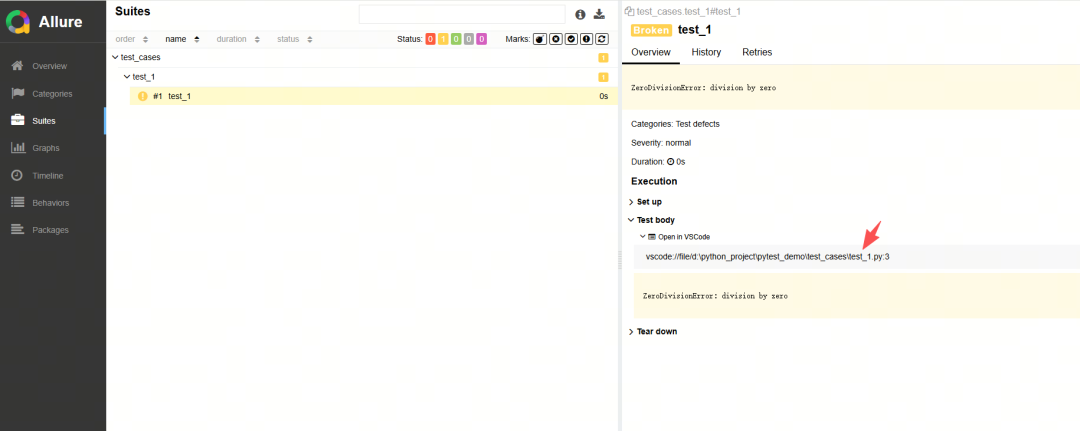
在 Allure 报告 具体用例 详情中,会看到一个附件链接Open in VSCode 点击它就会直接跳转 VS Code,对应到测试失败行。
备注:如果是打开远程服务器 那么格式是
vscode://vscode-remote/ssh-remote+<服务器名>/<远程绝对路径>:<行号>VS Code必须安装并配置好Remote SSHREMOTE_NAME要和~/.ssh/config或VS Code Remote SSH主机名一致
#Python #allure
本文参与 腾讯云自媒体同步曝光计划,分享自微信公众号。
原始发表:2025-10-30,如有侵权请联系 cloudcommunity@tencent.com 删除
评论
登录后参与评论
推荐阅读
目录
腾讯云开发者

Copyright © 2013 - 2026 Tencent Cloud. All Rights Reserved. 腾讯云 版权所有
深圳市腾讯计算机系统有限公司 ICP备案/许可证号:粤B2-20090059  粤公网安备44030502008569号
腾讯云计算(北京)有限责任公司 京ICP证150476号 | 京ICP备11018762号