
在DEVOPS中没有设置ScreenCaptureJob
在DEVOPS中没有设置ScreenCaptureJob
提问于 2019-08-16 13:51:35
下面的工作在我的个人电脑,但当我移动到DEVOPs,它的错误。
我通过nuget安装了Micrsosoft.Expression.Encoder。它在DEVOPS上安装了nuget安装程序步骤。
我的测试的第一步有以下内容
this.Scj = new ScreenCaptureJob();我得到了以下错误:
object reference not set to an instance of an object.在运行设置中设置了以下设置。
<DataCollectionRunSettings>
<DataCollectors>
      <DataCollector uri="datacollector://microsoft/VideoRecorder/1.0" assemblyQualifiedName="Microsoft.VisualStudio.TestTools.DataCollection.VideoRecorder.VideoRecorderDataCollector, Microsoft.VisualStudio.TestTools.DataCollection.VideoRecorder, Version=15.0.0.0, Culture=neutral, PublicKeyToken=b03f5f7f11d50a3a" friendlyName="Screen and Voice Recorder">
    <!--Video data collector was introduced in Visual Studio 2017 version 15.5 -->
  </DataCollector>
</DataCollectors>
在DEVOPS中是否还有运行这些测试所需的其他设置?我在2017年和2019年在当地经营过这个项目。我有‘最新’的设置,在DEVOPs。
回答 1
Stack Overflow用户
回答已采纳
发布于 2019-08-21 10:34:04
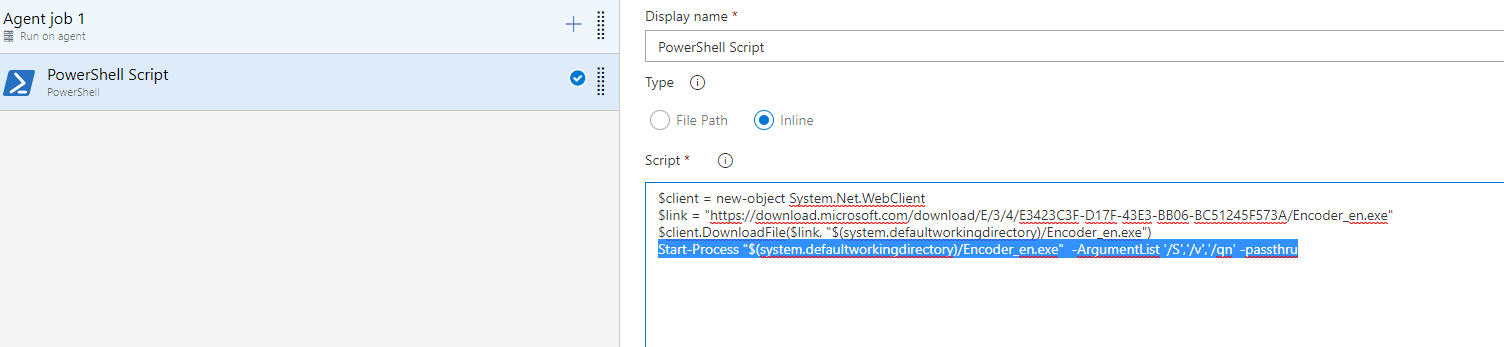
如果标准代理中缺少microsoft.expression.encoder。您可以添加一个powershell任务并在脚本下面运行,以便在这些代理上下载和安装编码器。
下载encoder.exe
$client = new-object System.Net.WebClient
$link = "https://download.microsoft.com/download/E/3/4/E3423C3F-D17F-43E3-BB06-BC51245F573A/Encoder_en.exe"
$client.DownloadFile($link, "$(Agent.BuildDirectory)/Encoder_en.exe")
安装encode_en.exe
Start-Process "$(Agent.BuildDirectory)/Encoder_en.exe" -ArgumentList '/S','/v','/qn' -passthruPowershell任务如下所示:
页面原文内容由Stack Overflow提供。腾讯云小微IT领域专用引擎提供翻译支持
原文链接:
https://stackoverflow.com/questions/57525856
复制相关文章
相似问题
腾讯云开发者

Copyright © 2013 - 2026 Tencent Cloud. All Rights Reserved. 腾讯云 版权所有
深圳市腾讯计算机系统有限公司 ICP备案/许可证号:粤B2-20090059  粤公网安备44030502008569号
腾讯云计算(北京)有限责任公司 京ICP证150476号 | 京ICP备11018762号