
Javafx儿童溢出的FlowPane
我正在重新做一个项目,我用正在处理中做的,因为我希望在JavaFX中得到一些实践,因为我明年在ui中需要它,它将给我更多的ui自由,而不是处理。这意味着我刚开始使用javafx做东西,对不起。
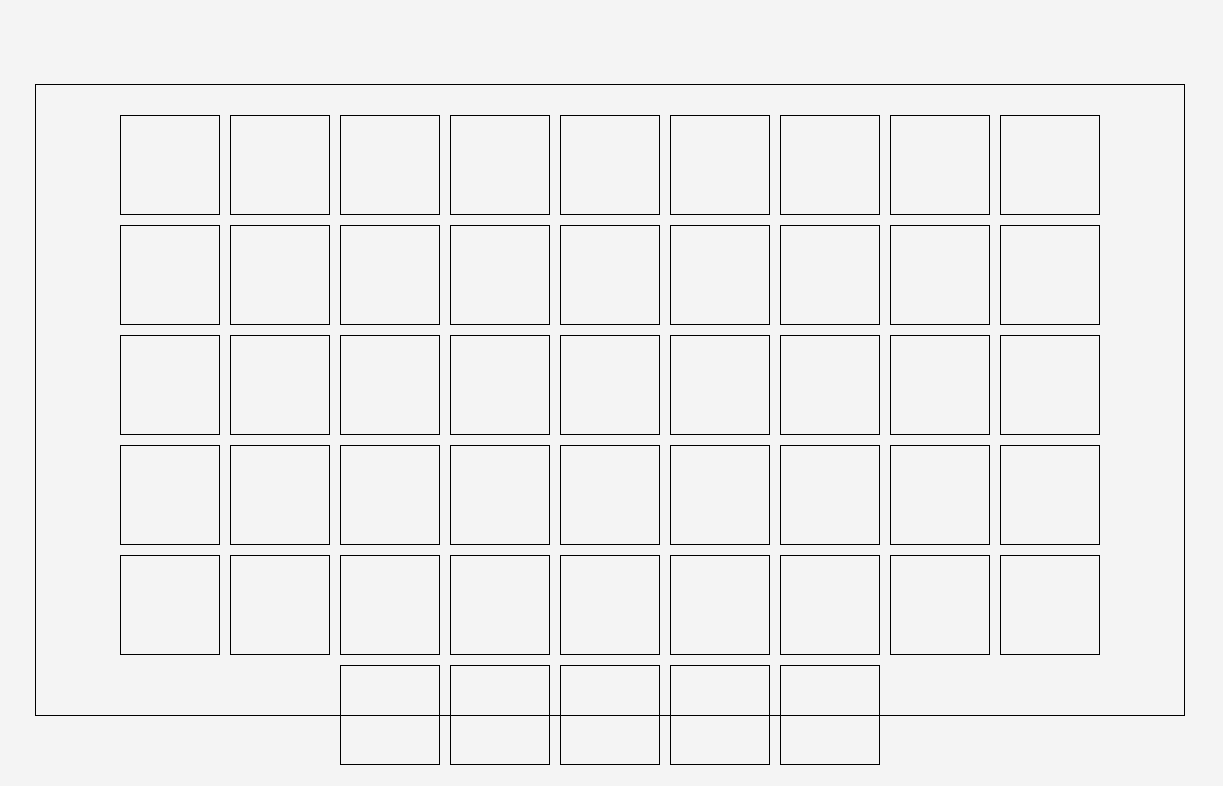
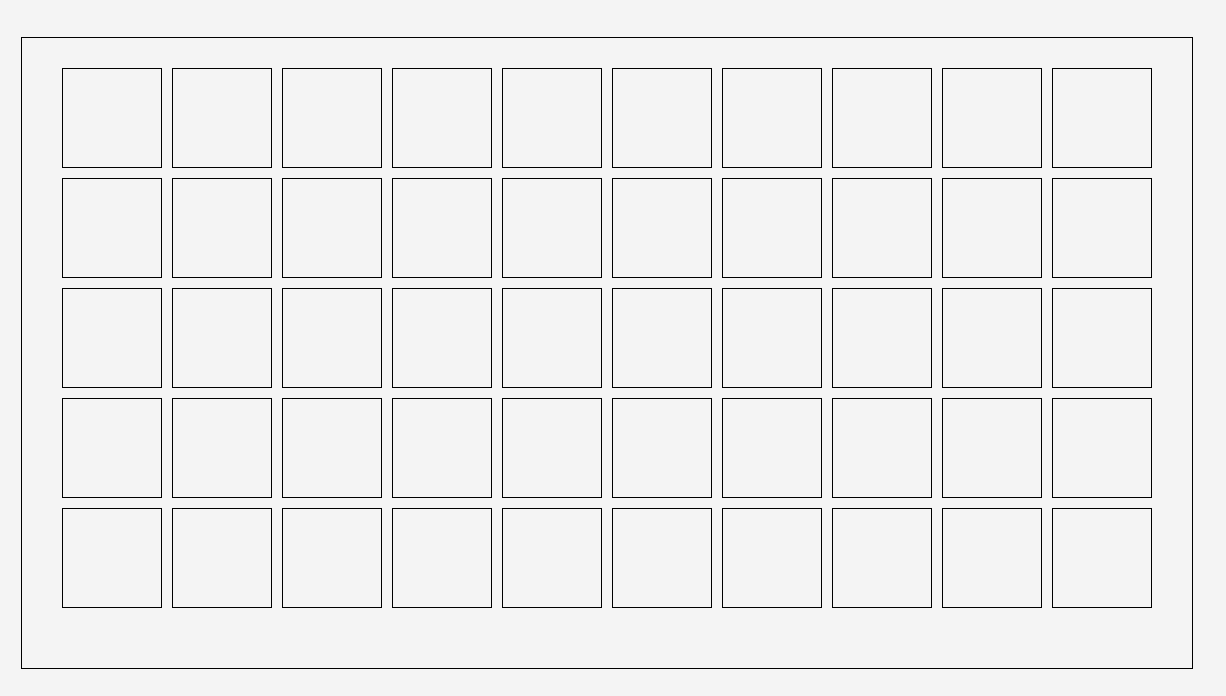
我正试着在我的主窗口里放一个容器,里面装着一些玻璃。在这些窗格上,我稍后将以不可分割的方式引用。我用了一个FlowPane,而小的窗格只是,嗯,窗格。我希望,如果窗口的大小发生变化,就会创建(删除)更多的窗格,在容器上总是可以看到完美数量的窗格(这有点难以解释,但是看看下面链接的图片,您就会知道了)。这是相当不错的工作时间99%,但有时窗格溢出的流程图。我试过很多次来解决这个问题(几乎是野蛮地强迫它失败),但我无法得到比这个更好的结果。
不期望的行为
期望行为
项目的Github (如果您想自己尝试的话)
控制器代码:
public class MainWindowController {

    private int sizeOfOneGame = 100; //In pixel

    //Space between the frame of the Pane that holds all games and the games
    private int[] paddingAroundGames = {30, 30, 30, 30}; //Top, Right, Bottom, Left

    //Space between two games
    private int[] gapBetweenGames = {10, 10}; //X, Y

    @FXML
    FlowPane flowPaneGames;

    public void initialize(){

        //Sets space between two games in the flowPane
        flowPaneGames.setHgap(gapBetweenGames[0]);
        flowPaneGames.setVgap(gapBetweenGames[1]);

        //Sets space between all games and the border of the flowPane
        flowPaneGames.setPadding(new Insets(paddingAroundGames[0], paddingAroundGames[1], paddingAroundGames[2], paddingAroundGames[3]));

        //Draws one frame around the flowPane
        flowPaneGames.setStyle("-fx-border-color: black");

        //Aligns the panes to the center
        flowPaneGames.setAlignment(Pos.BASELINE_CENTER);

        //Adds listeners to the width and height of the flowPane holding the games -> Adjusts shown Panes on size change
        flowPaneGames.widthProperty().addListener(e -> flowPaneGamesSizeChanged());
        flowPaneGames.heightProperty().addListener(e -> flowPaneGamesSizeChanged());

    }

    private void flowPaneGamesSizeChanged(){

        //TODO: Sometimes some panes are bigger than the flowPane

        //Available space for games x and y
        int totalSpaceX = (int) (flowPaneGames.getWidth() - paddingAroundGames[1] - paddingAroundGames[3] + gapBetweenGames[0]);
        int totalSpaceY = (int) (flowPaneGames.getHeight() - paddingAroundGames[0] - paddingAroundGames[2] + gapBetweenGames[1]);

        int totatlSizeOfOneGameX = sizeOfOneGame + gapBetweenGames[0];
        int totatlSizeOfOneGameY = sizeOfOneGame + gapBetweenGames[1];

        int totalSpaceForGamesX = (int) (((double) totalSpaceX) / ((double) totatlSizeOfOneGameX));
        int totalSpaceForGamesY = (int) (((double) totalSpaceY) / ((double) totatlSizeOfOneGameY));

        //Total amount of games
        int totalSpaceForGames = totalSpaceForGamesX * totalSpaceForGamesY;

        System.out.println("Width: " + flowPaneGames.getWidth());
        System.out.println("Height: " + flowPaneGames.getHeight());

        //We have more games shown that there should be we remove the last ones
        while (flowPaneGames.getChildren().size() > totalSpaceForGames) {

            //We remove the last game
            flowPaneGames.getChildren().remove(flowPaneGames.getChildren().size() - 1);
        }

        //While we have less games shown that there should be we add new ones
        while (flowPaneGames.getChildren().size() < totalSpaceForGames) {

            flowPaneGames.getChildren().add(generateNewPane());

        }
    }

    private Pane generateNewPane(){

        //Generates a new pane and returns it
        Pane pane = new Pane();
        pane.setPrefSize(sizeOfOneGame, sizeOfOneGame);
        pane.setStyle("-fx-border-color: black");

        return pane;
    }
}
如果有人能帮我解决这个问题,我会很高兴的(即使它只发生在少数情况下),它真的困扰着我。
Sidenote:我已经问过这个问题了,但是我在这个问题上几乎没有努力,结果几乎没有任何答案,这次我试着把它做得更好。Ppl还抱怨我没有真正遵循java的命名约定,我试着听了,希望现在读代码更好。
回答 1
Stack Overflow用户
发布于 2019-07-15 08:06:05
造成这一问题的原因是没有考虑到集装箱的边框宽度。为了考虑容器的边框宽度,必须将totalSpaceX和totalSpaceY确定为:
int totalSpaceX = (int) (flowPaneGames.getWidth() - paddingAroundGames[1] - paddingAroundGames[3] + gapBetweenGames[0] - flowPaneGames.getBorder().getStrokes().get(0).getWidths().getLeft() - flowPaneGames.getBorder().getStrokes().get(0).getWidths().getRight());
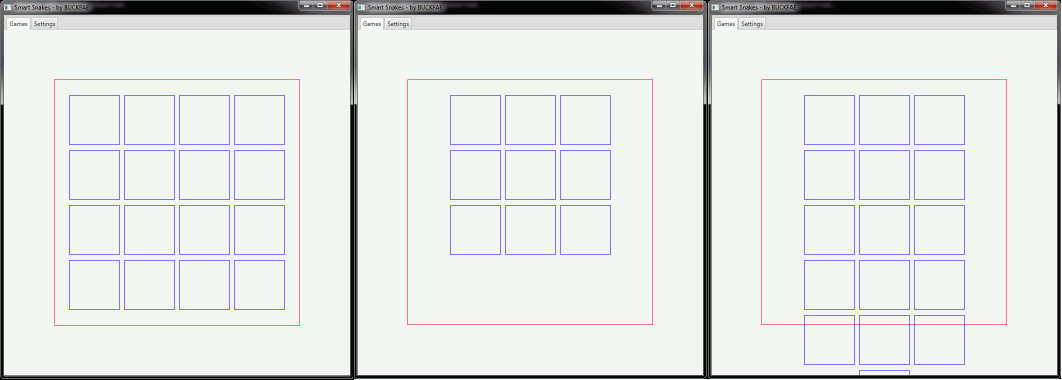
int totalSpaceY = (int) (flowPaneGames.getHeight() - paddingAroundGames[0] - paddingAroundGames[2] + gapBetweenGames[1] - flowPaneGames.getBorder().getStrokes().get(0).getWidths().getTop() - flowPaneGames.getBorder().getStrokes().get(0).getWidths().getBottom());左边的图显示容器的高度和宽度分别为492,并考虑到容器的边框宽度。默认情况下,容器的边框宽度为1。正好有4个子窗格适合宽度:492 = 2 x border width of container (= 1) + 2 * padding (= 30) + 3 * gap (= 10) + 4 * child pane width (= 100)。这同样适用于高度。
如果1减少了宽度和/或高度,则在宽度和/或高度中省略1子窗格。中间的图显示了491的容器高度和宽度,每个都考虑到容器的边框宽度。
在不考虑容器边框宽度的情况下,假定的空间比实际可用的要多,并且创建了太多子窗格。右边的图显示了491的容器高度和宽度,每个不考虑边框宽度(即,它显示当前代码所做的事情)。
编辑:
根据@Slaw的建议,可以使用totalSpaceX和totalSpaceY更容易地使用Region#snappedXXXInset()计算
int totalSpaceX = (int) (flowPaneGames.getWidth() - flowPaneGames.snappedLeftInset() - flowPaneGames.snappedRightInset() + gapBetweenGames[0]);
int totalSpaceY = (int) (flowPaneGames.getHeight() - flowPaneGames.snappedTopInset() - flowPaneGames.snappedBottomInset() + gapBetweenGames[1]);另外,应该设置snapToPixel (这是默认的)。
https://stackoverflow.com/questions/57026230
复制相似问题
腾讯云开发者

Copyright © 2013 - 2026 Tencent Cloud. All Rights Reserved. 腾讯云 版权所有
深圳市腾讯计算机系统有限公司 ICP备案/许可证号:粤B2-20090059  粤公网安备44030502008569号
腾讯云计算(北京)有限责任公司 京ICP证150476号 | 京ICP备11018762号