
索引/与ListObject匹配(表)
索引/与ListObject匹配(表)
提问于 2019-07-12 07:49:25
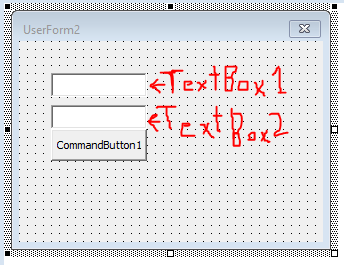
我需要知道某个名称的索引号,例如当我用TextBox1 = Sara写时,单击按钮,然后TextBox2应该返回与表中的名称相反的索引值(Table1)。

我尝试了单元格表上的索引/匹配方法,它成功了,但是我尝试将它转换成vba代码,但是我看到msgbox说
运行时1004无法获得worksheetFunction类的match属性。
我的代码是
Private Sub CommandButton1_Click()
Dim tbl As ListObject
Set tbl = Sheet1.ListObjects("Table1")
TextBox2.Value = Application.WorksheetFunction.Index(Sheet1.tbl.ListColumns(1), Application.WorksheetFunction.Match(TextBox1.Value, tbl.ListColumns(2), 0), 1)
End Sub
我希望TextBox2返回表上的索引号,如果我在TextBox1上写了"Sam“,那么TextBox2应该显示3。
回答 1
Stack Overflow用户
发布于 2019-07-12 08:02:23
如果使用WorksheetFunction.Match法,但没有匹配,则会引发异常。这可能就是你得到的。
所以要像这样使用它:
Dim MatchedRowNumber As Double
On Error Resume Next 'hide the exception
MatchedRowNumber = Application.WorksheetFunction.Match(TextBox1.Value, tbl.ListColumns(2), 0)
On Error Goto 0 'always directly re-activate error reporting!!!

If MatchedRowNumber > 0 Then 'the row number will be 0 if nothing matched
    Dim LookupValue As String
    LookupValue = Application.WorksheetFunction.Index(Sheet1.tbl.ListColumns(1), MatchedRowNumber, 1)
    TextBox2.Value = LookupValue
Else
    MsgBox "No match!"
End If改变的方式是使用Application.Match函数而不是WorksheetFunction.Match
Dim MatchedRowNumber As Double
MatchedRowNumber = Application.Match(TextBox1.Value, tbl.ListColumns(2), 0)

If Not IsError(MatchedRowNumber) Then
    Dim LookupValue As String
    LookupValue = Application.Index(Sheet1.tbl.ListColumns(1), MatchedRowNumber, 1)
    TextBox2.Value = LookupValue
Else
    MsgBox "No match!"
End If当WorksheetFunction.Match抛出异常时,Application.Match将返回一个可以用IsError函数测试的错误值。
页面原文内容由Stack Overflow提供。腾讯云小微IT领域专用引擎提供翻译支持
原文链接:
https://stackoverflow.com/questions/57002449
复制相关文章
相似问题
腾讯云开发者

Copyright © 2013 - 2026 Tencent Cloud. All Rights Reserved. 腾讯云 版权所有
深圳市腾讯计算机系统有限公司 ICP备案/许可证号:粤B2-20090059  粤公网安备44030502008569号
腾讯云计算(北京)有限责任公司 京ICP证150476号 | 京ICP备11018762号