
如何在PHPMailer中使用Sendinblue
我正在使用PHPMailer设置一个电子邮件配置,并在我的办公室中处理本地电子邮件,但是由于我希望使用Sendinblue作为电子邮件API,所以我刚刚塞进了它,但它没有工作。
我试着找一些建议来修理它,但还是塞了下来。有人想弄清楚我在用PHPMailer寻找Sendinblue的什么吗?
以PHPMailer库为背景,我通常使用以下代码来运行我的程序
function send_mail2($from,$from_name,$to,$to_name,$cc,$cc_name,$cc2,$cc_name2,$cc3,$cc_name3,$subjek,$template,$is_smtp,$usermail,$password){
    $sendmail = new PHPMailer();
    if($is_smtp = 'Y'){
        $sendmail->IsSMTP(); // enable SMTP
        // $sendmail->SMTPDebug = 1; // debugging: 1 = errors and messages, 2 = messages only
        $sendmail->SMTPAuth = true; // authentication enabled
        $sendmail->SMTPSecure = 'ssl'; // secure transfer enabled REQUIRED for GMail
        $sendmail->Host = "192.x.x.x";
        $sendmail->Port = 465; // or 587
        $sendmail->Username = "xxx@xxx.com";
        $sendmail->Password = "xxx";
    }
    $sendmail->setFrom("xxx@xxx.com","xxx@xxx.com"); //email pengirim
    $sendmail->addReplyTo("xxx@xxx.com","xxx@xxx.com"); //email replay
    $sendmail->addAddress($to,$to_name);
    $sendmail->AddCC($cc,$cc_name);
    $sendmail->AddCC($cc2,$cc_name2);
    $sendmail->AddCC($cc3,$cc_name3);
    $sendmail->Subject = $subjek;
    $sendmail->Body=$template;
    $sendmail->isHTML(true);
    if(!$sendmail->Send()) {
        return "failed";
    }else{
      return "success";
    }
}
我只想知道如何在PHPMailer中使用Sendinblue。
回答 2
Stack Overflow用户
发布于 2019-07-09 07:07:21
首先,看起来您使用的是PHPMailer的旧版本,并且您的代码是基于一个非常老的示例,所以是升级。
看起来您甚至没有尝试使用sendinblue,而是将脚本指向本地邮件服务器。因为您使用的是一个字面IP地址,所以SSL永远不会工作,因为它将无法验证证书。
如果要从PHPMailer直接使用sendinblue,则需要使用sendinblue的SMTP服务器,这将在它们的文档中讨论。如果他们不提供SMTP服务(比如mailgun ),您将需要使用他们的HTTP (其中有大量的文件)。您不能使用PHPMailer与其对话,但您可以使用它生成要发送的消息,例如,按照当前的方式执行所有操作,但不要调用send(),而是这样做:
$message = $sendmail->getSentMIMEMEssage();这将为您提供一个完全格式化的RFC822消息,可以提交到HTTP。
Stack Overflow用户
发布于 2022-08-26 06:32:06
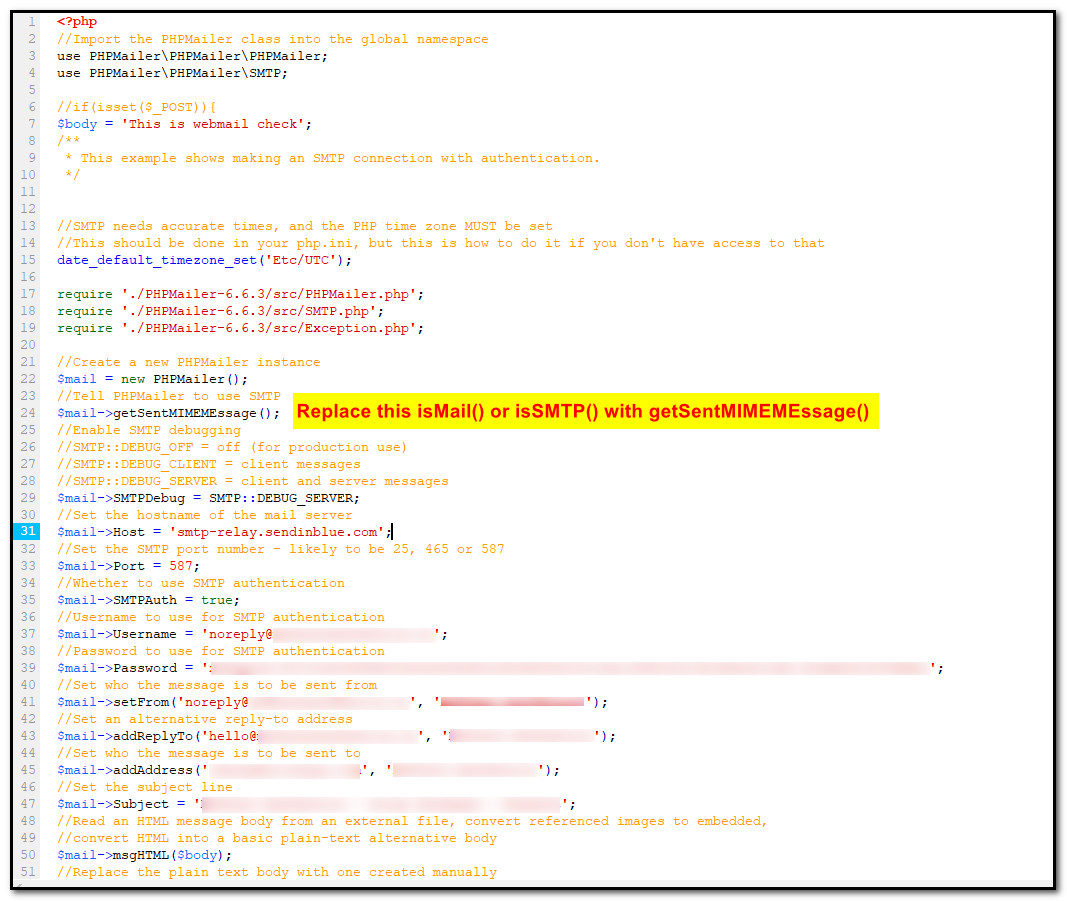
当您需要用PHPMailer配置sendinblue时,
那时,首先,从sendinblue帐户获取所有配置细节,如主机、用户名、密码
然后您的PHPMailer使用getSentMIMEMEssage();安装$mail->isSMTP()或$mail->isMail()
请查看下面的截图以供参考。
https://stackoverflow.com/questions/56946759
复制相似问题
腾讯云开发者

Copyright © 2013 - 2026 Tencent Cloud. All Rights Reserved. 腾讯云 版权所有
深圳市腾讯计算机系统有限公司 ICP备案/许可证号:粤B2-20090059  粤公网安备44030502008569号
腾讯云计算(北京)有限责任公司 京ICP证150476号 | 京ICP备11018762号