
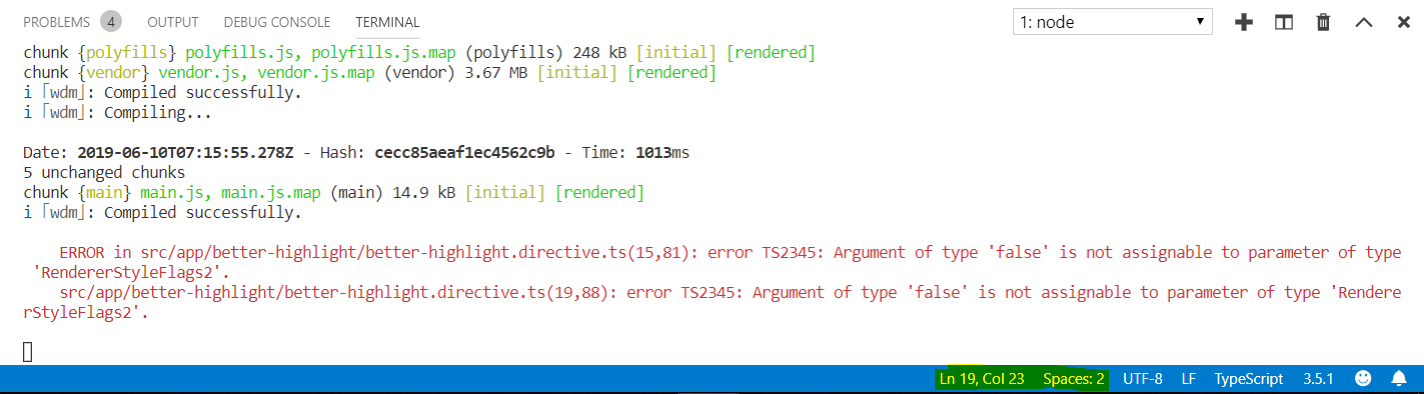
错误TS2554:预期的3-4参数,但得到5
错误TS2554:预期的3-4参数,但得到5
提问于 2019-06-10 07:15:03
我的指令出错了。我只是想显示颜色时,我悬停r文本。
better-highlight.directive.ts
import { Directive, OnInit, ElementRef, HostListener, Renderer2 } from '@angular/core';

@Directive({
  selector: '[appBetterHighlight]'
})
export class BetterHighlightDirective implements OnInit{

  constructor(private elRef: ElementRef, private rederer: Renderer2) { }

  ngOnInit() {
    // this.rederer.setStyle(this.elRef.nativeElement, 'background-color', 'blue', false, false);
  }

  @HostListener('mouseenter') mouseOver(eventData: Event) {
    this.rederer.setStyle(this.elRef.nativeElement, 'background-color', 'blue', false, false);
  }

  @HostListener('mouseenter') mouseleave(eventData: Event) {
    this.rederer.setStyle(this.elRef.nativeElement, 'background-color', 'transparent', false, false);
  }
}
basic-highlight-directive.ts
import { Directive, ElementRef, OnInit } from '@angular/core';

@Directive({
    selector: '[appBasicHighlight]'
})
export class BasicHighLightDirective implements OnInit {
    constructor(private elementRef: ElementRef) {

    }

    ngOnInit(){
        this.elementRef.nativeElement.style.backgroundColor = 'green';
    }
}
app.component.ts
import { Component } from '@angular/core';

@Component({
  selector: 'app-root',
  templateUrl: './app.component.html',
  styleUrls: ['./app.component.css']
})
export class AppComponent {
  oddNumbers = [1, 3, 5];
  evenNumbers = [2, 4];
  onlyOdd = false;
}
app.module.ts
import { BrowserModule } from '@angular/platform-browser';
import { NgModule } from '@angular/core';

import { AppComponent } from './app.component';
import { BasicHighLightDirective } from './basic-highlight/basic-highlight-directive';
import { BetterHighlightDirective } from './better-highlight/better-highlight.directive';

@NgModule({
  declarations: [
    AppComponent,
    BasicHighLightDirective,
    BetterHighlightDirective
  ],
  imports: [
    BrowserModule
  ],
  providers: [],
  bootstrap: [AppComponent]
})
export class AppModule { }
app.component.html
<div class="container">
  <div class="row">
    <div class="col-xs-12">
      <button class="btn btn-primary" (click)="onlyOdd = !onlyOdd">Show Numbers</button>
      <br><br>

      <ul class="list-group">
        <div *ngIf="onlyOdd">
          <li class="list-group-item"
              [ngClass]="{odd: odd % 2 !== 0}"
              [ngStyle]="{backgroundColor: even % 2 !== 0 ? 'yellow' : 'transparent'}"
              *ngFor="let odd of oddNumbers">
            {{ odd }}
          </li>
        </div>

        <div *ngIf="!onlyOdd">
          <li class="list-group-item"
              [ngClass]="{odd: even % 2 !== 0}"
              [ngStyle]="{backgroundColor: even % 2 !== 0 ? 'yellow' : 'transparent'}"
              *ngFor="let even of evenNumbers">
            {{ even }}
          </li>
        </div>
      </ul>

      <p appBasicHighlight>Style me with basic directive!</p>
      <p appBetterHighlight>Style me with a Better directive!</p>
    </div>
  </div>
</div>
回答 1
Stack Overflow用户
回答已采纳
发布于 2019-06-10 07:19:48
你好,你用错了setStyle。
this.rederer.setStyle(this.elRef.nativeElement, 'background-color', 'blue');只有4个param不是5. https://angular.io/api/core/Renderer2#setStyle
摘要setStyle(el: any,样式: string,value: any,标志?:RendererStyleFlags2):void参数
[ 1]任何元素。
(2)样式字符串
风格的名字。
3]对任何新的价值进行估价。
4]可选的标志RendererStyleFlags2标志的样式变化。默认情况下不设置任何标志。
可选。默认值未定义。
页面原文内容由Stack Overflow提供。腾讯云小微IT领域专用引擎提供翻译支持
原文链接:
https://stackoverflow.com/questions/56522061
复制相关文章
相似问题
腾讯云开发者

Copyright © 2013 - 2026 Tencent Cloud. All Rights Reserved. 腾讯云 版权所有
深圳市腾讯计算机系统有限公司 ICP备案/许可证号:粤B2-20090059  粤公网安备44030502008569号
腾讯云计算(北京)有限责任公司 京ICP证150476号 | 京ICP备11018762号