
如何给UIButton一个梯度,并在SwiftUI中给该按钮一个具有相同梯度的底部阴影?
如何给UIButton一个梯度,并在SwiftUI中给该按钮一个具有相同梯度的底部阴影?
提问于 2019-06-09 18:38:35
我的朋友是设计师,他给我做了一个密码生成器的模拟,我要做一个https://imgur.com/gallery/LZNNrWj,我不知道如何用SwiftUI在这个梯度中编码,按钮的梯度是#41A5ED -> #3099D8,向这个方向走(见图) https://imgur.com/gallery/2rd7Iix左上角是#41A5ED,右下角是#3099D8。我也想给这个按钮一个像这个https://imgur.com/gallery/gEmBJ1w一样的底部阴影,和这个按钮一样的梯度。如果你知道我会怎么做,请告诉我,因为我完全迷路了。
回答 3
Stack Overflow用户
回答已采纳
发布于 2019-06-10 07:13:50
你可以这样做:
Button(action: createTask) {
                   Text(“MyButton“)
                       .color(.white)
                       .font(Font.system(size: 17))
                       .frame(height: 56)
                       .frame(minWidth: 0, maxWidth: .infinity)
                       .background(LinearGradient.actionButton, cornerRadius: 28)
                       .shadow() // configure shadow as you want
                   }
为了提高代码的可读性,我分别创建了梯度:
fileprivate extension LinearGradient {
   static let actionButton = LinearGradient(gradient: Gradient(colors: [Color(“ActionGradientFirst”), Color(“ActionGradientSecond”)]),
                                            startPoint: .topLeading,
                                            endPoint: .bottomTrailing)
}在Assets.xcasset中声明的ActionGradientFirst和ActionGradientSecond
Stack Overflow用户
发布于 2021-08-08 03:27:38
有点晚了,但万一对别人有帮助。
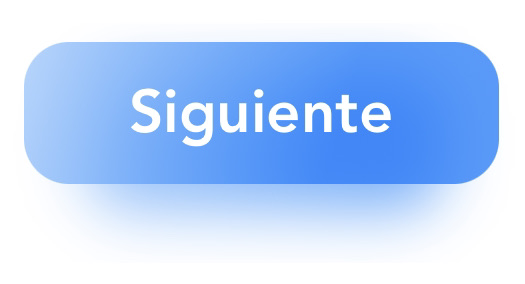
ZStack{
    LinearGradient(
        gradient: .init(colors: [Color.white, Color.blue.opacity(0.66)]),
        startPoint: .init(x: 0.0, y: 0.0),
        endPoint: .init(x: 0.75, y: 0.75)
    )
    .mask(
        RoundedRectangle(cornerRadius: 15)
            .frame(width: 120, height: 45, alignment: .center)
            .blur(radius: 10)
    )
    .padding(.top, 20)
    Button(action: {}, label: {
        Text("Siguiente")
            .font(.custom("Avenir-Heavy", size: 20))
            .padding(.top, 10)
            .padding(.bottom, 10)
            .padding(.leading, 16)
            .padding(.trailing, 16)
    })
    .foregroundColor(.white)
    .background(
        LinearGradient(
            gradient: .init(colors: [Color.white, Color.blue.opacity(0.75)]),
            startPoint: .init(x: -0.33, y: -0.33),
            endPoint: .init(x: 0.66, y: 0.66)
        ))
    .clipShape(RoundedRectangle(cornerRadius: 15))
    .buttonStyle(PlainButtonStyle())
}
.frame(height: 100)
Stack Overflow用户
发布于 2019-06-10 08:06:19
首先使用以下方法创建一个梯度,
let gradientLayer = CAGradientLayer()
gradientLayer.colors = [UIColor.red.cgColor, UIColor.black.cgColor]
gradientLayer.startPoint = CGPoint(x: 0, y: 0)
gradientLayer.endPoint = CGPoint(x: 1, y: 1)
gradientLayer.frame = view.bounds
然后简单地把它应用到你想要的任何视图中,
view.layer.addSublayer(gradientLayer)为了增加阴影,
    let shadowPath = UIBezierPath(rect: view.bounds)
    view.layer.masksToBounds = false
    view.layer.shadowColor = UIColor.grey.cgColor
    view.layer.shadowOffset = CGSize(width: 0, height: 0.5)
    view.layer.shadowOpacity = 0.2
view.layer.shadowPath = shadowPath.cgPath页面原文内容由Stack Overflow提供。腾讯云小微IT领域专用引擎提供翻译支持
原文链接:
https://stackoverflow.com/questions/56517380
复制相关文章
相似问题
腾讯云开发者

Copyright © 2013 - 2026 Tencent Cloud. All Rights Reserved. 腾讯云 版权所有
深圳市腾讯计算机系统有限公司 ICP备案/许可证号:粤B2-20090059  粤公网安备44030502008569号
腾讯云计算(北京)有限责任公司 京ICP证150476号 | 京ICP备11018762号