
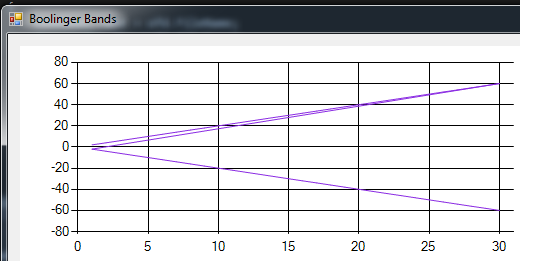
通过OpenFileDialog打开第二个文件时,绘制成双线的图表
通过OpenFileDialog打开第二个文件时,绘制成双线的图表
提问于 2019-05-26 09:09:34
我正在制作应用程序,它从文件中提取数据并显示在图表上。但是,当我添加一个额外的文件时,我会看到3个图表,而不是2个。
我正在读取csv文件,解析为双倍和添加系列。它必须是2个图,但我看到了3个。
    string[] tmpStrArr;
    double x;
    double y;
    public Form1()
    {
        InitializeComponent();
        chartGraphic.ChartAreas[0].AxisY.ScaleView.Zoom(-60, 15); // -15<= y <=15
        chartGraphic.ChartAreas[0].AxisX.ScaleView.Zoom(-60, 2); // -15 <= x <= 2
        chartGraphic.ChartAreas[0].CursorX.IsUserEnabled = true;
        chartGraphic.ChartAreas[0].CursorX.IsUserSelectionEnabled = true;
        chartGraphic.ChartAreas[0].AxisX.ScaleView.Zoomable = true;
        chartGraphic.ChartAreas[0].AxisY.ScaleView.Zoomable = true;
    }

    private void Form1_Load(object sender, EventArgs e)
    {

    }

    private void button1_Click(object sender, EventArgs e)
    {
        OpenFileDialog ofd = new OpenFileDialog();
        string line = "";
        ofd.Title = "Open File With Data";
        ofd.Filter = "CSV File|*.csv|TXT File|*txt";
        if (ofd.ShowDialog() == System.Windows.Forms.DialogResult.OK)
        {
            textBox1.Text = ofd.FileName;
            MessageBox.Show(ofd.FileName);
            StreamReader sr = new StreamReader(ofd.FileName);
            while (line != null)
            {

                //for (int i = -15; i < 2; i++)
                //{
                //}
                line = sr.ReadLine();
                if (line != null)
                {
                    tmpStrArr = line.Split(',');
                    x = Double.Parse(tmpStrArr[0]);
                    y = Double.Parse(tmpStrArr[1]);
                    chartGraphic.Series[0].Points.AddXY(x,y);


                    listBox1.Items.Add(line);
                }
            }
            chartGraphic.Series[0].ChartType = System.Windows.Forms.DataVisualization.Charting.SeriesChartType.Line;
            tmpStrArr = null;
            x = 0;
            y = 0;

            sr.Close();
            ofd.Dispose();

        }


    }
我期望输出2个图,2个文件,而不是2个文件中的3个图。
回答 1
Stack Overflow用户
回答已采纳
发布于 2019-05-26 09:56:53
您所看到的是,而不是,因为您怀疑三个‘图’,而是2!
但是,由于ChartType是Line,第一个数据部分的最后一点以x=30结束,第二个文件的第一个点从x=1开始,您可以看到连接的额外线路,这两个数据点连接在一起。
Line是为数不多的支持向前和向后的x值的类型之一。
您可以更改为ChartType Point进行测试。或者您可以使用2 Series作为第二个文件,工件就会消失。
如果您希望保持同一系列中的所有点,您不能阻止连接线,但是可以隐藏它,:您可以用Color.Transparent启动每一组数据点,因为行的颜色由第二点决定。
int pt = chartGraphic.Series[0].Points.AddXY(x,y);
if (pt == 0) chartGraphic.Series[0].Points[pt].Color = Color.Transparent页面原文内容由Stack Overflow提供。腾讯云小微IT领域专用引擎提供翻译支持
原文链接:
https://stackoverflow.com/questions/56312158
复制相关文章
相似问题
腾讯云开发者

Copyright © 2013 - 2026 Tencent Cloud. All Rights Reserved. 腾讯云 版权所有
深圳市腾讯计算机系统有限公司 ICP备案/许可证号:粤B2-20090059  粤公网安备44030502008569号
腾讯云计算(北京)有限责任公司 京ICP证150476号 | 京ICP备11018762号