
离子4与Tesseract离线获取“未登录的DOMException:未能在‘WorkerGlobalScope’上执行'importScripts‘”
我试图在我的Tesseract应用程序中使用脱机模式下的。为了做到这一点,我将我的代码建立在这个例子解释的基础上,尽管它是用Ionic 3完成的,而Tesseract GitHub解释的是离线模式。
首先,我将Tesseract文件按如下方式放置在src\assets\lib目录中(文件的tesseract-前缀已由我添加):
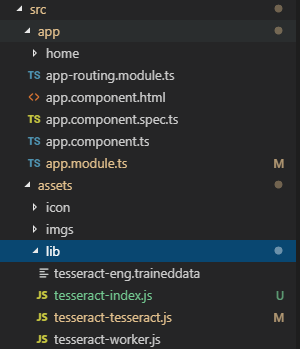
接下来,我创建了一个服务,它基本上创建了一个Tesseract脱机模式实例,如上面提到的链接所示:
  const path = this.webview.convertFileSrc(this.file.applicationDirectory + 'www/assets/lib/');

  this.tesseract = await Tesseract.create({
    langPath: path + 'tesseract-',
    corePath: path + 'tesseract-index.js',
    workerPath: path + 'tesseract-worker.js',
  });
关于守则的一些注意事项:
this.file是来自'@ionic-native/file/ngx'的File。- 对
convertFileSrc的调用是为了避免在试图直接加载Javascript文件时遇到的unable to load resource错误。 - 如果我用
this.file.listDir登录this.file.applicationDirectory + 'www/assets/lib/'的内容,我可以看到Tesseract文件。
现在,当我将其部署到Android emulator (Pixel 2 API 28)并尝试调用代码所在的函数时,会得到以下错误,如Chrome调试器所示:

FWIW,这是我的环境
Ionic:

   ionic (Ionic CLI)             : 4.12.0 (C:\Users\guillem.vicens\AppData\Roaming\nvm\v10.15.3\node_modules\ionic)
   Ionic Framework               : @ionic/angular 4.1.2
   @angular-devkit/build-angular : 0.13.6
   @angular-devkit/schematics    : 7.2.4
   @angular/cli                  : 7.3.6
   @ionic/angular-toolkit        : 1.4.1

Cordova:

   cordova (Cordova CLI) : not installed
   Cordova Platforms     : android 8.0.0
   Cordova Plugins       : cordova-plugin-ionic-keyboard 2.1.3, cordova-plugin-ionic-webview 3.1.2, (and 6 other plugins)

System:

   Android SDK Tools : 26.1.1 (C:\Users\myUser\AppData\Local\Android\Sdk)
   NodeJS            : v10.15.3 (C:\Program Files\nodejs\node.exe)
   npm               : 6.4.1
OS : Windows 10我遗漏了什么?访问assets文件夹的正确方法是什么?
回答 1
Stack Overflow用户
发布于 2019-04-16 10:14:29
最后,我使用了一个未计算的URL库来解决我的问题。
我注意到tesseract-tesseract-js文件是从以下URL加载的:
http://localhost/assets/lib/tesseract-tesseract.js但其他人都没上膛。这使我认为,这个问题在某种程度上与Tesseract.js内部使用与webview安全策略冲突的相关路径有关。
更改我的代码以执行以下操作,这就是其中的诀窍:
  this.tesseract = await Tesseract.create({
    langPath: 'http://localhost/assets/lib/tesseract-',
    corePath: 'http://localhost/assets/lib/tesseract-index.js',
    workerPath: 'http://localhost/assets/lib/tesseract-worker.js',
  });
我将不得不在真实的手机和iOS上测试这个问题,但这回答了我最初的问题。
https://stackoverflow.com/questions/55667971
复制相似问题
腾讯云开发者

Copyright © 2013 - 2026 Tencent Cloud. All Rights Reserved. 腾讯云 版权所有
深圳市腾讯计算机系统有限公司 ICP备案/许可证号:粤B2-20090059  粤公网安备44030502008569号
腾讯云计算(北京)有限责任公司 京ICP证150476号 | 京ICP备11018762号