
使用SSL加密在IIS 10上托管WCFService库
我试图在IIS 10上托管一个WCF服务库,其中包含一个自签名SSL。
要获得最小的完整可验证示例,请使用2017
使用这个New>Project>C#>Web>WCFLibrary,您将得到一个简单的代码,它有一个操作契约,它接受一个整数并返回一个字符串。
现在,我试图用自签名的SSL在IIS上托管它(do有更多的操作契约,但这样就可以了)。
我已经尝试过了。
现在下一部分是在IIS上托管它,所以我创建了SVC文件。
我的SVC文件包含->
<%@ ServiceHost Language = "C#" Debug = "true" Service = "WcfServiceLibrary2.Service1" %>然后我可以找到编辑Web.Config的所有教程,这在Visual 2017中是不可用的,所以我尝试了两件事1。创建了一个Web.Config文件并添加了配置2。发布了网站,然后获得了不需要任何更改的Web.Config。
然后我进入IIS (作为管理员)并添加了一个新的网站。
然后,在尝试浏览时,要查看承载IIS服务的消息,我得到了“无法读取配置文件”的错误,为了解决这个问题,我遵循了以下命令。
现在那个错误已经消失了,但现在我
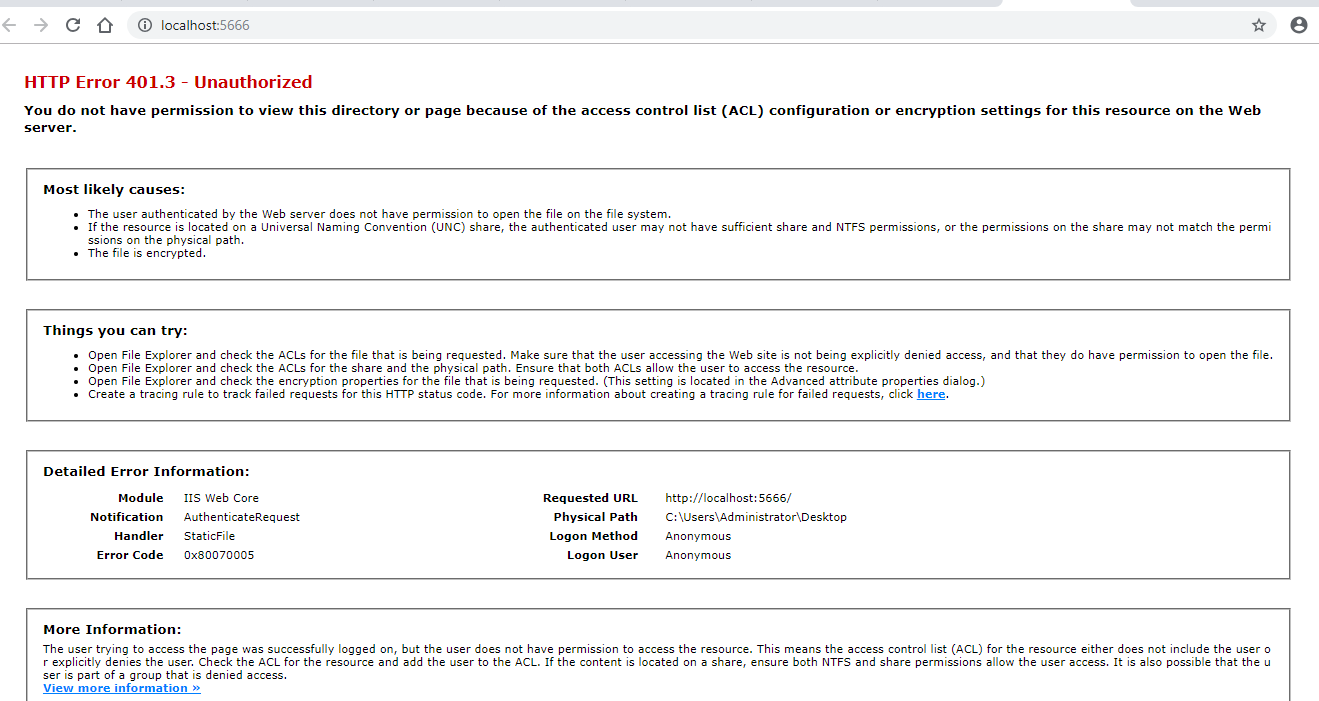
为了解决这个问题,我遵循了IIS - 401.3 - Unauthorized,但是这会导致浏览器,让我浏览目录,而不是给出服务已经创建的消息。
知道我在这里错过了什么吗?
当然,我在这里遗漏了一些重要的东西,因为我未能在HTTP上托管它,我在网上找到的所有教程都有一个文件Web.Config,而不是App.config,我正在寻找一个示例(最好用图片)来演示这个小示例。
我知道这并不是所有关于提问的准则,但我并没有把它表达成一个真正的问题。
编辑
按照LexLi关于它可能已经托管的建议,我尝试使用svcutil来使用它,这给了我错误
WS-Metadata Exchange Error
    URI: http://localhost/Service1.svc

    Metadata contains a reference that cannot be resolved: 'http://localhost/Service1.svc'.

    The remote server returned an unexpected response: (405) Method Not Allowed.

    The remote server returned an error: (405) Method Not Allowed.


HTTP GET Error
    URI: http://localhost/Service1.svc

    There was an error downloading 'http://localhost/Service1.svc'.

    The request failed with HTTP status 404: Not Found.
Url是正确的,因为我是通过使用IIS的浏览功能获得的。
回答 3
Stack Overflow用户
发布于 2019-04-04 05:19:45
第一,在信用到期的情况下,我被多个用户指向正确方向的许多问题是:Mikael bolinder、Abraham Qian、Lex Li、C# chat room中的优秀人员和我的同事(在写这个答案时没有账户),在这个答案中,我计划涵盖您使用HTTPS安全在IIS服务器中托管WCF库可能需要的所有内容。
我使用的工具:
- Visual 2017专业
- IIS 10 (随windows 10一起提供,但必须在windows功能中激活)(见下文)
首先:确保安装了visual所需的所有组件。
- Windows -> .Net桌面开发
- Windows ->通用Windows平台的开发
- Web & Cloud -> ASP.NET与web开发
在这个列表和即将出现的其他列表中,可能会包含一些额外的组件,原因是我安装了它们,如果它们是绝对必要的,就无法验证它们。
现在,让我们添加必要的windows功能。控制面板->程序->打开或关闭功能
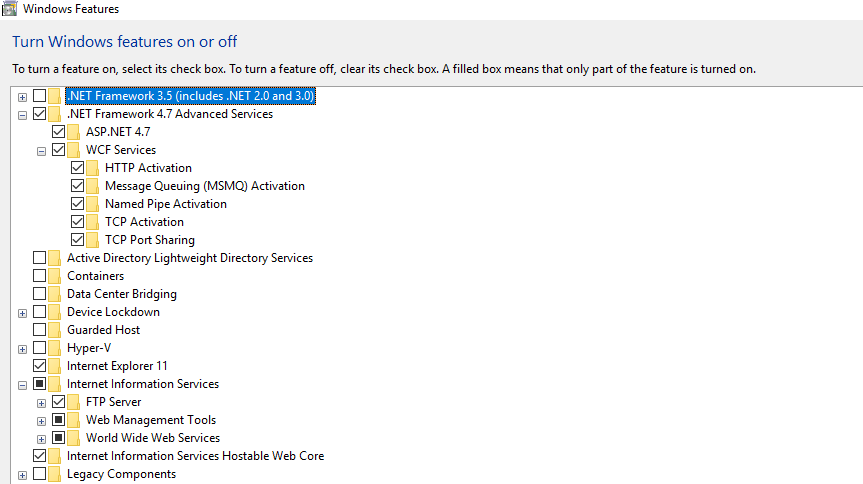
确保进入WCF服务并检查HTTP激活,不要被正方形块所欺骗(我的错误之一)
现在让我们开始创建服务。打开Visual 文件->新的->项目-> Visual C# -> Web -> WCF -> WCF Service Library这将生成您要托管的MCVE
现在,您必须将其链接到一个网站,以便生成Web.Config文件和SVC文件,为此,在解决方案资源管理器上,右键单击您的解决方案,Add-> New 。
现在在web.config文件中添加
<system.serviceModel>
    <services>
      <service name="WcfServiceLibrary4.Service1"> <!-- Change the library name as per your need -->
        <endpoint address=""
                  binding="wsHttpBinding"
                  bindingConfiguration="secureHttpBinding"
                  contract="WcfServiceLibrary4.IService1"/> <!-- Change the library name as per your need -->

        <endpoint address="mex"
                  binding="mexHttpsBinding"
                  contract="IMetadataExchange" />
      </service>
    </services>
    <bindings>
      <basicHttpBinding>
        <binding name="secureHttpBinding">
          <security mode="Transport">
            <transport clientCredentialType="None"/>
          </security>
        </binding>
      </basicHttpBinding>
    </bindings>
    <behaviors>
      <serviceBehaviors>
        <behavior>
          <!-- To avoid disclosing metadata information, set the value below to false and remove the metadata endpoint above before deployment -->
          <serviceMetadata httpsGetEnabled="true"/>
          <!-- To receive exception details in faults for debugging purposes, set the value below to true.  Set to false before deployment to avoid disclosing exception information -->
          <serviceDebug includeExceptionDetailInFaults="false"/>
        </behavior>
      </serviceBehaviors>
    </behaviors>
    <serviceHostingEnvironment multipleSiteBindingsEnabled="true" />
  </system.serviceModel>
接下来在网站上添加对服务的引用
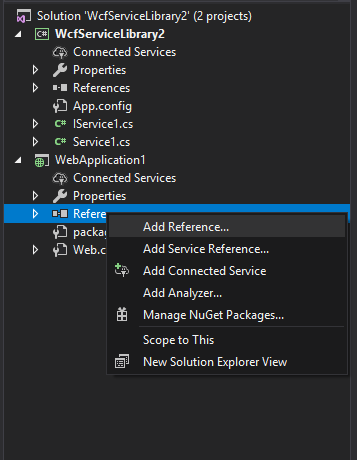
发现服务并添加您创建的服务。现在构建解决方案并发布它。**小心不要在用户目录中发布解决方案,如桌面或文档,否则ACL权限会让您头疼,而是直接将其发布到驱动器中的目录中。
现在托管时间首先允许打开IIS (始终作为管理员)并创建一个新的证书。
在服务器上,转到IIS部件并选择“服务器证书”,然后单击右侧的“创建新证书”。
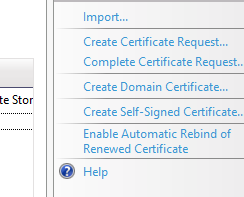
现在从左侧菜单创建一个新网站。
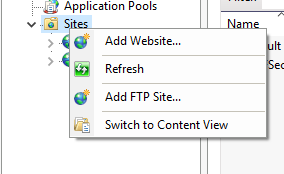
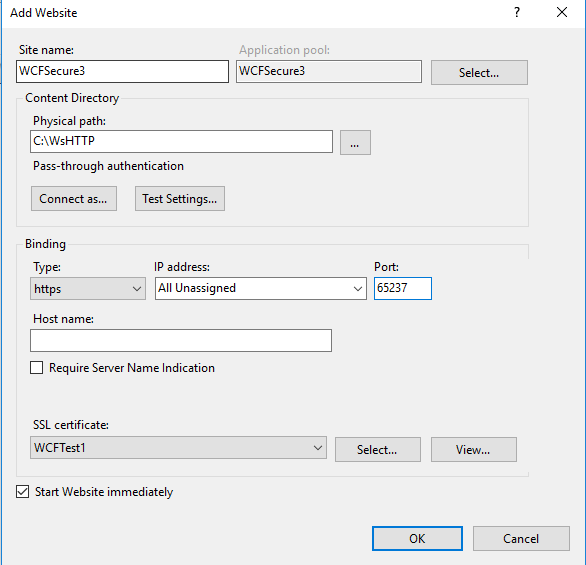
请确保切换到https并在这里选择您的证书,现在要验证您的服务是否创建了,您需要浏览您创建的网站svc文件,不幸的是此时您会发现一个错误,上面说Server Error in '/' Application. Could not find a base address that matches scheme http for the endpoint with binding BasicHttpBinding. Registered base address schemes are [https]. i找不到错误的原因,但是我找到了一个绕过它的方法,
绕过此错误的步骤->从左侧的菜单中选择网站,在右键单击绑定的菜单上添加一个具有不同端口的HTTP。在此之后,您将能够浏览svc文件的HTTPS版本。
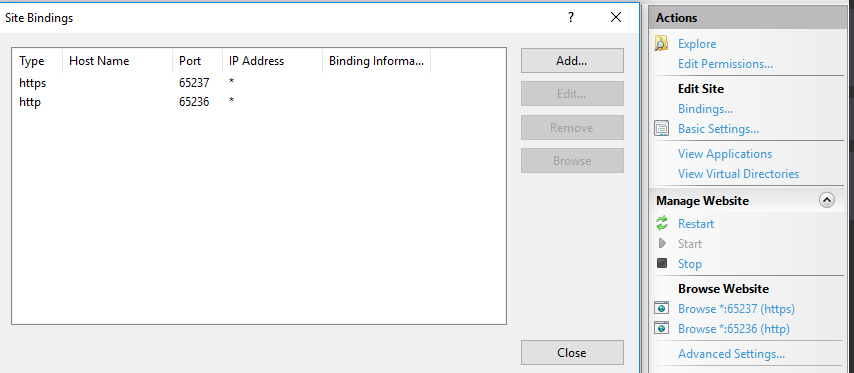
现在,如果浏览HTTPS链接,就会得到创建服务的消息。
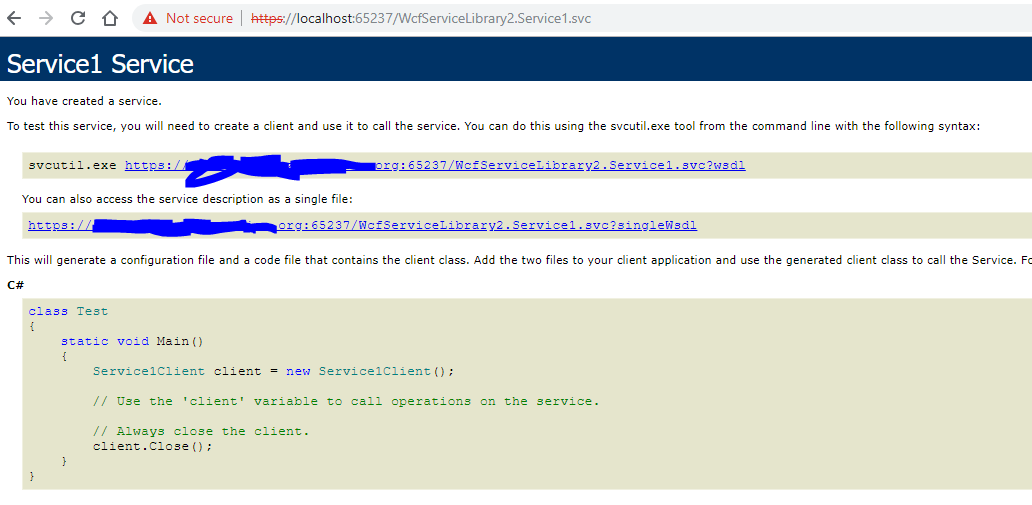
现在,您可以继续创建一个使用此服务的应用程序。
前方是什么
- 我将设法在不添加额外绑定的情况下找到一种方法来完成这一任务。
- 第二个目标是在不增加额外网站的情况下实现这一目标。
如果和当我实现了这些,我将更新,但这些不是我现在的优先,可能不会增加很长一段时间,如果有什么不合理的,或者你有任何改进意见如下。
Stack Overflow用户
发布于 2019-04-02 07:10:10
首先,请不要将IIS物理路径设置到桌面,这将导致权限问题。我们可以将IIS站点物理路径设置为C分区下的文件夹。
其次,请阅读以下链接,该链接主要表明WCF服务库项目无法直接发布到IIS,因为IIS无法识别其Appconfig,除非在网站的根目录中手动添加其他Webconfig。
https://learn.microsoft.com/en-us/dotnet/framework/wcf/deploying-a-wcf-library-project
一般来说,我们使用包含自动生成的Webconfig文件的WCF服务项目模板,而不是WCF服务库项目模板,因为它通常用作类库。
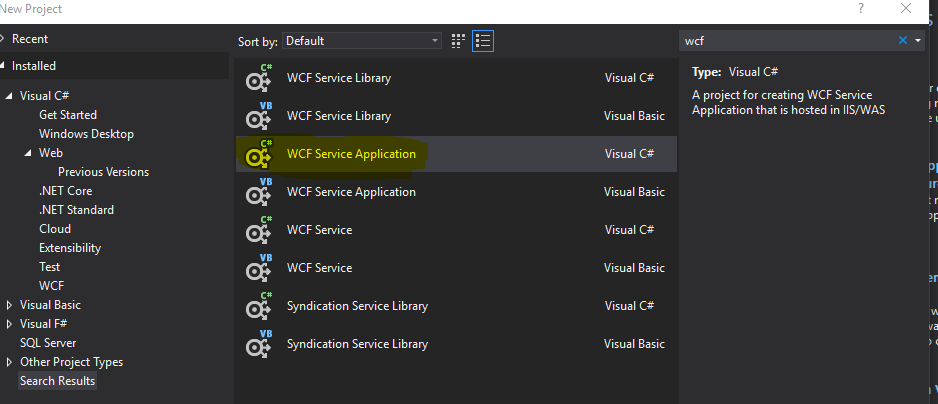
默认情况下,服务是由BasicHttpBinding托管的,它依赖于以下标记。
<protocolMapping>
        <add binding="basicHttpBinding" scheme="http" />
</protocolMapping>
还可以通过以下方式手动配置服务。这两种方式配置文件是等价的。
<system.serviceModel>
    <services>
      <service name="WcfService1.Service1" behaviorConfiguration="mybehavior">
        <endpoint address="" binding="basicHttpBinding" contract="WcfService1.IService1" bindingConfiguration="mybinding"></endpoint>
        <endpoint address="mex" binding="mexHttpBinding" contract="IMetadataExchange"></endpoint>
      </service>
    </services>
    <bindings>
      <basicHttpBinding>
        <binding name="mybinding">
          <security mode="None">
          </security>
        </binding>
      </basicHttpBinding>
</bindings>
没有必要在webconfig中分配服务端地址。它应该在IIS站点绑定模块中完成。
WCF System.ServiceModel.EndpointNotFoundException
最后,通过添加一个额外的服务端点,我们可以通过https托管服务,参考下面的配置(简化配置)。
<protocolMapping>
  <add binding="basicHttpBinding" scheme="http"/>
    <add binding="basicHttpsBinding" scheme="https" />
</protocolMapping>
然后在IIS站点绑定模块中添加https协议。
Configuring Web.config to publish WCF Service
如果有什么需要我帮忙的,请随时通知我。
Stack Overflow用户
发布于 2019-04-01 12:54:26
简而言之,以下是步骤:
- 创建自签名证书
- 添加SSL绑定
- 为SSL配置虚拟目录
- 为HTTP传输安全配置WCF服务
https://stackoverflow.com/questions/55451768
复制相似问题
腾讯云开发者

Copyright © 2013 - 2026 Tencent Cloud. All Rights Reserved. 腾讯云 版权所有
深圳市腾讯计算机系统有限公司 ICP备案/许可证号:粤B2-20090059  粤公网安备44030502008569号
腾讯云计算(北京)有限责任公司 京ICP证150476号 | 京ICP备11018762号