
使用GIT-TFS工具将Azure DevOps TFVC集合中的所有历史复制到Git时发生的TF31002错误
我正在尝试将一个项目从Azure DevOps TFVC迁移到Azure DevOps Git,所有更改集的历史,不只是在过去的180天。以防万一,我用Azure DevOps中包含的工具迁移了过去180天的更改。所以现在我在这个项目中有了两个存储库:
- 具有{ collection -name}的TFVC集合
- 使用另一个名称的Git存储库。
我问过你和我被困在“克隆存储库到本地文件夹”的步骤中。我已经安装并下载了GIT-TFS的最新发展工具。
我有一个个人和专业帐户在Azure DevOps与{email-account}。我想迁移的项目在个人帐户中。我正在按照官方的帮助运行以下命令
git tfs clone -u {email-account} -p {personal-account-password} https://{devops-username}.visualstudio.com/{collection-name}/ $/{folder-name}/ . --branches=none
当我试图连接到远程集合时,我从VisualStudio2017 Pro获得{collection-name}和{folder-name}。我只有这个版本的VS。运行该命令后,将得到以下输出:
Initialized empty Git repository in C:/DATA/Git/.git/

TF31002: Unable to connect to this Team Foundation Server: https://{devops-username}.visualstudio.com/{collection-name}.
Team Foundation Server Url: https://{devops-username}.visualstudio.com/{collection-name}.

Possible reasons for failure include:
- The name, port number, or protocol for the Team Foundation Server is incorrect.
- The Team Foundation Server is offline.
- The password has expired or is incorrect.

Technical information (for administrator):
The remote server returned an error: (404) Not Found.
The remote server returned an error: (404) Not Found.
All the logs could be found in the log file: C:\Users\{user}\AppData\Local\git-tfs\git-tfs_log.txt
如果有帮助,下面是日志文件内容:
2019-03-04 11:42:17.4562 [Debug] Trying to get HKEY_LOCAL_MACHINE\SOFTWARE\Wow6432Node\Microsoft\DevDiv\vs\Servicing\14.0
2019-03-04 11:42:17.4816 [Debug] Visual Studio 2015 detected...
2019-03-04 11:42:17.6387 [Debug] git command: Starting process: git rev-parse --show-prefix
2019-03-04 11:42:17.6744 [Debug] git stderr: fatal: not a git repository (or any of the parent directories): .git
2019-03-04 11:42:17.6744 [Debug] git command time: [00:00:00.0396901] rev-parse --show-prefix
2019-03-04 11:42:17.7083 [Debug] Command run:git tfs clone -u {email-account} -p {personal-account-password} https://{devops-username}.visualstudio.com/{collection-name} $/{folder-name} . --branches=none
2019-03-04 11:42:17.7083 [Debug] No authors file used.
2019-03-04 11:42:17.7083 [Debug] git-tfs version 0.29.0.0 (TFS client library 14.0.0.0 (MS)) (64-bit)
2019-03-04 11:42:17.7379 [Debug] Looking for assembly StructureMap.resources, Version=2.6.1.0, Culture=en-US, PublicKeyToken=e60ad81abae3c223 ...
2019-03-04 11:42:17.7379 [Debug] Trying to get HKEY_LOCAL_MACHINE\Software\WOW6432Node\Microsoft\VisualStudio\14.0|InstallDir
2019-03-04 11:42:17.7379 [Debug] Trying to get HKEY_LOCAL_MACHINE\Software\Microsoft\VisualStudio\14.0|InstallDir
2019-03-04 11:42:17.7379 [Debug] Trying to get HKEY_CURRENT_USER\Software\WOW6432Node\Microsoft\WDExpress\14.0_Config|InstallDir
2019-03-04 11:42:17.7379 [Debug] Trying to get HKEY_CURRENT_USER\Software\Microsoft\WDExpress\14.0_Config|InstallDir
2019-03-04 11:42:17.7379 [Debug] Looking for assembly StructureMap.resources, Version=2.6.1.0, Culture=en, PublicKeyToken=e60ad81abae3c223 ...
2019-03-04 11:42:17.7379 [Debug] Trying to get HKEY_LOCAL_MACHINE\Software\WOW6432Node\Microsoft\VisualStudio\14.0|InstallDir
2019-03-04 11:42:17.7379 [Debug] Trying to get HKEY_LOCAL_MACHINE\Software\Microsoft\VisualStudio\14.0|InstallDir
2019-03-04 11:42:17.7379 [Debug] Trying to get HKEY_CURRENT_USER\Software\WOW6432Node\Microsoft\WDExpress\14.0_Config|InstallDir
2019-03-04 11:42:17.7379 [Debug] Trying to get HKEY_CURRENT_USER\Software\Microsoft\WDExpress\14.0_Config|InstallDir
2019-03-04 11:42:17.7379 [Debug] git command: Starting process: git init
2019-03-04 11:42:17.8112 [Info] Initialized empty Git repository in C:/DATA/Git/.git/

2019-03-04 11:42:17.8252 [Debug] git command time: [00:00:00.0767692] init
2019-03-04 11:42:17.8481 [Debug] No .gitignore file specified...
2019-03-04 11:42:18.9405 [Debug] System.Reflection.TargetInvocationException: Exception has been thrown by the target of an invocation. ---> Microsoft.TeamFoundation.TeamFoundationServiceUnavailableException: TF31002: Unable to connect to this Team Foundation Server: https://{devops-username}.visualstudio.com/{collection-name}.
Team Foundation Server Url: https://{devops-username}.visualstudio.com/{collection-name}.

Possible reasons for failure include:
- The name, port number, or protocol for the Team Foundation Server is incorrect.
- The Team Foundation Server is offline.
- The password has expired or is incorrect.

Technical information (for administrator):
The remote server returned an error: (404) Not Found. ---> System.Net.WebException: The remote server returned an error: (404) Not Found.
   at System.Net.HttpWebRequest.GetResponse()
   at Microsoft.TeamFoundation.Client.Channels.TfsHttpWebRequest.SendRequestAndGetResponse(HttpWebRequest webRequest, WebException& webException)
   --- End of inner exception stack trace ---
   at Microsoft.TeamFoundation.Client.TfsConnection.EnsureProviderConnected()
   at Microsoft.TeamFoundation.Client.TfsConnection.EnsureAuthenticated()
   at GitTfs.VsCommon.TfsHelperBase.EnsureAuthenticated()
   at GitTfs.Core.GitTfsRemote.EnsureTfsAuthenticated()
   at GitTfs.Core.GitRepository.CreateTfsRemote(RemoteInfo remote, String autocrlf, String ignorecase)
   at GitTfs.Commands.Init.Run(String tfsUrl, String tfsRepositoryPath)
   at GitTfs.Commands.Init.Run(String tfsUrl, String tfsRepositoryPath, String gitRepositoryPath)
   at GitTfs.Commands.Clone.Run(String tfsUrl, String tfsRepositoryPath, String gitRepositoryPath)
   --- End of inner exception stack trace ---
   at System.RuntimeMethodHandle.InvokeMethod(Object target, Object[] arguments, Signature sig, Boolean constructor)
   at System.Reflection.RuntimeMethodInfo.UnsafeInvokeInternal(Object obj, Object[] parameters, Object[] arguments)
   at System.Reflection.RuntimeMethodInfo.Invoke(Object obj, BindingFlags invokeAttr, Binder binder, Object[] parameters, CultureInfo culture)
   at GitTfs.Util.GitTfsCommandRunner.Run(GitTfsCommand command, IList`1 args)
   at GitTfs.GitTfs.Main(GitTfsCommand command, IList`1 unparsedArgs)
   at GitTfs.GitTfs.Run(IList`1 args)
   at GitTfs.Program.Main(String[] args)
2019-03-04 11:42:18.9635 [Error] TF31002: Unable to connect to this Team Foundation Server: https://{devops-username}.visualstudio.com/{collection-name}.
Team Foundation Server Url: https://{devops-username}.visualstudio.com/{collection-name}.

Possible reasons for failure include:
- The name, port number, or protocol for the Team Foundation Server is incorrect.
- The Team Foundation Server is offline.
- The password has expired or is incorrect.

Technical information (for administrator):
The remote server returned an error: (404) Not Found.
2019-03-04 11:42:18.9635 [Error] The remote server returned an error: (404) Not Found.
2019-03-04 11:42:18.9734 [Warn] All the logs could be found in the log file: C:\Users\{user}\AppData\Local\git-tfs\git-tfs_log.txt回答 2
Stack Overflow用户
发布于 2019-03-04 15:21:04
要在Azure DevOps上克隆TFVC存储库,您应该:
- 启用备用凭据。转到“我的配置文件”->输入数据并“启用备用凭据”
- 使用下面的命令(在前面的步骤中定义了“yourLogin”和“yourPassword”)
git tfs clone https://dev.azure.com/{organization} $/project/folder --username=yourLogin --password=yourPassword
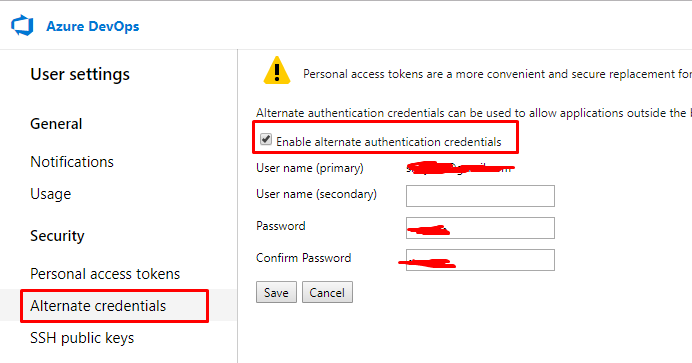
要想成功,visualstudio.com需要使用TFS的TFS2012版本(用于身份验证)。否则,您将看到消息:
TF400813: Resource not available for anonymous access. Client authentication required
要确保git使用此版本,请使用命令git tfs --version,您应该看到文本TFS client library 11.0.0.0,如下所示:
git-tfs version 0.17.2.0 (TFS client library 11.0.0.0 (MS)) (64-bit)
Stack Overflow用户
发布于 2022-06-17 15:11:55
我能够解决这个问题:git tfs clone https://dev.azure.com/{OrganizationName} $/{Project}/{Branch} ./
https://stackoverflow.com/questions/54981796
复制相似问题
腾讯云开发者

Copyright © 2013 - 2026 Tencent Cloud. All Rights Reserved. 腾讯云 版权所有
深圳市腾讯计算机系统有限公司 ICP备案/许可证号:粤B2-20090059  粤公网安备44030502008569号
腾讯云计算(北京)有限责任公司 京ICP证150476号 | 京ICP备11018762号