
Gradle spring引导2-启动依赖项不能下载依赖项
Gradle spring引导2-启动依赖项不能下载依赖项
提问于 2019-02-18 10:06:00
我正在使用eclipse 2018,gradle 5.2.1,buildship 3.0.1。
我的配置如下:
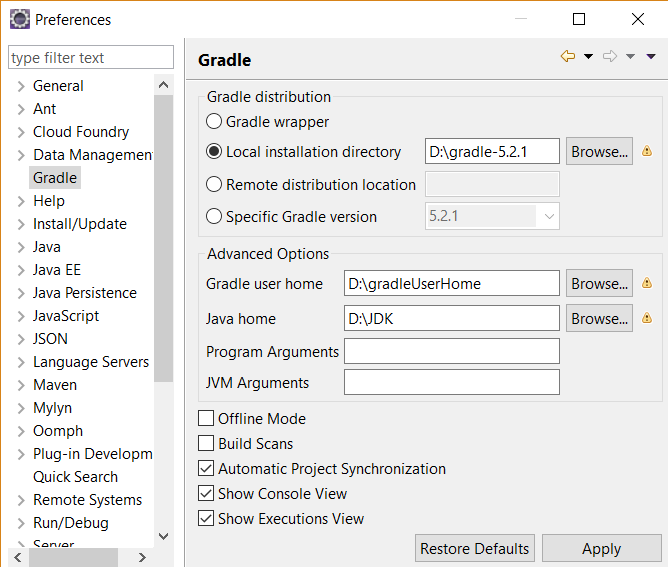
根据建筑.弹簧-启动-2-项目-与分级,我尝试创建spring 2
build.gradle是:
plugins {
    id 'java'
    id 'com.gradle.build-scan' version '2.1'
    id 'org.springframework.boot' version '2.1.3.RELEASE'
}

repositories {
    jCenter()
}

dependencies {
    implementation 'org.springframework.boot:spring-boot-dependencies:2.1.3.RELEASE'
    implementation 'org.springframework.boot:spring-boot-starter-web'

    testImplementation 'org.springframework.boot:spring-boot-starter-test'

    components {
        withModule('org.springframework:spring-beans') {
            allVariants {
                withDependencyConstraints {
                    // Need to patch constraints because snakeyaml is an optional dependency
                    it.findAll { it.name == 'snakeyaml' }.each { it.version { strictly '1.23' } }
                }
            }
        }
    }
}

buildScan {

    // always accept the terms of service
    termsOfServiceUrl = 'https://gradle.com/terms-of-service'
    termsOfServiceAgree = 'yes'

    // always publish a build scan
    publishAlways()
}

bootJar {
    mainClassName = 'gt4.App'
}但是,在我保存build.gradle之后,项目和外部依赖项消失了,spring引导jars也没有下载。
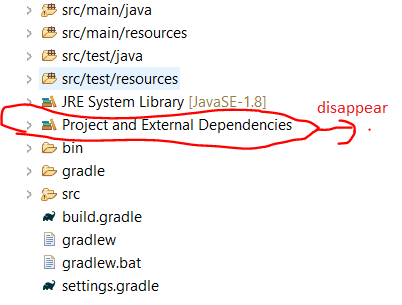
我错了什么?
如果我使用gradle by Spring Tool Suite 4创建spring引导项目,生成的build.gradle是:
plugins {
    id 'org.springframework.boot' version '2.1.3.RELEASE'
    id 'java'
}

apply plugin: 'io.spring.dependency-management'

group = 'com.example'
version = '0.0.1-SNAPSHOT'
sourceCompatibility = '1.8'

repositories {
    mavenCentral()
}

dependencies {
    implementation 'org.springframework.boot:spring-boot-starter'
    testImplementation 'org.springframework.boot:spring-boot-starter-test'
}
那就成功了。
我用错了spring-boot-dependencies吗?
回答 1
Stack Overflow用户
发布于 2021-02-12 12:28:18
尝试删除本地存储库并再次构建项目以下载依赖性。
删除.m2或.gradle文件夹,然后重新构建项目。
A)在Windows机器上,.gradle或.m2路径为:
c:\Users\username\.m2或c:\Users\username\.m2
(B)在linux机器上,.gradle或.m2路径为:
USER_HOME/.m2/页面原文内容由Stack Overflow提供。腾讯云小微IT领域专用引擎提供翻译支持
原文链接:
https://stackoverflow.com/questions/54744726
复制相关文章
相似问题
腾讯云开发者

Copyright © 2013 - 2026 Tencent Cloud. All Rights Reserved. 腾讯云 版权所有
深圳市腾讯计算机系统有限公司 ICP备案/许可证号:粤B2-20090059  粤公网安备44030502008569号
腾讯云计算(北京)有限责任公司 京ICP证150476号 | 京ICP备11018762号