
app_dev位于子目录中时的Symfony Apache配置
我正在运行一个Symfony 3应用程序在我的本地占卜机。它与XAMPP服务器一起使用。当我访问本地URL时,这个应用程序运行良好。问题是,我似乎无法在开发环境中运行它。
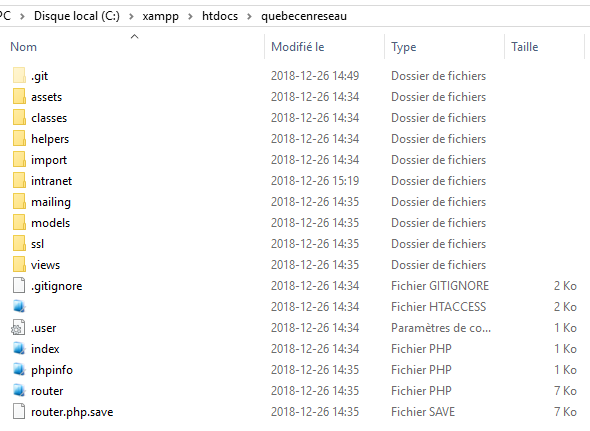
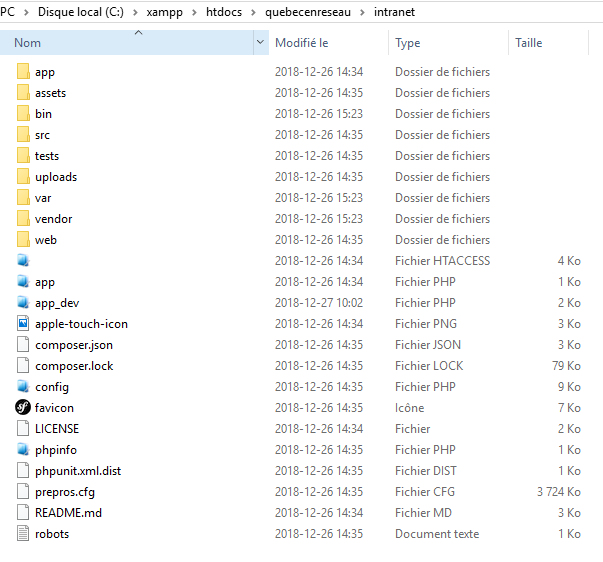
Symfony应用程序文件夹结构是不同的,我已经习惯了。app_dev.php位于intranet文件夹中。
这是intranet文件夹
我当前的apache配置文件如下所示:
<VirtualHost *:443>
    ServerName quebecenreseau.ca
    ServerAlias www.quebecenreseau.ca

    SSLEngine on
    SSLCertificateFile "crt/quebecenreseau.ca/server.crt"
    SSLCertificateKeyFile "crt/quebecenreseau.ca/server.key"

    DocumentRoot C:\xampp\htdocs\quebecenreseau
    <Directory C:\xampp\htdocs\quebecenreseau>
        AllowOverride All
        Order Allow,Deny
        Allow from All
    </Directory>

    # uncomment the following lines if you install assets as symlinks
    # or run into problems when compiling LESS/Sass/CoffeeScript assets
    # <Directory /var/www/project>
    #     Options FollowSymlinks
    # </Directory>

    ErrorLog C:\xampp\apache\logs\project_error.log
    CustomLog C:\xampp\apache\logs\project_access.log combined
</VirtualHost>
我不知道如何配置VirtualHost块,以便使开发环境既可以在根目录上工作,也可以在充当网站管理员的intranet目录上工作。
如果我像这样更改DocumentRoot行:
DocumentRoot C:\xampp\htdocs\quebecenreseau\intranet\app_dev.php我的应用程序CSS文件没有加载,我的内联网是在根级服务的。如何配置本地环境以加载app_dev.php?而且,我的prod环境是在centos服务器上的,所以我真的不想搞砸prod环境。
如果您在根级别上漫游index.php文件中的内容,则如下所示:
<?php

/**
 * Start session
 */

session_start();

/**
 * Load configuration and router
 */

require 'classes/Router.php';
require 'classes/Database.php';
require 'classes/Main.php';

/**
 * Load helpers
 */

require 'helpers/phpmailer/class.phpmailer.php';
require 'helpers/GUMP.php';
require 'helpers/MailChimp.php';


/**
 * Load models
 */

require 'models/Article.php';
require 'models/Formation.php';
require 'models/SAE.php';


/**
 * Load routes
 */

require 'router.php';


/**
 * Match requests
 */

$match = $router->match();

if( $match && is_callable( $match['target'] ) ) {
    // call function related to matched route
    call_user_func_array( $match['target'], $match['params'] );
} else {
    // no route was matched
    header( $_SERVER["SERVER_PROTOCOL"] . ' 404 Not Found');
}回答 1
Stack Overflow用户
发布于 2018-12-27 23:20:12
尝试将C:\xampp\htdocs\quebecenreseau更改为C:\xampp\htdocs\quebecenreseau\intranet\web。如果我记得清楚,文档根目录必须指向app.php和app_dev.php所在的文件夹。
更新:
好的。现在比较清楚了。您没有在prod中运行纯Symfony项目。有人从Symfony获取了一些基本类,用于路由请求和处理DB连接。
现在你实际上有两个项目。主文件夹中的普通PHP项目和intranet文件夹中的Symfony项目。
所以让我们开始研究吧。首先,您必须知道,要使Symfony项目作为主应用程序正常工作,根文件夹必须是"web“文件夹。
所以:
- 在quebecenreseau文件夹中创建一个新的Symfony项目。
- 将现有资产移动到新的资产文件夹
- 检查现有控制器是否需要进行一些调整以显示资产。
从我从结构中看到的情况来看,您需要进行最少的更改才能使其工作。
https://stackoverflow.com/questions/53948241
复制相似问题
腾讯云开发者

Copyright © 2013 - 2026 Tencent Cloud. All Rights Reserved. 腾讯云 版权所有
深圳市腾讯计算机系统有限公司 ICP备案/许可证号:粤B2-20090059  粤公网安备44030502008569号
腾讯云计算(北京)有限责任公司 京ICP证150476号 | 京ICP备11018762号