
IValueConverter返回int阵列
嗨,我在编辑日历。现在我需要用我最喜欢的日子来填满日历。
这就是我试过的,这就是输出
object IValueConverter.Convert(object value, Type targetType, object parameter, CultureInfo culture)
{
    int[] days = new int[] { 1,2,3,4,5,6,7,8,9,10,11,12,13,14,15,16,17,18,19,20,21,22,23,24,25,26,27,28,29,30,31 };
    return days;
}
这是xaml:
<ContentPresenter
x:Name="NormalText"
Content="{Binding Converter={StaticResource GeorgianToPersianDate}}"
/>
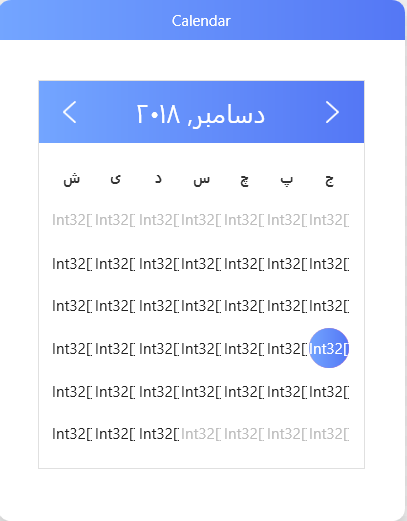
更新:
<Style x:Key="CalendarDayButtonStyle" TargetType="CalendarDayButton">

        <Setter Property="MinWidth" Value="10" />
        <Setter Property="MinHeight" Value="10" />
        <Setter Property="FontSize" Value="12" />
        <Setter Property="Width" Value="32" />
        <Setter Property="Height" Value="32" />
        <Setter Property="HorizontalContentAlignment" Value="Center" />
        <Setter Property="VerticalContentAlignment" Value="Center" />
        <Setter Property="FocusVisualStyle" Value="{x:Null}" />
        <Setter Property="Template">
            <Setter.Value>
                <ControlTemplate TargetType="CalendarDayButton">
                    <ControlTemplate.Resources>
                        <local:GeorgianToPersianDate x:Key="GeorgianToPersianDate" />
                    </ControlTemplate.Resources>
                    <Grid>
                        <Rectangle
                            x:Name="TodayBackground"
                            Fill="{DynamicResource DangerBrush}"
                            Opacity="0"
                            RadiusX="16"
                            RadiusY="16" />
                        <Rectangle
                            x:Name="SelectedBackground"
                            Fill="{DynamicResource PrimaryBrush}"
                            Opacity="0"
                            RadiusX="16"
                            RadiusY="16" />
                        <ContentPresenter
                            x:Name="NormalText"
                            Content="{Binding Converter={StaticResource GeorgianToPersianDate}}"
                            HorizontalAlignment="{TemplateBinding HorizontalContentAlignment}"
                            VerticalAlignment="{TemplateBinding VerticalContentAlignment}">
                            <TextElement.Foreground>
                                <SolidColorBrush Color="{DynamicResource PrimaryTextColor}" />
                            </TextElement.Foreground>
                        </ContentPresenter>
                        <VisualStateManager.VisualStateGroups>
                            <VisualStateGroup x:Name="CommonStates">
                                <VisualStateGroup.Transitions>
                                    <VisualTransition GeneratedDuration="0:0:0.1" />
                                </VisualStateGroup.Transitions>
                                <VisualState x:Name="Normal" />
                                <VisualState x:Name="Disabled">
                                    <Storyboard>
                                        <DoubleAnimation
                                            Storyboard.TargetName="NormalText"
                                            Storyboard.TargetProperty="Opacity"
                                            To=".35"
                                            Duration="0" />
                                    </Storyboard>
                                </VisualState>
                            </VisualStateGroup>
                            <VisualStateGroup x:Name="SelectionStates">
                                <VisualStateGroup.Transitions>
                                    <VisualTransition GeneratedDuration="0" />
                                </VisualStateGroup.Transitions>
                                <VisualState x:Name="Unselected" />
                                <VisualState x:Name="Selected">
                                    <Storyboard>
                                        <DoubleAnimation
                                            Storyboard.TargetName="SelectedBackground"
                                            Storyboard.TargetProperty="Opacity"
                                            To="1"
                                            Duration="0:0:.2" />
                                        <ColorAnimation
                                            Storyboard.TargetName="NormalText"
                                            Storyboard.TargetProperty="(TextElement.Foreground).(SolidColorBrush.Color)"
                                            To="White"
                                            Duration="0" />
                                    </Storyboard>
                                </VisualState>
                            </VisualStateGroup>
                            <VisualStateGroup x:Name="ActiveStates">
                                <VisualStateGroup.Transitions>
                                    <VisualTransition GeneratedDuration="0" />
                                </VisualStateGroup.Transitions>
                                <VisualState x:Name="Active" />
                                <VisualState x:Name="Inactive">
                                    <Storyboard>
                                        <ColorAnimation
                                            Storyboard.TargetName="NormalText"
                                            Storyboard.TargetProperty="(TextElement.Foreground).(SolidColorBrush.Color)"
                                            To="{DynamicResource ThirdlyTextColor}"
                                            Duration="0" />
                                    </Storyboard>
                                </VisualState>
                            </VisualStateGroup>
                            <VisualStateGroup x:Name="DayStates">
                                <VisualStateGroup.Transitions>
                                    <VisualTransition GeneratedDuration="0" />
                                </VisualStateGroup.Transitions>
                                <VisualState x:Name="RegularDay" />
                                <VisualState x:Name="Today">
                                    <Storyboard>
                                        <DoubleAnimation
                                            Storyboard.TargetName="TodayBackground"
                                            Storyboard.TargetProperty="Opacity"
                                            To="1"
                                            Duration="0" />
                                        <ColorAnimation
                                            Storyboard.TargetName="NormalText"
                                            Storyboard.TargetProperty="(TextElement.Foreground).(SolidColorBrush.Color)"
                                            To="White"
                                            Duration="0" />
                                    </Storyboard>
                                </VisualState>
                            </VisualStateGroup>
                        </VisualStateManager.VisualStateGroups>
                    </Grid>
                </ControlTemplate>
            </Setter.Value>
        </Setter>
    </Style>
这是我的xaml,我只想移除那些愚蠢的日子,再加上我自己的日子,我想我可以用转换器来做这件事。那么,如果我不能用转换器做这件事,我该如何改变这些日子呢?
回答 1
Stack Overflow用户
发布于 2018-12-21 15:44:18
首先,让我们从绑定开始.
ContentPresenter通过Content属性显示它的UI。这只是一个object。XAML有一些奇特的方法可以将某些对象转换为可视化对象,但是如果它失败了,它只会在该ToString()上调用object并显示文本。看看您的IValueConverter,您将返回一个int[],而Content就会变成这样。您给出的代码不知道为什么不显示System.Int32[],但这就是正在发生的事情。
所以我知道让我们看看你的IValueConverter**.**
您正在返回一个array of int (int[])。当您调用System.Int32[]时,这就是ToString()。
如果您是Template,则ItemsControl是包含多个项的类型,那么分配ItemsSource会自动执行相同的操作,但对数组中的每个项都是如此。
使用IValueConverter是不正确的。它没有转换任何东西,也不是转换器的用途。您应该只是对ViewModel中或任何地方的属性执行纯绑定,而不是为此使用IValueConverter。
当您已经有了一些绑定时,就会使用转换器;但是不想使用绑定的结果,而更愿意将结果“转换”到其他东西上。
例如:如果要绑定到返回int值但倾向于将该int转换为相关enum名称的属性,则需要编写一个转换器,该转换器读取int并返回相关的enum名称。
修复:
您所提供的XAML很难提供,但是要知道有几种方法可以做到这一点。首先,您需要至少有一个模板,该模板将数组排除为绑定,以显示它们的原样。看看你的看法,我不相信这是你的情况。我相信您已经将ContentControl放到了模板中;该模板是另一个控件的ItemsSource的一部分。如果是这样的话,那么您将将ItemsSource绑定到数组;在ContentPresenter中,只需绑定到提供给它的数据,如下所示:
<ContentPresenter x:Name="NormalText"
                  Content="{Binding}"/>
所有这一切,我不能给你一个明确的解决方案,并以正确的方式,而不看到整体的XAML。
在更新之后,我相信问题在于您正在对CalenderButton进行样式化,并将那里的Content分配给数组。像上面那样编写绑定;然后自定义Style Calendar并将绑定设置为数组。我从来没有做过日历样式,但通过查看它,我可以看出Calendar具有某种时尚的panel和ItemsSource,而这些项目的模板是CalendarButton。换句话说,日被分配到日历中的按钮中,而您正试图从按钮中直接完成它。
https://stackoverflow.com/questions/53887257
复制相似问题
腾讯云开发者

Copyright © 2013 - 2026 Tencent Cloud. All Rights Reserved. 腾讯云 版权所有
深圳市腾讯计算机系统有限公司 ICP备案/许可证号:粤B2-20090059  粤公网安备44030502008569号
腾讯云计算(北京)有限责任公司 京ICP证150476号 | 京ICP备11018762号