
XML错误:未引用的属性值
XML错误:未引用的属性值
提问于 2018-08-23 14:37:30
每当我运行ionic cordova build ios命令时,我都会得到以下错误
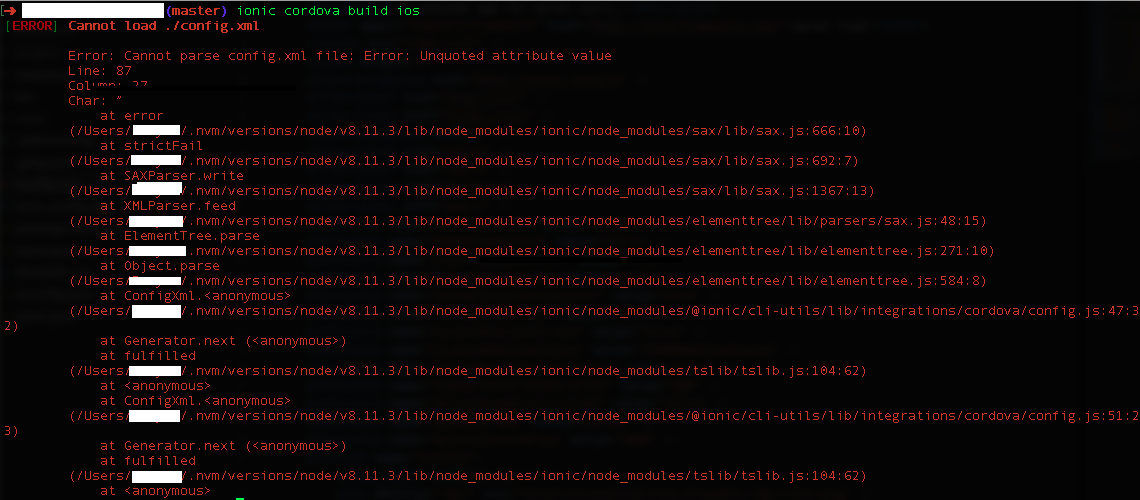
我已经进入了文本行,它声明有一个未引用的属性值,没有什么似乎是不寻常的。
<platform name="ios">
    <allow-intent href="itms:*" />
    <allow-intent href="itms-apps:*" />
    <icon height="57" src="resources/ios/icon/icon.png" width="57" />
    <icon height="114" src="resources/ios/icon/icon@2x.png" width="114" />
    <icon height="40" src="resources/ios/icon/icon-40.png" width="40" />
    <icon height="80" src="resources/ios/icon/icon-40@2x.png" width="80" />
    <icon height="120" src="resources/ios/icon/icon-40@3x.png" width="120" />
    <icon height="50" src="resources/ios/icon/icon-50.png" width="50" />
    <icon height="100" src="resources/ios/icon/icon-50@2x.png" width="100" />
    <icon height="60" src="resources/ios/icon/icon-60.png" width="60" />
    <icon height="120" src="resources/ios/icon/icon-60@2x.png" width="120" />
    <icon height="180" src="resources/ios/icon/icon-60@3x.png" width="180" />
    <icon height="72" src="resources/ios/icon/icon-72.png" width="72" />
    <icon height="144" src="resources/ios/icon/icon-72@2x.png" width="144" />
    <icon height="76" src="resources/ios/icon/icon-76.png" width="76" />
    <icon height="152" src="resources/ios/icon/icon-76@2x.png" width="152" />
    <icon height="167" src="resources/ios/icon/icon-83.5@2x.png" width="167" />
    <icon height="29" src="resources/ios/icon/icon-small.png" width="29" />
    <icon height="58" src="resources/ios/icon/icon-small@2x.png" width="58" />
    <icon height="87" src="resources/ios/icon/icon-small@3x.png" width="87" />
    <splash height="1136" src="resources/ios/splash/Default-568h@2x~iphone.png" width="640" />
    <splash height="1334" src="resources/ios/splash/Default-667h.png" width="750" />
    <splash height="2208" src="resources/ios/splash/Default-736h.png" width="1242" />
    <splash height="1242" src="resources/ios/splash/Default-Landscape-736h.png" width="2208" />
    <splash height="1536" src="resources/ios/splash/Default-Landscape@2x~ipad.png" width="2048" />
    <splash height="2048" src="resources/ios/splash/Default-Landscape@~ipadpro.png" width="2732" />
    <splash height="768" src="resources/ios/splash/Default-Landscape~ipad.png" width="1024" />
    <splash height="2048" src="resources/ios/splash/Default-Portrait@2x~ipad.png" width="1536" />
    <splash height="2732" src="resources/ios/splash/Default-Portrait@~ipadpro.png" width="2048" />
    <splash height="1024" src="resources/ios/splash/Default-Portrait~ipad.png" width="768" />
    <splash height="960" src="resources/ios/splash/Default@2x~iphone.png" width="640" />
    <splash height="480" src="resources/ios/splash/Default~iphone.png" width="320" />
    <icon height="1024" src="resources/ios/icon/icon-1024.png" width="1024" />
<splash height="2732" src="resources/ios/splash/Default@2x~universal~anyany.png" width="2732" />回答 1
Stack Overflow用户
发布于 2018-08-23 15:48:50
在为platform添加结束标记后,您发布的XML格式良好。
我们只能猜测,因为您没有在文档中包含错误部分,但是您很可能在属性值周围犯了以下错误之一:
- 省略(单引号或双引号)
- 使用卷曲引号
“/”,而不是直接引用"。 - 使用卷曲撇号
‘/’而不是直撇号'。
页面原文内容由Stack Overflow提供。腾讯云小微IT领域专用引擎提供翻译支持
原文链接:
https://stackoverflow.com/questions/51988342
复制相关文章
相似问题
腾讯云开发者

Copyright © 2013 - 2026 Tencent Cloud. All Rights Reserved. 腾讯云 版权所有
深圳市腾讯计算机系统有限公司 ICP备案/许可证号:粤B2-20090059  粤公网安备44030502008569号
腾讯云计算(北京)有限责任公司 京ICP证150476号 | 京ICP备11018762号