
如何利用Ionic 4检测平台
如何利用Ionic 4检测平台
提问于 2018-08-13 06:42:08
如何使用Ionic 4来检测浏览器和移动网络平台,因为当我尝试在桌面浏览器中使用下面的代码时,它并没有落入‘核心’状态。
if (this.platform.is('core')) {
    alert('core platform');
  } else {
    alert('something else');
}当我在chrome工具中调试时,它显示了'android'平台,如下所示。
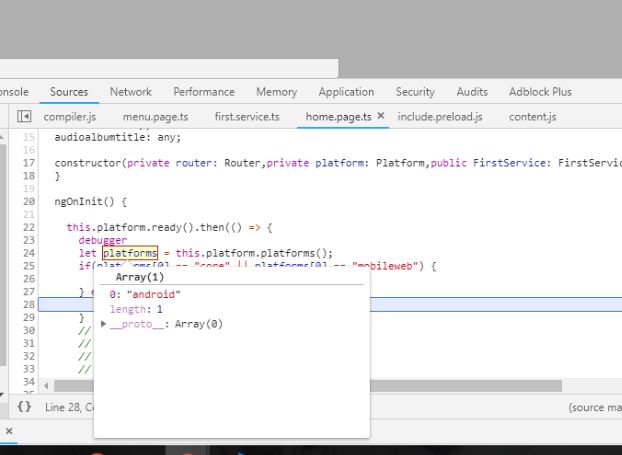
有人能帮我如何在Ionic 4中探测平台吗?或者有什么可以替代的呢?
回答 10
Stack Overflow用户
发布于 2020-01-28 13:14:44
对于我的用例,我想要区分native和browser平台。也就是说,我的应用程序是在浏览器或本地移动设备中运行的。这是我想出的服务:
import { Injectable } from '@angular/core';
import {Platform} from '@ionic/angular';


type CurrentPlatform = 'browser' | 'native';

@Injectable({
  providedIn: 'root'
})
export class CurrentPlatformService {

  private _currentPlatform: CurrentPlatform;

  constructor(private platform: Platform) {
    this.setCurrentPlatform();
  }

  get currentPlatform() {
    return this._currentPlatform;
  }

  isNative() {
    return this._currentPlatform === 'native';
  }
  isBrowser() {
    return this._currentPlatform === 'browser';
  }

  private setCurrentPlatform() {
    // Are we on mobile platform? Yes if platform is ios or android, but not desktop or mobileweb, no otherwise
    if (
        this.platform.is('ios')
        || this.platform.is('android')
        && !( this.platform.is('desktop') || this.platform.is('mobileweb') ) ) {
      this._currentPlatform = 'mobile';
    } else {
      this._currentPlatform = 'browser';
    }
  }
}Stack Overflow用户
发布于 2018-11-27 07:58:15
目前,Ionic 4支持平台检测。下面的代码适用于我。
import { Platform } from '@ionic/angular';
...
constructor(private platform: Platform) {}
...
ngOnInit() {
   this.platform.ready().then(() => {
      if (this.platform.is('android')) {
           console.log('android');
      } else if (this.platform.is('ios')) {
           console.log('ios');
      } else {
           //fallback to browser APIs or
           console.log('The platform is not supported');
             }
}}Stack Overflow用户
发布于 2018-08-13 13:05:22
以下链接可能对您有所帮助:
https://forum.ionicframework.com/t/how-to-determine-if-browser-or-app/89149/16
也可以使用以下方法:
public isDesktop() {
    let platforms = this.plt.platforms();
    if(platforms[0] == "core" || platforms[0] == "mobileweb") {
        return true;
    } else {
        return false;
    }
}页面原文内容由Stack Overflow提供。腾讯云小微IT领域专用引擎提供翻译支持
原文链接:
https://stackoverflow.com/questions/51816498
复制相关文章
相似问题
腾讯云开发者

Copyright © 2013 - 2026 Tencent Cloud. All Rights Reserved. 腾讯云 版权所有
深圳市腾讯计算机系统有限公司 ICP备案/许可证号:粤B2-20090059  粤公网安备44030502008569号
腾讯云计算(北京)有限责任公司 京ICP证150476号 | 京ICP备11018762号