
XAML样式/基类中VisualStateGroup / VisualState的继承
- 我有一个基类
SecurePage,它继承了UserControl。 - 应用程序中的每一个“页面”都是从
SecurePage继承的。 - 我想在默认的
StyleofSecurePage中定义一个带有一些VisualState的VisualStateGroup。
问题是,在派生类中,这些VisualState**s都不可用。
var states = VisualStateManager.GetVisualStateGroups(this);
返回空列表。
如果我复制我的XAML VisualState定义并将其粘贴到我的DerivadedFooSecurePage中,我可以轻松地进入状态:
VisualStateManager.GoToState(this, "Blink", false);与这里描述的问题相同:VisualState in abstract control
更多的细节
SecurePage
[TemplateVisualState(GroupName = "State", Name = "Normal")]
[TemplateVisualState(GroupName = "State", Name = "Blink")]
public class SecurePage: UserControl
{
    public SecurePage()
    {
        DefaultStyleKey = typeof(HtSecurePage);
    }
}<Style TargetType="basic:SecurePage">
<Setter Property="FontSize" Value="14"/>
<Setter Property="Template">
<Setter.Value>
<ControlTemplate TargetType="basic:SecurePage">
<Grid>
<VisualStateManager.VisualStateGroups>
<VisualStateGroup x:Name="Signals">
<VisualState x:Name="Normal"/>
<VisualState x:Name="Blink">
<Storyboard>
<ColorAnimationUsingKeyFrames Storyboard.TargetProperty="(Border.BorderBrush).(SolidColorBrush.Color)" Storyboard.TargetName="border">
<EasingColorKeyFrame KeyTime="0:0:0.4" Value="#FF3AFF00">
<EasingColorKeyFrame.EasingFunction>
<BounceEase EasingMode="EaseIn" Bounciness="3" Bounces="4"/>
</EasingColorKeyFrame.EasingFunction>
</EasingColorKeyFrame>
</ColorAnimationUsingKeyFrames>
</Storyboard>
</VisualState>
</VisualStateGroup>
</VisualStateManager.VisualStateGroups>
<ContentPresenter Content="{TemplateBinding Content}"/>
<Border
x:Name="border"
BorderThickness="5"
BorderBrush="Transparent"
IsHitTestVisible="False"/>
</Grid>
</ControlTemplate>
</Setter.Value>
</Setter>
</Style>InfoPage
Info.xaml.cs
namespace Views.General
{
    public partial class Info
    {
        public Info()
        {
            InitializeComponent();
        }
    }
}
Info.xaml
<basic:SecurePage
    x:Class="Views.General.Info"
    xmlns="http://schemas.microsoft.com/winfx/2006/xaml/presentation"
    xmlns:x="http://schemas.microsoft.com/winfx/2006/xaml"
    xmlns:mc="http://schemas.openxmlformats.org/markup-compatibility/2006"
    xmlns:d="http://schemas.microsoft.com/expression/blend/2008"
    xmlns:i="http://schemas.microsoft.com/expression/2010/interactivity"
    xmlns:basic="clr-namespace:Foo.PlcFramework.Controls.Basic;assembly=Foo"
    FontSize="14">
    <Grid>
        <TextBlock Text="HelloWorld"/>
    </Grid>
</basic:SecurePage>
现场调试
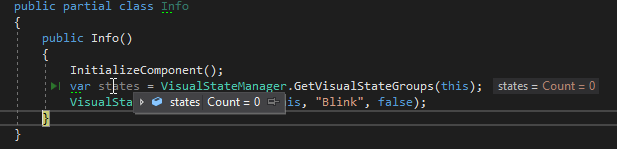
states = 0- 调用
VisualStateManager.GoToState(this, "Blink", false);后什么都不会发生

states = 0- 调用
VisualStateManager.GoToState(this, "Blink", false);后什么都不会发生
将VisualState复制到派生类中
namespace Views.General
{
    [TemplateVisualState(GroupName = "State", Name = "Normal")]
    [TemplateVisualState(GroupName = "State", Name = "Blink")]
    public partial class Info
    {
        public Info()
        {
            InitializeComponent();
            var states = VisualStateManager.GetVisualStateGroups(this);
            VisualStateManager.GoToState(this, "Blink", false);
        }
    }
}<basic:SecurePage
x:Class="Views.General.Info"
xmlns="http://schemas.microsoft.com/winfx/2006/xaml/presentation"
xmlns:x="http://schemas.microsoft.com/winfx/2006/xaml"
xmlns:mc="http://schemas.openxmlformats.org/markup-compatibility/2006"
xmlns:d="http://schemas.microsoft.com/expression/blend/2008"
xmlns:i="http://schemas.microsoft.com/expression/2010/interactivity"
xmlns:basic="clr-namespace:Foo.PlcFramework.Controls.Basic;assembly=Foo"
FontSize="14">
<Grid>
<VisualStateManager.VisualStateGroups>
<VisualStateGroup x:Name="Signals">
<VisualState x:Name="Normal"/>
<VisualState x:Name="Blink">
<Storyboard>
<ColorAnimationUsingKeyFrames Storyboard.TargetProperty="(Border.BorderBrush).(SolidColorBrush.Color)" Storyboard.TargetName="border">
<EasingColorKeyFrame KeyTime="0:0:0.4" Value="#FF3AFF00">
<EasingColorKeyFrame.EasingFunction>
<BounceEase EasingMode="EaseIn" Bounciness="3" Bounces="4"/>
</EasingColorKeyFrame.EasingFunction>
</EasingColorKeyFrame>
</ColorAnimationUsingKeyFrames>
</Storyboard>
</VisualState>
</VisualStateGroup>
</VisualStateManager.VisualStateGroups>
<TextBlock Text="HelloWorld"/>
<Border
x:Name="border"
BorderThickness="5"
BorderBrush="Transparent"
IsHitTestVisible="False"/>
</Grid>
</basic:SecurePage >
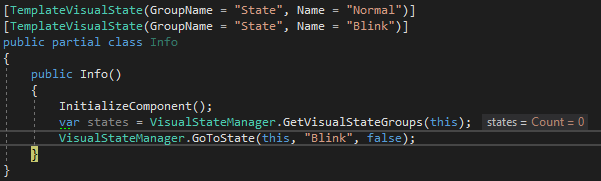
states = 0- 在调用
VisualStateManager.GoToState(this, "Blink", false);之后,状态发生了更改!!
我只想在XAML Style SecurePage 的定义中定义状态,然后在任何派生类中进入状态!
回答 2
Stack Overflow用户
发布于 2018-07-12 07:21:35
我很想重新生成您刚才提到的场景,并且我能够从基类中获得VisualStateGroup列表。下面是我实现的示例。
首先,您需要获得当前基类的VisualStateGroup,然后向它添加自定义创建的组。
基类
public partial class SecurePage : UserControl
{
    public VisualStateGroup vsGroup = new VisualStateGroup();

    public SecurePage()
    {
        System.Collections.IList groups = VisualStateManager.GetVisualStateGroups(this);


        VisualState state1 = new VisualState() { Name = "State1" };

        Storyboard sb = new Storyboard();
        DoubleAnimation anim = new DoubleAnimation(1, 0, TimeSpan.FromSeconds(1.0));
        Storyboard.SetTargetProperty(anim, new PropertyPath(FrameworkElement.OpacityProperty));
        sb.AutoReverse = true;
        sb.Children.Add(anim);

        state1.Storyboard = sb;

        vsGroup.States.Add(state1);

        groups.Add(vsGroup);
    }
}
派生类
派生类的根是基类的类型。记住,要不断地改变这种状况。XAML文件的第一行。检查下面。
<UserControl x:Class="WPFTest.SecurePage"
      xmlns="http://schemas.microsoft.com/winfx/2006/xaml/presentation"
      xmlns:x="http://schemas.microsoft.com/winfx/2006/xaml"
      xmlns:mc="http://schemas.openxmlformats.org/markup-compatibility/2006"
      xmlns:d="http://schemas.microsoft.com/expression/blend/2008"
      xmlns:local="clr-namespace:WPFTest"
      mc:Ignorable="d"
      d:DesignHeight="300" d:DesignWidth="300">

    <Grid>
        <Rectangle x:Name="rect" Height="100" Width="100" Fill="Red" HorizontalAlignment="Center" VerticalAlignment="Center"/>
    </Grid>
</UserControl>

public partial class DerivadedFooSecurePage : SecurePage
{
    public DerivadedFooSecurePage()
    {
        InitializeComponent();

        var states = VisualStateManager.GetVisualStateGroups(this);

        //VisualStateManager.GoToElementState(this.rect, "State1", false);
    }
} 更进一步,可以在任何窗口或其他用户控件上实现DerivadedFooSecurePage。
Stack Overflow用户
发布于 2018-07-12 10:19:11
变通解决方案
我为每个可用的enum定义了一个值。
public enum ESecurePageVisualState
{
    Normal,
    Blink
}在DependencyProperty类中添加了一个SecurePage。
/// <summary>
/// Set the visual State of the page
/// </summary>
public ESecurePageVisualState VisualState
{
    get => (ESecurePageVisualState)GetValue(VisualStateProperty);
    set => SetValue(VisualStateProperty, value);
}

/// <summary>
/// The <see cref="VisualState"/> DependencyProperty.
/// </summary>
public static readonly DependencyProperty VisualStateProperty = DependencyProperty.Register("VisualState", typeof(ESecurePageVisualState), typeof(SecurePage), new PropertyMetadata(ESecurePageVisualState.Normal));并更改了Style的SecurePage
<Style TargetType="basic:SecurePage">
    <Setter Property="FontSize" Value="14"/>
    <Setter Property="Template">
        <Setter.Value>
            <ControlTemplate TargetType="basic:SecurePage">
                <Grid x:Name="Grid">
                    <VisualStateManager.VisualStateGroups>
                        <VisualStateGroup x:Name="Signals">
                            <VisualState x:Name="Normal"/>
                            <VisualState x:Name="Blink">
                                <Storyboard>
                                    <ColorAnimationUsingKeyFrames Storyboard.TargetProperty="(Border.BorderBrush).(SolidColorBrush.Color)" Storyboard.TargetName="border">
                                        <EasingColorKeyFrame KeyTime="0:0:0.4" Value="#FF3AFF00">
                                            <EasingColorKeyFrame.EasingFunction>
                                                <BounceEase EasingMode="EaseIn" Bounciness="3" Bounces="4"/>
                                            </EasingColorKeyFrame.EasingFunction>
                                        </EasingColorKeyFrame>
                                    </ColorAnimationUsingKeyFrames>
                                </Storyboard>
                            </VisualState>
                        </VisualStateGroup>
                    </VisualStateManager.VisualStateGroups>
                    <ContentPresenter Content="{TemplateBinding Content}"/>
                    <Border
                        x:Name="border"
                        BorderThickness="5"
                        BorderBrush="Transparent"
                        IsHitTestVisible="False"/>
                    <i:Interaction.Triggers>
                        <ei:DataTrigger Binding="{Binding RelativeSource={RelativeSource Mode=FindAncestor, AncestorType=basic:SecurePage}, Path=VisualState}" Value="{x:Static basic:ESecurePageVisualState.Normal}">
                            <ei:GoToStateAction StateName="Normal" TargetName="Grid" TargetObject="{Binding RelativeSource={RelativeSource Mode=FindAncestor, AncestorType=Grid}}"/>
                        </ei:DataTrigger>
                        <ei:DataTrigger Binding="{Binding RelativeSource={RelativeSource Mode=FindAncestor, AncestorType=basic:SecurePage}, Path=VisualState}" Value="{x:Static basic:ESecurePageVisualState.Blink}">
                            <ei:GoToStateAction StateName="Blink" TargetName="Grid" TargetObject="{Binding RelativeSource={RelativeSource Mode=FindAncestor, AncestorType=Grid}}"/>
                        </ei:DataTrigger>
                    </i:Interaction.Triggers>
                </Grid>
            </ControlTemplate>
        </Setter.Value>
    </Setter>
</Style>现在,我可以通过属性更改VisualState。
public partial class Info
{
    public Info()
    {
        InitializeComponent();
        Loaded += (sender, args) =>
        {
            VisualState = ESecurePageVisualState.Blink;
        };
    }
}
如果你找到更好的解决办法,告诉我!
https://stackoverflow.com/questions/51246313
复制相似问题
腾讯云开发者

Copyright © 2013 - 2026 Tencent Cloud. All Rights Reserved. 腾讯云 版权所有
深圳市腾讯计算机系统有限公司 ICP备案/许可证号:粤B2-20090059  粤公网安备44030502008569号
腾讯云计算(北京)有限责任公司 京ICP证150476号 | 京ICP备11018762号