
对于某些用户,Outlook外接程序在outlook 2013桌面上显示为灰色。
我和outlook插件有这个问题。因此,该插件是由IT在公司内部发布的,每个人都在OWA上看到它,并且它的运作方式是它应该做的。
现在,对于一些用户来说,当他们打开Outlook2013Desktop时,就像一样灰暗了

,当我去管理附加的owa,这是我看到的,似乎是好的:。
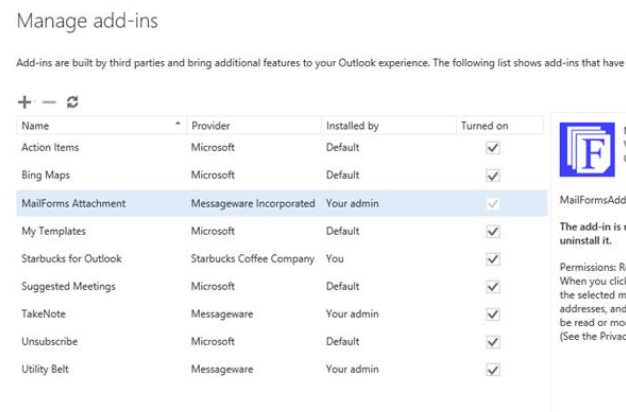
我试图禁用其他外接程序,以查看这些外接程序是否会导致冲突,但不起作用。下面是清单文件:我删除了一些与公司相关的行,并修改了url,但其余的都是相同的。
    <FormSettings>
    <!--
    <Form xsi:type="ItemRead">
      <DesktopSettings>
        <SourceLocation DefaultValue="~remoteAppUrl/AppRead/Home/Home.html"/>
        <RequestedHeight>250</RequestedHeight>
      </DesktopSettings>
    </Form>
    -->
    <Form xsi:type="ItemEdit">
      <DesktopSettings>
        <SourceLocation               DefaultValue="~remoteAppUrl/MailForms/AppCompose/1.0.0.3/Home/Home.html"/>
      </DesktopSettings>
    </Form>
  </FormSettings>
  <Permissions>ReadWriteItem</Permissions>
  <Rule xsi:type="RuleCollection" Mode="Or">
    <Rule xsi:type="ItemIs" ItemType="Message" FormType="Edit" />
    <Rule xsi:type="ItemIs" ItemType="Appointment" FormType="Edit" />
    <!--
    <Rule xsi:type="ItemIs" ItemType="Message" FormType="Read" />
    <Rule xsi:type="ItemIs" ItemType="Appointment" FormType="Read" />
    -->
  </Rule>
  <DisableEntityHighlighting>false</DisableEntityHighlighting>

  <VersionOverrides xmlns="http://schemas.microsoft.com/office/mailappversionoverrides" xsi:type="VersionOverridesV1_0">
    <Requirements>
      <bt:Sets DefaultMinVersion="1.4">
        <bt:Set Name="Mailbox" />
      </bt:Sets>
    </Requirements>
     <DesktopFormFactor>
          <!-- Location of the Functions that UI-less buttons can trigger (ExecuteFunction Actions). -->
          <FunctionFile resid="functionFile" />

          <!-- Message Read -->
          <!--<ExtensionPoint xsi:type="MessageReadCommandSurface">
            --><!-- Use the default tab of the ExtensionPoint or create your own with <CustomTab id="myTab"> --><!--
            <OfficeTab id="TabDefault">
              --><!-- Up to 6 Groups added per Tab --><!--
              <Group id="msgReadGroup">
                <Label resid="groupLabel" />
                --><!-- Launch the add-in : task pane button --><!--
                <Control xsi:type="Button" id="msgReadOpenPaneButton">
                  <Label resid="paneReadButtonLabel" />
                  <Supertip>
                    <Title resid="paneReadSuperTipTitle" />
                    <Description resid="paneReadSuperTipDescription" />
                  </Supertip>
                  <Icon>
                    <bt:Image size="16" resid="icon16" />
                    <bt:Image size="32" resid="icon32" />
                    <bt:Image size="80" resid="icon80" />
                  </Icon>
                  <Action xsi:type="ShowTaskpane">
                    <SourceLocation resid="messageReadTaskPaneUrl" />
                  </Action>
                </Control>
                --><!-- Go to http://aka.ms/ButtonCommands to learn how to add more Controls: ExecuteFunction and Menu --><!--
              </Group>
            </OfficeTab>
          </ExtensionPoint>-->

          <!-- Message Compose -->
          <ExtensionPoint xsi:type="MessageComposeCommandSurface">
            <!-- Use the default tab of the ExtensionPoint or create your own with <CustomTab id="myTab"> -->
            <OfficeTab id="TabDefault">
              <!-- Up to 6 Groups added per Tab -->
              <Group id="msgReadGroup">
                <Label resid="groupLabel" />
                <!-- Launch the add-in : task pane button -->
                <Control xsi:type="Button" id="msgReadOpenPaneButton">
                  <Label resid="paneReadButtonLabel" />
                  <Supertip>
                    <Title resid="paneReadSuperTipTitle" />
                    <Description resid="paneReadSuperTipDescription" />
                  </Supertip>
                  <Icon>
                    <bt:Image size="16" resid="icon16" />
                    <bt:Image size="32" resid="icon32" />
                    <bt:Image size="80" resid="icon80" />
                  </Icon>
                  <Action xsi:type="ShowTaskpane">
                    <SourceLocation resid="messageComposeTaskPaneUrl" />
                  </Action>
                </Control>
                <!-- Go to http://aka.ms/ButtonCommands to learn how to add more Controls: ExecuteFunction and Menu -->
              </Group>
            </OfficeTab>
          </ExtensionPoint>
          <!-- Go to http://aka.ms/ExtensionPointsCommands to learn how to add more Extension Points: MessageRead, AppointmentOrganizer, AppointmentAttendee -->
        </DesktopFormFactor>
      </Host>
    </Hosts>

    <Resources>
      <bt:Images>
        <bt:Image id="icon16" DefaultValue="~remoteAppUrl/MailForms/Images/icon16.png"/>
        <bt:Image id="icon32" DefaultValue="~remoteAppUrl/MailForms/Images/icon32.png"/>
        <bt:Image id="icon80" DefaultValue="~remoteAppUrl/MailForms/Images/icon80.png"/>
      </bt:Images>
      <bt:Urls>
        <bt:Url id="functionFile" DefaultValue=" ~remoteAppUrl/MailForms/Functions/FunctionFile.html"/>
        <!--<bt:Url id="messageReadTaskPaneUrl" DefaultValue="~remoteAppUrl/AppRead/Home/Home.html"/>-->
        <bt:Url id="messageComposeTaskPaneUrl" DefaultValue="~remoteAppUrl/MailForms/AppCompose/1.0.0.3/Home/Home.html"/>
      </bt:Urls>
      <bt:ShortStrings>
        <bt:String id="groupLabel" DefaultValue="My Add-in Group"/>
        <bt:String id="customTabLabel"  DefaultValue="My Add-in Tab"/>
        <bt:String id="paneReadButtonLabel" DefaultValue="Messageware Mail Forms"/>
        <bt:String id="paneReadSuperTipTitle" DefaultValue="Get all properties"/>
      </bt:ShortStrings>
      <bt:LongStrings>
        <bt:String id="paneReadSuperTipDescription" DefaultValue="Opens a pane displaying all available properties. This is an example of a button that opens a task pane."/>
      </bt:LongStrings>
    </Resources>
  </VersionOverrides>
</OfficeApp>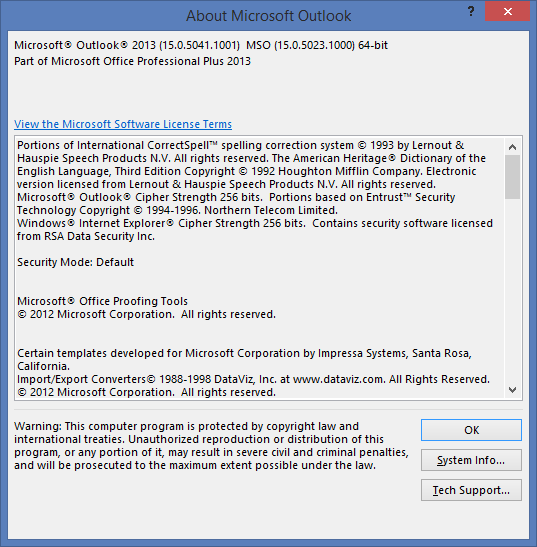
有什么想法吗?
回答 1
Stack Overflow用户
发布于 2018-07-06 13:45:41
好的-那么你的DefaultMinVersion是1.4:
<bt:Sets DefaultMinVersion="1.4">根据需求集文档,需求集1.4是通过kb 3118280 ( 15.0.4859.1000 )添加到Outlook 2013中的。因此,您应该检查正在运行的Outlook 2013版本。任何过时的客户端都会提供需求集1.3或更低,并将图标显示为灰色。
你对Salesforce的评论让我想起了我刚调试过的东西。Outlook的版本本身对于需求集并不重要。重要的是osf.dll和osfshared.dll的版本。很可能这已经过时了。试试最新OSF更新,看看它是否能让Salesforce工作。
在需求集文档上注册的Bug I:https://github.com/OfficeDev/office-js-docs/issues/1461
https://stackoverflow.com/questions/51197685
复制相似问题
腾讯云开发者

Copyright © 2013 - 2026 Tencent Cloud. All Rights Reserved. 腾讯云 版权所有
深圳市腾讯计算机系统有限公司 ICP备案/许可证号:粤B2-20090059  粤公网安备44030502008569号
腾讯云计算(北京)有限责任公司 京ICP证150476号 | 京ICP备11018762号