
我不能在后台播放音乐(Xcode 9,Swift 4)
正如问题所示,我需要我的应用程序在后台播放音乐,就像大多数音乐播放器一样。我试图在网上找到一些东西,但它们不起作用。有人能看看我的问题吗?我认为苹果会自动在后台杀死我的应用程序,因为它可以在后台播放几秒钟(可能是10秒)。
此外,我还想让音乐继续在另一个viewController中播放。现在,每当我回到我的根viewController,音乐总是停止。
这是我的密码。
//
//  MusicLibraryTableViewController.swift
//  WF
//
//  Created by Bo Ni on 7/1/18.
//  Copyright © 2018 Bo Ni. All rights reserved.
//

import UIKit
import AVFoundation

class MusicLibraryTableViewController: UITableViewController, AVAudioPlayerDelegate{

    let songs: [String] = ["After Master"]

    let producer: [String] = ["August Wu/Zoro"]

    let identifier = "musicIdentifier"

    var audioPlayer: AVAudioPlayer?

    var isAudioPlayerPlaying = false

    // MARK: - Table view data source

    override func numberOfSections(in tableView: UITableView) -> Int {
        // #warning Incomplete implementation, return the number of sections
        return 1
    }

    override func tableView(_ tableView: UITableView, cellForRowAt
        indexPath: IndexPath) -> UITableViewCell {

        let cell: MusicTableViewCell = self.tableView.dequeueReusableCell(withIdentifier: identifier) as! MusicTableViewCell
        cell.producerLabel.text = producer[indexPath.row]
        cell.musicNameLabel.text = songs[indexPath.row]
        cell.playButton.setImage(UIImage(named:"Play Button")?.withRenderingMode(.alwaysOriginal), for: UIControlState.normal)

        return cell
    }

    override func tableView(_ tableView: UITableView, heightForRowAt indexPath: IndexPath) -> CGFloat {
        return 64.0
    }

    override func tableView(_ tableView: UITableView, numberOfRowsInSection section: Int) -> Int {
        // #warning Incomplete implementation, return the number of rows
        return songs.count
    }

    override func tableView(_ tableView: UITableView,
        didSelectRowAt indexPath: IndexPath) {

        let cell: MusicTableViewCell = self.tableView.cellForRow(at: indexPath) as! MusicTableViewCell

        let music = NSURL.fileURL(withPath: Bundle.main.path(forResource: songs[indexPath.row], ofType: "mp3")!)
        do {
            try audioPlayer = AVAudioPlayer(contentsOf: music)
        } catch{
            print(error.localizedDescription)
        }

        UIApplication.shared.beginReceivingRemoteControlEvents()

        audioPlayer?.delegate = self
        audioPlayer?.prepareToPlay()

        if isAudioPlayerPlaying == true{
            stopAudio()
            isAudioPlayerPlaying = false
            cell.playButton.setImage(UIImage(named: "Play Button"), for: UIControlState.normal)
        }else{
            prepareAudio()
            playAudio()
            isAudioPlayerPlaying = true
            cell.playButton.setImage(UIImage(named: "Stop Button"), for: UIControlState.normal)
        }
    }

    func prepareAudio(){
        do {
            //keep alive audio at background
            try AVAudioSession.sharedInstance().setCategory(AVAudioSessionCategoryPlayback)
        } catch _ {
        }
        do {
            try AVAudioSession.sharedInstance().setActive(true)
        } catch _ {
        }
    }

    func playAudio(){
        if let player = audioPlayer{
            player.play()
        }
    }

    func stopAudio(){
        if let player = audioPlayer{
            player.stop()
        }
    }
}回答 4
Stack Overflow用户
发布于 2018-07-15 10:24:26
在这个问题上花了几天时间之后,我终于明白了。在swift 4中,我认为我们需要向项目目录下的appDelegate类添加几行代码。如下所示:
import UIKit
import AVFoundation

@UIApplicationMain
class AppDelegate: UIResponder, UIApplicationDelegate {

    var window: UIWindow?

    func application(_ application: UIApplication, didFinishLaunchingWithOptions launchOptions: [UIApplicationLaunchOptionsKey: Any]?) -> Bool {
        // Override point for customization after application launch.
        let session = AVAudioSession.sharedInstance()
        do{
            try session.setActive(true)
            try session.setCategory(AVAudioSessionCategoryPlayback)
        } catch{
            print(error.localizedDescription)
        }
        return true
    }

    func applicationWillResignActive(_ application: UIApplication) {
        // Sent when the application is about to move from active to inactive state. This can occur for certain types of temporary interruptions (such as an incoming phone call or SMS message) or when the user quits the application and it begins the transition to the background state.
        // Use this method to pause ongoing tasks, disable timers, and invalidate graphics rendering callbacks. Games should use this method to pause the game.
    }

    func applicationDidEnterBackground(_ application: UIApplication) {
        // Use this method to release shared resources, save user data, invalidate timers, and store enough application state information to restore your application to its current state in case it is terminated later.
        // If your application supports background execution, this method is called instead of applicationWillTerminate: when the user quits.
    }

    func applicationWillEnterForeground(_ application: UIApplication) {
        // Called as part of the transition from the background to the active state; here you can undo many of the changes made on entering the background.
    }

    func applicationDidBecomeActive(_ application: UIApplication) {
        // Restart any tasks that were paused (or not yet started) while the application was inactive. If the application was previously in the background, optionally refresh the user interface.
    }

    func applicationWillTerminate(_ application: UIApplication) {
        // Called when the application is about to terminate. Save data if appropriate. See also applicationDidEnterBackground:.
    }
}
更新:SWIFT4.2
这对我也有帮助:
- 第一步:
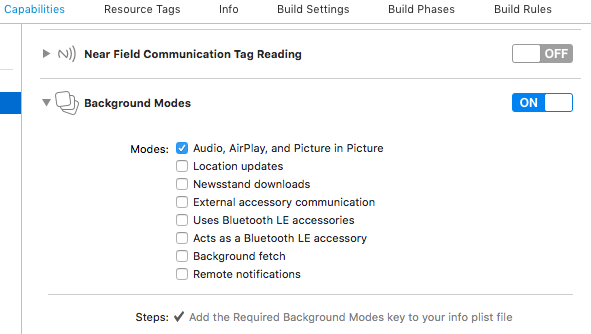
- 第二:
func application(_ application: UIApplication, didFinishLaunchingWithOptions launchOptions: [UIApplication.LaunchOptionsKey: Any]?) -> Bool {
    // Override point for customization after application launch.

    let session = AVAudioSession.sharedInstance()
    do{
        try session.setActive(true)
        try session.setCategory(.playback, mode: .default,  options: .defaultToSpeaker)
    } catch{
        print(error.localizedDescription)
    }
    return true
}Stack Overflow用户
发布于 2018-07-02 06:07:18
打开项目,继续使用Capabilities并启用后台模式,并选择Audio、AirPlay和Picture in Picture。它将在您的Info.plist文件中添加一个键,用于背景中的音频。
Stack Overflow用户
发布于 2021-04-16 16:50:23
对我来说,我的应用程序在我的应用程序中有"NSFileProtectionComplete“的权利。这导致音频在应用程序进入后台后不久停止播放。
在此设置下,如果应用程序导入音频文件(而不是与应用程序捆绑),则需要编写文件,以便它们能够在后台播放,否则默认情况下,文件都将具有"completeFileProtection“,而AVAudioPlayer在进入后台后不久将无法解码您的文件。
try data.write(to: fileURL, options: .completeFileProtectionUnlessOpen)来自:files
https://stackoverflow.com/questions/51128454
复制相似问题
腾讯云开发者

Copyright © 2013 - 2026 Tencent Cloud. All Rights Reserved. 腾讯云 版权所有
深圳市腾讯计算机系统有限公司 ICP备案/许可证号:粤B2-20090059  粤公网安备44030502008569号
腾讯云计算(北京)有限责任公司 京ICP证150476号 | 京ICP备11018762号