
向ListView中添加卡
我正在尝试获取卡片列表,并尝试使用Expanded小部件,但得到了overflow错误
我的代码:
new Expanded(
      child: StreamBuilder(
          stream: Firestore.instance.collection('baby').snapshots(),
          builder: (context, snapshot) {
            if (!snapshot.hasData) return const Text('Loading...');
            return ListView.builder(
                itemCount: snapshot.data.documents.length,
                padding: const EdgeInsets.only(top: 10.0),
                itemExtent: 25.0,
                itemBuilder: (context, index) {
                  DocumentSnapshot ds = snapshot.data.documents[index];
                  return //Text(" ${ds['name']} ${ds['vote']}");
                    Card(
                      child: Expanded(
                        child: Column(
                          mainAxisSize: MainAxisSize.min,
                          children: <Widget>[
                            const ListTile(
                              leading: const Icon(Icons.album),
                              title: const Text('The Enchanted Nightingale'),
                              subtitle: const Text('Music by Julie Gable. Lyrics by Sidney Stein.'),
                            ),
                            new ButtonTheme.bar( // make buttons use the appropriate styles for cards
                              child: ButtonBar(
                                children: <Widget>[
                                   FlatButton(
                                    child: const Text('BUY TICKETS'),
                                    onPressed: () { /* ... */ },
                                  ),
                                   FlatButton(
                                    child: const Text('LISTEN'),
                                    onPressed: () { /* ... */ },
                                  ),
                                ],
                              ),
                            ),
                          ],
                        ),
                    ),
                    );
                });
})),我得到的错误是:Incorrect use of ParentDataWidget.
完全错误:
进行热装..。I/flutter ( 9119):小部件库╞═══════════════════════════════════════════════════════════I/flutter (9119)捕获的══╡异常:引发构建DefaultTextStyle(debugLabel:(englishLike I/flutter ( 9119):body1).merge(blackMountainView body1)、继承: false、color: Color(0xdd000000)、家庭: Roboto、I/颤振( 9119):尺寸: 14.0,重量: 400,基线:字母,装饰: TextDecoration.none,softWrap:包装I/颤振( 9119):方框宽度,溢出:剪辑):I/颤振( 9119):不正确使用ParentDataWidget。I/flutter ( 9119):扩展的小部件必须直接放置在Flex小部件中。I/颤振( 9119):扩展(没有深度,弯曲: 1,脏)有一个Flex祖先,但它们之间还有其他小部件: I/flutter ( 9119):-InkFeatures GlobalKey#93e52墨水呈现器I/颤振( 9119):- CustomPaint I/颤振( 9119):-PhysicalShape(剪贴器: ShapeBorderClipper,高程: 1.0,颜色:颜色(0 0xffffffff),shadowColor: I/颤振( 9119):颜色(0xff000000)i/颤振( 9119):-填充(填充: EdgeInsets.all(4.0)) i/颤振( 9119):-语义(容器: true,属性: SemanticsProperties,标签: null,值: null,提示: null) I/颤振( 9119):-修正边界-<0>I/颤振( 9119):- KeepAlive(keepAlive: false) I/颤振( 9119):-SliverFixedExtentList(委托:SliverChildBuilderDelegate#b334e(估计子计数:3)I/颤振( 9119):-SliverPadding(填充: EdgeInsets(0.0,10.0,0.0,0.0)) I/flutter ( 9119):- Viewport(axisDirection: down,锚: 0.0,)偏移:ScrollPositionWithSingleContext#bebad(偏移量:i/颤振( 9119):0.0,范围:0.0.0.0,视口: 380.0,ScrollableState,AlwaysScrollableScrollPhysics -> I/flutter ( 9119):ClampingScrollPhysics,IdleScrollActivity#7b3a8,ScrollDirection.idle) I/flutter ( 9119):-IgnorePoint-GlobalKey#4c7f9 I/flutter ( 9119):语义(容器: false,属性: SemanticsProperties,标签: null,值: null,提示: null) i/颤振侦听器( 9119):-(侦听器:向下,行为:不透明的I/颤振( 9119):- _GestureSemantics I/颤振( 9119):I/颤振( 9119):违规扩展的母公司的所有权链为:I/颤振( 9119):DefaultTextStyle←AnimatedDefaultTextStyle←_InkFeatures GlobalKey#93e52墨水渲染器←I/颤振( 9119):NotificationListener←CustomPaint←_ShapeBorderPaint←PhysicalShape I/颤振( 9119):←_MaterialInterior←Material←⋯I/颤振(9119)═══════════════════════════════════════════════════════════════════════I/颤振( 9119):引发另一个异常:不正确地使用ParentDataWidget。I/chatty ( 9119):uid=10096(com.example.flutterapp) Thread-3相同的3行I/flutter ( 9119):引发另一个异常:不正确地使用ParentDataWidget。
更新
这是我得到的输出屏幕:
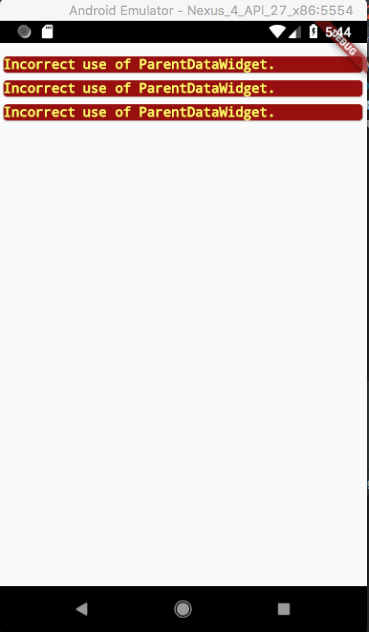
如果删除Expanded,输出将变成如下所示:
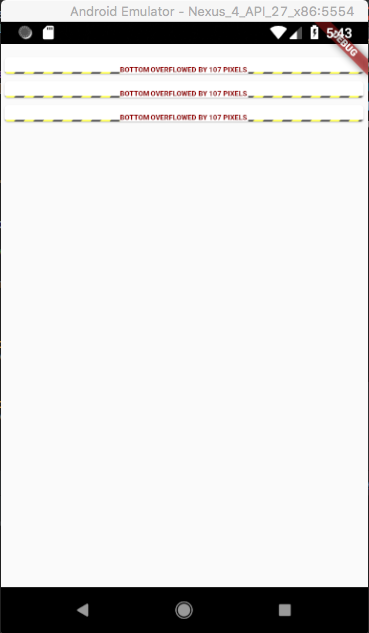
回答 2
Stack Overflow用户
发布于 2018-06-24 20:46:00
我明白了,整个问题在于通过删除itemExtent: 25.0,在ListView.builder上使用它,默认情况下一切都可以扩展,运行也很顺利。
在搜索解决方案时,我遇到了这、这和这,它们帮助我用更干净的代码重建应用程序,下面是谁感兴趣的内容:
main.dart
import 'package:flutter/material.dart';
import 'package:cloud_firestore/cloud_firestore.dart';
import 'BabyModel.dart';
import 'BabyCard.dart';

void main() => runApp(MyApp(
  textInput: Text("Text Widget"),
));

class MyApp extends StatefulWidget {
  final Widget textInput;
  MyApp({this.textInput});

  @override
  State<StatefulWidget> createState() => MyAppState();
}

class MyAppState extends State<MyApp> {
  bool checkBoxValue = false;

  @override
  Widget build(BuildContext ctxt) {
    return StreamBuilder(
      stream: Firestore.instance.collection('baby').snapshots(),
      builder: (_, AsyncSnapshot<QuerySnapshot> snapshot) {
        var documents = snapshot.data?.documents ?? [];
        var baby =
        documents.map((snapshot) => BabyData.from(snapshot)).toList();
        return BabyPage(baby);
      },
    );
  }
}

class BabyPage extends StatefulWidget {
  final List<BabyData> allBaby;

  BabyPage(this.allBaby);

  @override
  State<StatefulWidget> createState() {
    return BabyPageState();
  }
}


class BabyPageState extends State<BabyPage> {
  @override
  Widget build(BuildContext context) {

  //  var filteredBaby = widget.allFish.where((BabyData data) {
  //    data.name = 'Dana';
  //  }).toList();

    return MaterialApp(
        home: SafeArea(
        child: Scaffold(
        body: Container(
        child: ListView.builder(
            itemCount: widget.allBaby.length,
            padding: const EdgeInsets.only(top: 10.0),
            itemBuilder: (context, index) {
              return BabyCard(widget.allBaby[index]);
            })
      ),
    )));
  }
}
BabyModel.dart
import 'package:cloud_firestore/cloud_firestore.dart';

class BabyData {
  final DocumentReference reference;
  String name;
  int vote;

  BabyData.data(this.reference,
      [this.name,
        this.vote]) {
    // Set these rather than using the default value because Firebase returns
    // null if the value is not specified.
    this.name ??= 'Frank';
    this.vote ??= 7;
  }

  factory BabyData.from(DocumentSnapshot document) => BabyData.data(
      document.reference,
      document.data['name'],
      document.data['vote']);

  void save() {
    reference.setData(toMap());
  }

  Map<String, dynamic> toMap() {
    return {
      'name': name,
      'vote': vote,
    };
  }
}
BabyCard.dart
import 'package:flutter/material.dart';
import 'BabyModel.dart';

class BabyCard extends StatefulWidget {
  final BabyData baby;

  BabyCard(this.baby);

  @override
  State<StatefulWidget> createState() {
    return BabyCardState(baby);
  }
}

class BabyCardState extends State<BabyCard> {
  BabyData baby;
  String renderUrl;

  BabyCardState(this.baby);

  Widget get babyCard {
    return
      new Card(
        child: Column(
          mainAxisSize: MainAxisSize.min,
          children: <Widget>[
            ListTile(
              leading: const Icon(Icons.album),
              title: Text('The ${baby.name} is having:'),
              subtitle: Text('${baby.vote} Votes.'),
            ),
            new ButtonTheme.bar( // make buttons use the appropriate styles for cards
              child: new ButtonBar(
                children: <Widget>[
                  new FlatButton(
                    child: const Text('Thumb up'),
                    onPressed: () { /* ... */ },
                  ),
                  new FlatButton(
                    child: const Text('Thumb down'),
                    onPressed: () { /* ... */ },
                  )]))]));
  }

  @override
  Widget build(BuildContext context) {
    return new Container(
          child:  babyCard,
        );
  }
}
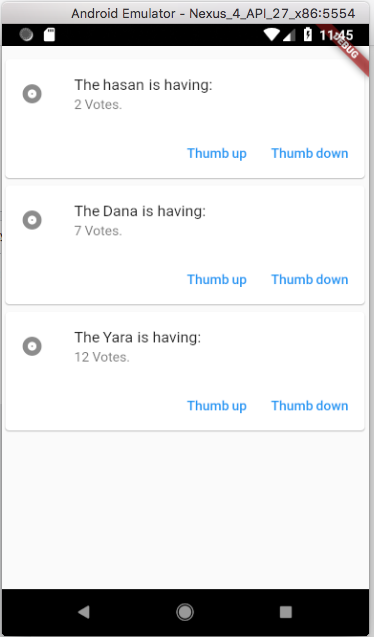
产出如下:
Stack Overflow用户
发布于 2018-06-23 20:13:43
你能把手机屏幕的打印放在你的问题上吗?
我把你的代码和没有展开的小部件和它的完美,你想要改变什么?

https://stackoverflow.com/questions/51002111
复制相似问题
腾讯云开发者

Copyright © 2013 - 2026 Tencent Cloud. All Rights Reserved. 腾讯云 版权所有
深圳市腾讯计算机系统有限公司 ICP备案/许可证号:粤B2-20090059  粤公网安备44030502008569号
腾讯云计算(北京)有限责任公司 京ICP证150476号 | 京ICP备11018762号