
为什么".vue“单个文件组件更倾向于在TypeScript中分离文件?
根据文档,我应该在.vue文件中编写vue组件。我喜欢在vscode中使用TypeScript,因为它具有出色的导航、自动完成、自动导入和智能感知功能。类型安全也是优先考虑。
当我使用.vue文件时,我在外部导出中失去了intellisense和tyoe安全。
我用katashins vue-模板加载程序把所有的东西都拿回来。
我为什么要在.vue中使用TypeScript文件?
这里是一个回购工具,我在那里使用了katashin的出色的加载器。
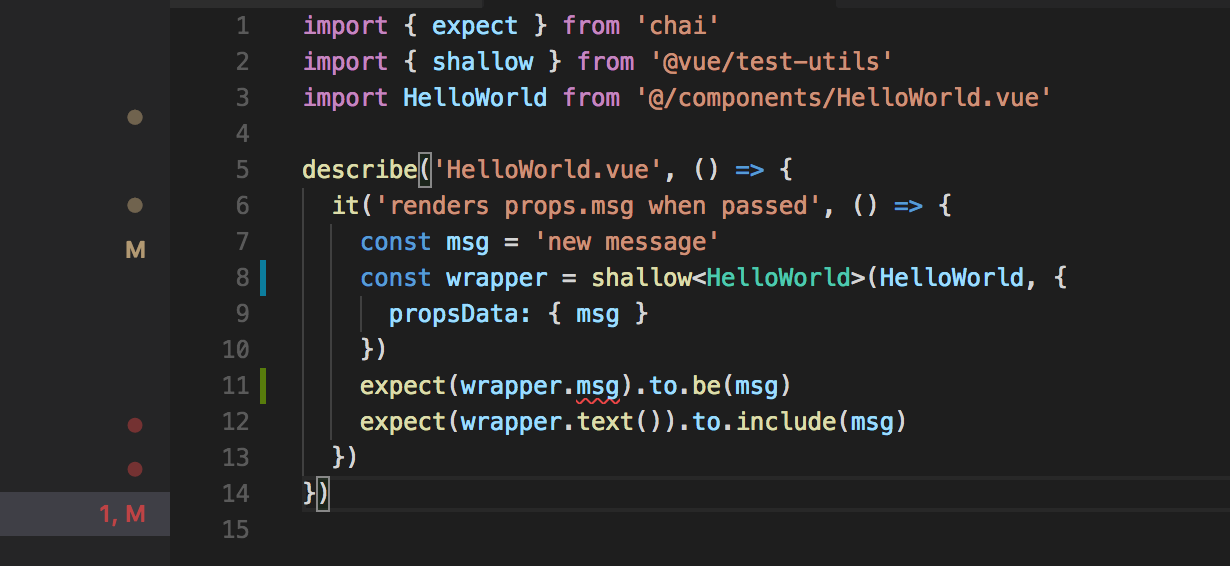
这里编辑的是使用vetur 0.11.0、vscode 1.21.0和vue cli快速显示HelloWorld.spec.ts文件的样子。
我们可以看到第11行的问题,它可以使用any关键字来解决,但是它会松散类型安全性。
回答 1
Stack Overflow用户
发布于 2018-03-09 03:45:42
在VSCode中,安装扩展/插件以编辑.vue文件。
例如,git clone https://github.com/Microsoft/TypeScript-Vue-Starter项目并转到:
- 菜单文件->打开文件夹..。
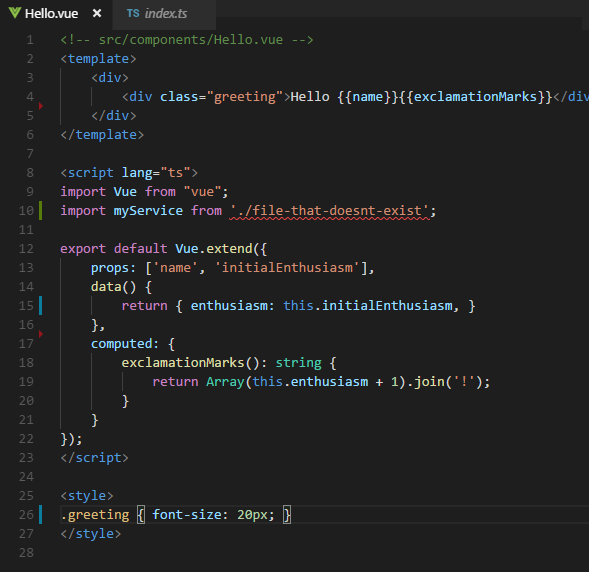
.vue文件具有完美的<script lang="ts">标记
如下面的截图所示:
作为项目所需的依赖项,请再次检查https://github.com/Microsoft/TypeScript-Vue-Starter。作为参考,下面是它到现在为止的依赖关系:
  "dependencies": {
    "vue": "^2.5.2",
    "vue-class-component": "^6.0.0",
    "vue-property-decorator": "^6.0.0",
    "vue-router": "^3.0.1"
  },
  "devDependencies": {
    "css-loader": "^0.28.1",
    "ts-loader": "^2.0.3",
    "typescript": "^2.3.2",
    "vue-loader": "^12.0.3",
    "vue-template-compiler": "^2.5.2",
    "webpack": "^2.5.0"
}和一个webpack.config.js摘录(处理.vue文件的点):
module.exports = {
  // ...
  module: {
    rules: [
      {
        test: /\.vue$/,
        loader: 'vue-loader',
        options: {
          loaders: {
            // Since sass-loader (weirdly) has SCSS as its default parse mode, we map
            // the "scss" and "sass" values for the lang attribute to the right configs here.
            // other preprocessors should work out of the box, no loader config like this necessary.
            'scss': 'vue-style-loader!css-loader!sass-loader',
            'sass': 'vue-style-loader!css-loader!sass-loader?indentedSyntax',
          }
          // other vue-loader options go here
        }
},https://stackoverflow.com/questions/49176735
复制相似问题
腾讯云开发者

Copyright © 2013 - 2026 Tencent Cloud. All Rights Reserved. 腾讯云 版权所有
深圳市腾讯计算机系统有限公司 ICP备案/许可证号:粤B2-20090059  粤公网安备44030502008569号
腾讯云计算(北京)有限责任公司 京ICP证150476号 | 京ICP备11018762号