
JavaFx - String和FlowPane (行?)在tableView?
我目前正在尝试实现以下内容:
- 一个以TableView作为数据集的ObservableList,有两个列,每个列都包含String(播放机的名称)。这部分很容易。
- 单击播放机(名称)后,应该在所选播放机下面注入自定义FlowPane。如果单击了另一个播放器,则该流窗格应消失并注入到当前单击的播放机下面。
下面的代码实现了TableView (减去鼠标侦听器部分)。请帮助我让FlowPane跨越整个行。我猜我需要一个RowFactory,但不知道如何使它达到我的目的:)
而且,很明显,我的两列现在都显示相同的数据。是否有办法告诉一列使用一半的数据集,另一列使用另一半的数据集?我显然不想让我的数据显示两次。
public class main extends Application
{
    public static void main(String[] args)
    {
        launch(args);
    }

    @Override
    public void start(Stage stage) throws Exception
    {
        try
        {

            FlowPane f = new FlowPane();
            Scene scene = new Scene(f, 300, 200);

            Player p1 = new Player("player 1 ");
            Player p2 = new Player("player 2 ");
            Player p3 = new Player("player 3 ");

            ArrayList<Object> players = new ArrayList<>();
            players.add(p1);
            players.add(p2);
            players.add(p3);

            ObservableList<Object> observableList = FXCollections.observableArrayList(players);
            TableView<Object> table = createTableView(observableList, 300, 200);

            f.getChildren().add(table);
            injectFlowPane(table);

            stage.setScene(scene);
            stage.show();
        }
        catch (Exception e)
        {
            e.printStackTrace();
        }

    }

    public TableView<Object> createTableView(ObservableList<Object> items, double width, double height)
    {
        TableView<Object> table = new TableView<>();

        table.setItems(items);

        table.getColumns().add(createTableColumn(width / 2));
        table.getColumns().add(createTableColumn(width / 2));


        table.setMinSize(width, height);
        table.setPrefSize(width, height);
        table.setMaxSize(width, height);
        return table;
    }

    private TableColumn<Object, Object> createTableColumn(double width)
    {
        TableColumn<Object, Object> tableColumn = new TableColumn<>();
        tableColumn.setCellFactory(
                new Callback<TableColumn<Object, Object>, TableCell<Object, Object>>() {
                    @Override
                    public TableCell<Object, Object> call(TableColumn<Object, Object> arg0)
                    {
                        return new PlayerCell();
                    }
                });

        tableColumn.setCellValueFactory(cellDataFeatures -> {

            Object item = cellDataFeatures.getValue();
            return new SimpleObjectProperty<>(item);

        });

        tableColumn.setMinWidth(width);

        return tableColumn;
    }

    private void injectFlowPane(TableView<Object> table)
    {
        FlowPane f = new FlowPane();
        f.setMinSize(50, 50);
        f.setBackground(new Background(new BackgroundFill(Color.DARKGREEN, CornerRadii.EMPTY, Insets.EMPTY)));
        table.getItems().add(1, f);
    }

}

public class PlayerCell extends TableCell<Object, Object>
{
    @Override
    protected void updateItem(Object item, boolean empty)
    {
        super.updateItem(item, false);

        //      if (empty)

        if (item != null)
        {

            if (item instanceof Player)
            {
                setText(((Player) item).getName());
                setGraphic(null);
            }
            else if (item instanceof FlowPane)
            {
                setGraphic((FlowPane) item);
            }
            else
            {
                setText("N/A");
                setGraphic(null);
            }
        }
        else
        {
            setText(null);
            setGraphic(null);
        }

    }
}


public class Player
{
    private String name;

    public Player(String name)
    {
        this.name = name;
    }

    public String getName()
    {
        return name;
    }

}
编辑:
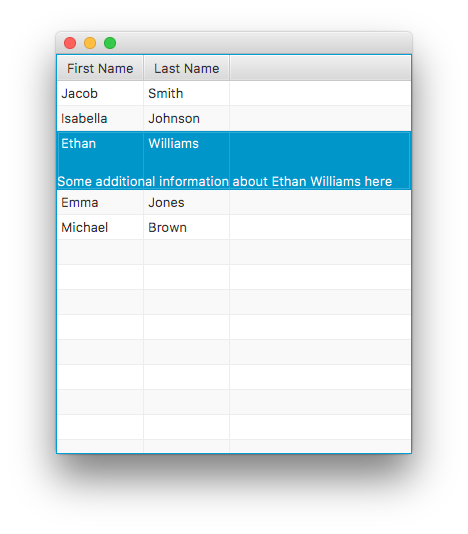
我现在已经实现了James_D的ExpandingTableRow,它可以很好地显示所选TableRow下面的FlowPane。我还设法更改了我的数据结构,使每一列现在显示不同的参与者,而不是在每一列中显示相同的参与者。
但是,创建的FlowPane实际上应该取决于在行中单击的实际播放器(单元格)。在詹姆斯的例子中:如果选择了FlowPane或LastName (即使是针对同一行),则会创建一个不同的LastName。FlowPane应该以相同的方式显示--在选定的行下面--但是它是一个不同的新FlowPane,取决于单击了FirstName还是单击了LastName。我怎么能做到这一点?
我看过使用:
table.getSelectionModel().setCellSelectionEnabled(true);但这实际上似乎使James_d的解决方案失效了。
回答 1
Stack Overflow用户
发布于 2018-03-08 14:25:38
此解决方案仅适用于Java 9及更高版本。
行的显示由TableRow管理,该行的实际布局由其皮肤( TableRowSkin)执行。因此,要管理这一点,您需要安装自定义外观的TableRow子类。
行实现非常简单:在本例中,我为选中该行时显示的“附加内容”添加了一个属性。它还重写createDefaultSkin()方法以指定自定义皮肤实现。
import javafx.beans.property.ObjectProperty;
import javafx.beans.property.SimpleObjectProperty;
import javafx.scene.Node;
import javafx.scene.control.Skin;
import javafx.scene.control.TableRow;

public class ExpandingTableRow<T> extends TableRow<T> {

    private final ObjectProperty<Node> selectedRowContent = new SimpleObjectProperty<>();

    public final ObjectProperty<Node> selectedRowContentProperty() {
        return this.selectedRowContent;
    }


    public final Node getSelectedRowContent() {
        return this.selectedRowContentProperty().get();
    }


    public final void setSelectedRowContent(final Node selectedRowContent) {
        this.selectedRowContentProperty().set(selectedRowContent);
    }

    public ExpandingTableRow(Node selectedRowContent) {
        super();
        setSelectedRowContent(selectedRowContent);
    }

    public ExpandingTableRow() {
        this(null);
    }

    @Override
    protected Skin<?> createDefaultSkin() {
        return new ExpandingTableRowSkin<T>(this);
    }

}皮肤实现必须完成布局工作。如果需要,它需要覆盖计算高度的方法,计算额外内容的高度;如果需要,它需要重写layoutChildren()方法来定位附加内容。最后,它必须管理附加内容,如果行的选定状态发生变化(或者附加内容本身发生了更改),则必须添加或删除附加内容。
import javafx.scene.control.skin.TableRowSkin;

public class ExpandingTableRowSkin<T> extends TableRowSkin<T> {

    private ExpandingTableRow<T> row;

    public ExpandingTableRowSkin(ExpandingTableRow<T> row) {
        super(row);
        this.row = row;

        row.selectedRowContentProperty().addListener((obs, oldContent, newContent) -> {
            if (oldContent != null) {
                getChildren().remove(oldContent);
            }
            if (newContent != null && row.isSelected()) {
                getChildren().add(newContent);
            }
            if (row.getTableView() != null) {
                row.getTableView().requestLayout();
            }
        });
        row.selectedProperty().addListener((obs, wasSelected, isNowSelected) -> {
            if (isNowSelected && row.getSelectedRowContent() != null
                    && !getChildren().contains(row.getSelectedRowContent())) {
                getChildren().add(row.getSelectedRowContent());
            } else {
                getChildren().remove(row.getSelectedRowContent());
            }
        });
    }

    @Override
    protected double computeMaxHeight(double width, double topInset, double rightInset, double bottomInset,
            double leftInset) {
        if (row.isSelected() && row.getSelectedRowContent() != null) {
            return super.computeMaxHeight(width, topInset, rightInset, bottomInset, leftInset)
                    + row.getSelectedRowContent().maxHeight(width);
        }
        return super.computeMaxHeight(width, topInset, rightInset, bottomInset, leftInset);
    }

    @Override
    protected double computeMinHeight(double width, double topInset, double rightInset, double bottomInset,
            double leftInset) {
        if (row.isSelected() && row.getSelectedRowContent() != null) {
            return super.computeMinHeight(width, topInset, rightInset, bottomInset, leftInset)
                    + row.getSelectedRowContent().minHeight(width);
        }
        return super.computeMinHeight(width, topInset, rightInset, bottomInset, leftInset);
    }

    @Override
    protected double computePrefHeight(double width, double topInset, double rightInset, double bottomInset,
            double leftInset) {
        if (row.isSelected() && row.getSelectedRowContent() != null) {
            return super.computePrefHeight(width, topInset, rightInset, bottomInset, leftInset)
                    + row.getSelectedRowContent().prefHeight(width);
        }
        return super.computePrefHeight(width, topInset, rightInset, bottomInset, leftInset);
    }

    @Override
    protected void layoutChildren(double x, double y, double w, double h) {
        if (row.isSelected()) {
            double rowHeight = super.computePrefHeight(w, snappedTopInset(), snappedRightInset(), snappedBottomInset(),
                    snappedLeftInset());
            super.layoutChildren(x, y, w, rowHeight);
            row.getSelectedRowContent().resizeRelocate(x, y + rowHeight, w, h - rowHeight);
        } else {
            super.layoutChildren(x, y, w, h);
        }
    }

}
最后,测试(使用Oracle常用的示例或其版本):
import java.util.function.Function;

import javafx.application.Application;
import javafx.beans.property.SimpleStringProperty;
import javafx.beans.property.StringProperty;
import javafx.beans.value.ObservableValue;
import javafx.scene.Scene;
import javafx.scene.control.Label;
import javafx.scene.control.TableColumn;
import javafx.scene.control.TableRow;
import javafx.scene.control.TableView;
import javafx.scene.layout.FlowPane;
import javafx.stage.Stage;

public class ExpandingTableRowTest extends Application {

    @Override
    public void start(Stage primaryStage) {
        TableView<Person> table = new TableView<>();
        table.getColumns().add(column("First Name", Person::firstNameProperty));
        table.getColumns().add(column("Last Name", Person::lastNameProperty));

        table.setRowFactory(tv -> {
            Label label = new Label();
            FlowPane flowPane = new FlowPane(label);
            TableRow<Person> row = new ExpandingTableRow<>(flowPane) {
                @Override
                protected void updateItem(Person person, boolean empty) {
                    super.updateItem(person, empty);
                    if (empty) {
                        label.setText(null);
                    } else {
                        label.setText(String.format("Some additional information about %s %s here",
                                person.getFirstName(), person.getLastName()));
                    }
                }
            };
            return row;
        });

        table.getItems().addAll(
                new Person("Jacob", "Smith"),
                new Person("Isabella", "Johnson"),
                new Person("Ethan", "Williams"),
                new Person("Emma", "Jones"),
                new Person("Michael", "Brown")
        );

        Scene scene = new Scene(table);
        primaryStage.setScene(scene);
        primaryStage.show();
    }

    private static <S, T> TableColumn<S, T> column(String title, Function<S, ObservableValue<T>> property) {
        TableColumn<S, T> col = new TableColumn<>(title);
        col.setCellValueFactory(cellData -> property.apply(cellData.getValue()));
        return col;
    }

    public static class Person {
        private final StringProperty firstName = new SimpleStringProperty();
        private final StringProperty lastName = new SimpleStringProperty();

        public Person(String firstName, String lastName) {
            setFirstName(firstName);
            setLastName(lastName);
        }

        public final StringProperty firstNameProperty() {
            return this.firstName;
        }

        public final String getFirstName() {
            return this.firstNameProperty().get();
        }

        public final void setFirstName(final String firstName) {
            this.firstNameProperty().set(firstName);
        }

        public final StringProperty lastNameProperty() {
            return this.lastName;
        }

        public final String getLastName() {
            return this.lastNameProperty().get();
        }

        public final void setLastName(final String lastName) {
            this.lastNameProperty().set(lastName);
        }

    }

    public static void main(String[] args) {
        launch(args);
    }
}
正如您所看到的,可能需要对样式和大小进行一些改进才能使生产做好准备,但这显示了将起作用的方法。
https://stackoverflow.com/questions/49158338
复制相似问题
腾讯云开发者

Copyright © 2013 - 2026 Tencent Cloud. All Rights Reserved. 腾讯云 版权所有
深圳市腾讯计算机系统有限公司 ICP备案/许可证号:粤B2-20090059  粤公网安备44030502008569号
腾讯云计算(北京)有限责任公司 京ICP证150476号 | 京ICP备11018762号