
将文件上载到Azure存储文件共享的脚本
情境:我刚刚创建了一个Azure存储文件共享,我想出了如何通过脚本(C#)将文件上传到Azure BLOB存储。
问题:我想通过脚本上传文件到我的Azure存储文件共享(不是BLOB)。我已经安装了Azure,但问题是我必须先登录(az登录)才能采取任何行动。
有没有任何方法可以上传文件从一个文件夹的基础上,我的电脑,到Azure存储文件共享(testuser.file.core.windows.net\test),而不挂载它?
非常感谢。
回答 2
Stack Overflow用户
发布于 2018-03-01 17:24:58
are multiple就是为了实现这一点。如果您唯一的问题是登录部分,那么您可以使用服务主体和证书自动登录。
示例
az login --service-principal -u http://azure-cli-2016-08-05-14-31-15 -p ~/mycertfile.pem --tenant contoso.onmicrosoft.com
您可以通过使用
az login -h
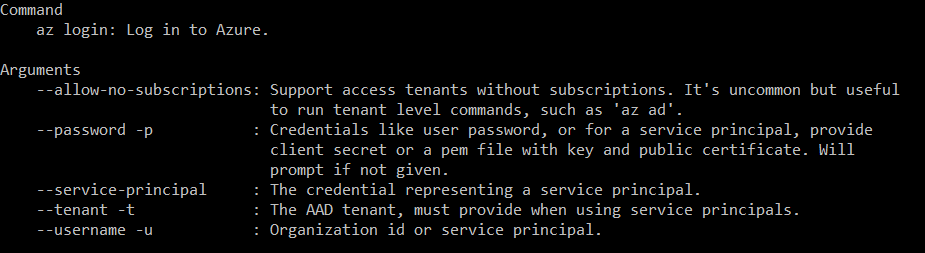
希望这能有所帮助。
Stack Overflow用户
发布于 2018-03-07 07:27:51
有没有任何方法可以上传文件从一个文件夹的基础上,我的电脑,到Azure存储文件共享(testuser.file.core.windows.net\test),而不挂载它?
是的,我们也可以使用C#代码将文件上传到azure文件存储中。请尝试使用以下代码。
 CloudStorageAccount storageAccount = CloudStorageAccount.Parse("storage connection string");
// Create a CloudFileClient object for credentialed access to File storage.
 CloudFileClient fileClient = storageAccount.CreateCloudFileClient();

 // Get a reference to the file share we created previously.
 CloudFileShare share = fileClient.GetShareReference("test");

 share.CreateIfNotExists();

 CloudFile cloudFile = share.GetRootDirectoryReference().GetFileReference("fileName");

 Stream fileStream = File.OpenRead(@"localpath");

cloudFile.UploadFromStream(fileStream);https://stackoverflow.com/questions/49052554
复制相似问题
腾讯云开发者

Copyright © 2013 - 2026 Tencent Cloud. All Rights Reserved. 腾讯云 版权所有
深圳市腾讯计算机系统有限公司 ICP备案/许可证号:粤B2-20090059  粤公网安备44030502008569号
腾讯云计算(北京)有限责任公司 京ICP证150476号 | 京ICP备11018762号