
DirectX 11渲染到纹理
DirectX 11渲染到纹理
提问于 2018-02-25 02:14:34
基本上,我正在尝试将场景呈现为纹理,如本ogl教程这里中所示,但在DirectX 11中,我遇到了一些问题:
- 当我启动IDK程序时,绝对不会呈现任何内容。
- 纹理显示“正确”的唯一东西是清晰的颜色。

- 我已经检查了RenderDoc中的可执行文件,在捕获的帧中,后缓冲区绘制了四角体,并且它上的纹理正确地显示了场景!
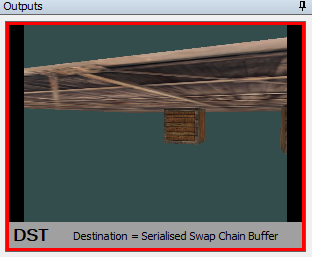
源代码峰值:
                D3D11_TEXTURE2D_DESC texDesc;
            ZeroMemory(&texDesc, sizeof(D3D11_TEXTURE2D_DESC));

            texDesc.Width = Data.Width;
            texDesc.Height = Data.Height;
            texDesc.Format = R32G32B32A32_FLOAT;
            texDesc.Usage = D3D11_USAGE_DEFAULT;
            texDesc.SampleDesc.Count = 1;
            texDesc.SampleDesc.Quality = 0;
            texDesc.CPUAccessFlags = 0;
            texDesc.ArraySize = 1;
            texDesc.BindFlags = D3D11_BIND_SHADER_RESOURCE | D3D11_BIND_RENDER_TARGET;
            texDesc.MiscFlags = 0;
            texDesc.MipLevels = 1;

            if (Data.Img_Data_Buf == NULL)
            {
                if (FAILED(DX11Context::GetDevice()->CreateTexture2D(&texDesc, NULL, &result->tex2D)))
                {
                    Log.Error("[DirectX] Texture2D Creation Failed for Null-ed Texture2D!\n");
                    return;
                }
                D3D11_SHADER_RESOURCE_VIEW_DESC srvDesc;
                srvDesc.Format = texDesc.Format;
                srvDesc.ViewDimension = D3D11_SRV_DIMENSION_TEXTURE2D;
                srvDesc.Texture2D.MostDetailedMip = 0;
                srvDesc.Texture2D.MipLevels = 1;

                DX11Context::GetDevice()->CreateShaderResourceView(result->tex2D, &srvDesc, &result->resourceView);

                return;
            }
            //depth stencil texture
            D3D11_TEXTURE2D_DESC texDesc;
            {
                texDesc.Width = size.x;
                texDesc.Height = size.y;
                texDesc.MipLevels = 1;
                texDesc.ArraySize = 1;
                texDesc.Format = DXGI_FORMAT_D24_UNORM_S8_UINT;
                texDesc.SampleDesc.Count = 1;
                texDesc.SampleDesc.Quality = 0;
                texDesc.Usage = D3D11_USAGE_DEFAULT;
                texDesc.BindFlags = D3D11_BIND_DEPTH_STENCIL;
                texDesc.CPUAccessFlags = 0;
                texDesc.MiscFlags = 0;
            }
            if (FAILED(API::DirectX::DX11Context::GetDevice()->CreateTexture2D(&texDesc, nullptr, &depthstenciltex)))
            {
                Log.Error("[DX11RenderTarget] Failed to create DepthStencilTexture for render-target!\n");
                //Return or the next call will fail too
                return;
            }
            if (FAILED(API::DirectX::DX11Context::GetDevice()->CreateDepthStencilView(depthstenciltex, nullptr, &depthstencilview)))
            {
                Log.Error("[DX11RenderTarget] Failed to create DepthStencilView for render-target!\n");
            }

            //render target
            D3D11_RENDER_TARGET_VIEW_DESC renderTargetViewDesc;
            ZeroMemory(&renderTargetViewDesc, sizeof(D3D11_RENDER_TARGET_VIEW_DESC));
            renderTargetViewDesc.Format = texDesc.Format;

            renderTargetViewDesc.ViewDimension = D3D11_RTV_DIMENSION_TEXTURE2D;
            renderTargetViewDesc.Texture2D.MipSlice = 0;

            ID3D11RenderTargetView* rtv;

            if (FAILED(API::DirectX::DX11Context::GetDevice()->CreateRenderTargetView(texture->tex2D, &renderTargetViewDesc, &rtv)))
            {
                Log.Error("[DX11RenderTarget] Failed to create render-target-view (RTV)!\n");
                return;
            }

            //binding
            Context->OMSetRenderTargets(1, &rtv, rt->depthstenciltex);
着色器:
    std::string VertexShader = R"(struct VertexInputType
{
    float4 position : POSITION;
    float2 tex : TEXCOORD;
};

struct PixelInputType
{
    float4 position : SV_POSITION;
    float2 tex : TEXCOORD;
};

cbuffer NE_Camera : register(b0)
{
    matrix Model;
    matrix View;
    matrix Projection;
};

PixelInputType main(VertexInputType input)
{
    PixelInputType output;

    // Calculate the position of the vertex against the world, view, and projection matrices.
    output.position = mul(Model, input.position);
    output.position = mul(View, output.position);
    output.position = mul(Projection, output.position);

    // Store the input texture for the pixel shader to use.
    output.tex = input.tex;
    return output;
})";

    std::string PixelShader = R"(
struct PixelInputType
{
    float4 position : SV_POSITION;
    float2 tex : TEXCOORD;
};

Texture2D NE_Tex_Diffuse : register(t0);
SamplerState NE_Tex_Diffuse_Sampler : register(s0);

float4 main(PixelInputType input) : SV_TARGET
{
    return NE_Tex_Diffuse.Sample(NE_Tex_Diffuse_Sampler, input.tex);
}
)";
    std::string ScreenVertexShader = R"(struct VertexInputType
{
    float2 position : POSITION;
    float2 tex : TEXCOORD;
};

struct PixelInputType
{
    float4 position : SV_POSITION;
    float2 tex : TEXCOORD;
};


PixelInputType main(VertexInputType input)
{
    PixelInputType output;

    // CalcSulate the position of the vertex against the world, view, and projection matrices.
    output.position = float4(input.position.x,input.position.y,0.0f,1.0f);
    // Store the input texture for the pixel shader to use.
    output.tex = input.tex;
    return output;
})";

    std::string ScreenPixelShader = R"(
struct PixelInputType
{
    float4 position : SV_POSITION;
    float2 tex : TEXCOORD;
};

Texture2D ScreenTexture : register(t0);
SamplerState ScreenTexture_Sampler : register(s0);

float4 main(PixelInputType input) : SV_TARGET
{
    return float4(ScreenTexture.Sample(ScreenTexture_Sampler, input.tex).rgb, 1.0f);
}
)";我还捕获了一个带有visual图形调试器的框架,并注意到渲染到纹理绘制调用有PS着色器与"stage不运行,没有输出“。
注意:我知道场景应该在DirectX中翻转。
回答 1
Stack Overflow用户
回答已采纳
发布于 2018-03-06 00:57:43
我发现了导致这个问题的错误,我没有在渲染时清除深度模板视图,我想知道为什么清除RenderTarget输出所必需的DSV。
页面原文内容由Stack Overflow提供。腾讯云小微IT领域专用引擎提供翻译支持
原文链接:
https://stackoverflow.com/questions/48969606
复制相关文章
相似问题
腾讯云开发者

Copyright © 2013 - 2026 Tencent Cloud. All Rights Reserved. 腾讯云 版权所有
深圳市腾讯计算机系统有限公司 ICP备案/许可证号:粤B2-20090059  粤公网安备44030502008569号
腾讯云计算(北京)有限责任公司 京ICP证150476号 | 京ICP备11018762号