
未识别JS服务器,请继续构建
环境
Windows 10
国家预防机制5.5.1
反应-本机-cli 2.0.1
反应-原生0.50.3
Genymotion Google Nexus 7- 6.0.0 API 23
安卓设备:
Sdk版本: 26
buildToolsVersion '26.0.2‘
TargetsdkVersion: 26
编译"com.android.support:appcompat-v7:26.0.2“
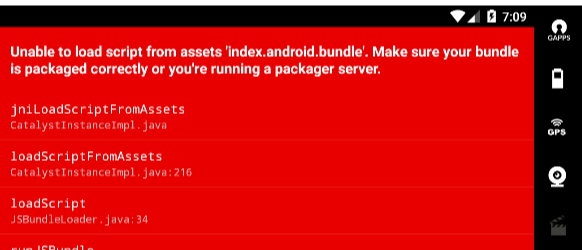
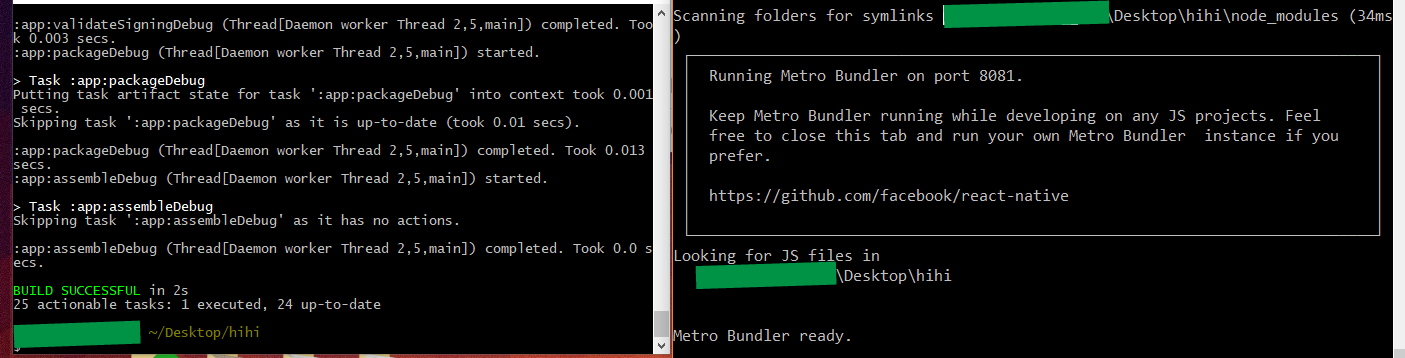
我已经运行了npm启动-重置-缓存以及反应-本机启动-复位-缓存,但我一直让JS服务器不被识别,继续构建。这样可以防止包程序在我的模拟器上运行之前捆绑资产。
我在这篇文章中遵循了解决方案1:
https://github.com/facebook/react-native/issues/9136#issuecomment-306486102
就像这个一样:
我开始这个项目的反应-本机init应用。已经无法用这个错误来构建它了。检查在这里和其他网站提到的使用npm缓存清洁和反应-本机启动-重置-缓存,这似乎没有帮助我继续得到同样的错误。我曾经让它运行得很顺利,但我改变了一个npm方案,我想我又把它弄坏了。任何帮助都将不胜感激。我还更新了gradle版本,并将其同步到项目中。
以下是我所经历的一些截图..。
**代码**
index.js
import { AppRegistry } from 'react-native';
import App from './App';

AppRegistry.registerComponent('hihi', () => App);
App.js /** *示例响应本地应用程序* https://github.com/facebook/react-native * @flow */
import React, { Component } from 'react';
import {
  Platform,
  StyleSheet,
  Text,
  View
} from 'react-native';

const instructions = Platform.select({
  ios: 'Press Cmd+R to reload,\n' +
    'Cmd+D or shake for dev menu',
  android: 'Double tap R on your keyboard to reload,\n' +
    'Shake or press menu button for dev menu',
});

export default class App extends Component<{}> {
  render() {
    return (
      <View style={styles.container}>
        <Text style={styles.welcome}>
          Welcome to React Native!
        </Text>
        <Text style={styles.instructions}>
          To get started, edit App.js
        </Text>
        <Text style={styles.instructions}>
          {instructions}
        </Text>
      </View>
    );
  }
}

const styles = StyleSheet.create({
  container: {
    flex: 1,
    justifyContent: 'center',
    alignItems: 'center',
    backgroundColor: '#F5FCFF',
  },
  welcome: {
    fontSize: 20,
    textAlign: 'center',
    margin: 10,
  },
  instructions: {
    textAlign: 'center',
    color: '#333333',
    marginBottom: 5,
  },
});
app.json
{
  "name": "hihi",
  "displayName": "hihi"
}
.babelrc
{
  "presets": ["react-native"]
}
package.json
{
    "name": "hihi",
    "version": "0.0.1",
    "private": true,
    "scripts": {
        "start": "node node_modules/react-native/local-cli/cli.js start",
        "test": "jest"
    },
    "dependencies": {
        "react": "16.0.0",
        "react-native": "0.50.3",
        "watchman": "^0.1.8"
    },
    "devDependencies": {
        "babel-jest": "21.2.0",
        "babel-polyfill": "^6.26.0",
        "babel-preset-es2015": "^6.24.1",
        "babel-preset-react-native": "4.0.0",
        "babel-register": "^6.26.0",
        "jest": "21.2.1",
        "react-test-renderer": "16.0.0"
    },
    "jest": {
        "preset": "react-native"
    }
}
更新更新
我想出来了,这是关于这个帖子的建议和这个解决方案的结合:
Could not find com.android.tools.build:gradle:3.0.0-alpha1 in circle ci
我需要在中包括google()和位置,以及将其切换到8082端口并在模拟器上启用该端口的解决方案。非常感谢你们的帮助!
回答 5
Stack Overflow用户
发布于 2017-11-17 23:38:08
在类似情况下帮助我的步骤:
- 在与8081:
react-native start --port 8082 --reset-cache不同的端口上运行包装机 - 在第二个命令提示符窗口中运行命令
react-native run-android --port 8082。 - 出现错误屏幕后,单击
Ctrl + M。 - 单击底部的
Dev Settings按钮。 - 单击
Debug server host & port for device按钮。 - 编写
localhost:8082并单击OK按钮。 - 再次运行命令
react-native run-android --port 8082
Stack Overflow用户
发布于 2019-03-21 01:19:37
在端口8081上运行另一个进程时,我遇到了这个问题。
- 查找过程
lsof -i tcp:8081 - 得到PID,在我的例子中是
25120 - 终止进程:
kill -9 25120 - 开始反应本土化
Stack Overflow用户
发布于 2018-08-17 11:12:46
在我的例子中(有相同的错误),我只是在win CMD (check for reference)中选中netstat。我的问题是在端口上运行另一个实例:8081,所以我不得不杀了那个混蛋。
- 关闭所有正在运行的本地服务器实例。
- 在Windows上查看参考链接:8081进程
- 重建和重新运行项目。
- 利润
https://stackoverflow.com/questions/47341120
复制相似问题
腾讯云开发者

Copyright © 2013 - 2026 Tencent Cloud. All Rights Reserved. 腾讯云 版权所有
深圳市腾讯计算机系统有限公司 ICP备案/许可证号:粤B2-20090059  粤公网安备44030502008569号
腾讯云计算(北京)有限责任公司 京ICP证150476号 | 京ICP备11018762号