
IdentityServer4 -谷歌的失踪索赔
TLDR;在使用IdentityServer4的上下文中
- 你如何从谷歌获得电子邮件地址和hd声明?
- 如何让User.Identity.Name被填充?
我通过IdentityServer 快速启动工作过,让一个正在工作的MVC客户端与IdentityServer实例进行对话(如果使用错误的术语,请原谅)。我使用的是外部身份验证(Google),没有任何稍微复杂的东西,比如本地登录/数据库等等。我没有使用ASP.NET身份。一切都很顺利。
我可以在我的MVC应用程序中成功地进行身份验证,下面的代码在下面的屏幕截图中生成声明:
@foreach (var claim in User.Claims)
{
<dt>@claim.Type</dt>
<dd>@claim.Value</dd>
}
<dt>Identity.Name</dt>
<dd> @User.Identity.Name</dd>
<dt>IsAuthenticated</dt>
<dd>@User.Identity.IsAuthenticated</dd>
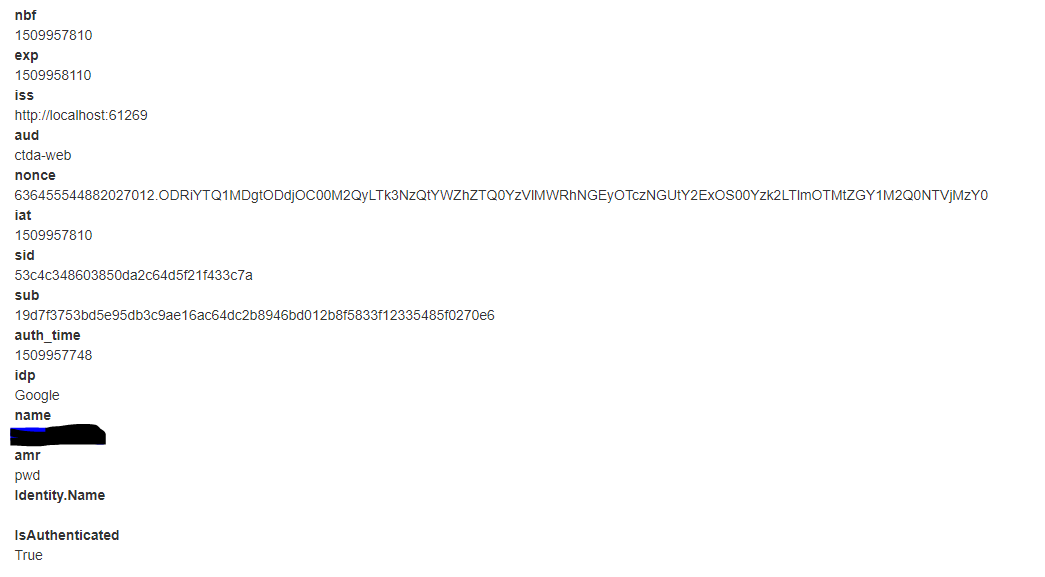
问题:
- 我无法收回额外的索赔(对吗?)来自谷歌。特别是'hd‘,甚至’电子邮件‘-注意,他们没有出现在上述屏幕截图的声明。我如何从谷歌获得电子邮件地址和hd声明?我错过了什么或者做错了什么?
- 注意,User.Identity.Name的输出是空的。为什么会这样,我怎么才能让它人烟稠密呢?这似乎是User.Identity唯一没有设置的属性。
我的设置如下所示-您可以看到上面的输出:
客户端(MVC)
在Startup.cs,ConfigureServices中
JwtSecurityTokenHandler.DefaultInboundClaimTypeMap.Clear();

services.AddAuthentication(options =>
{
    options.DefaultScheme = "Cookies";
    options.DefaultChallengeScheme = "oidc";
})
.AddCookie("Cookies")
.AddOpenIdConnect("oidc", options =>
{
    options.SignInScheme = "Cookies";
    options.Authority = Configuration["App:Urls:IdentityServer"];
    options.RequireHttpsMetadata = false;
    options.Resource = "openid profile email";
    options.Scope.Add("openid");
    options.Scope.Add("profile");
    options.Scope.Add("email");
    options.Scope.Add("domain");
    options.ClientId = "ctda-web";
    options.SaveTokens = true;
    options.GetClaimsFromUserInfoEndpoint = true;
});
身份服务器
客户定义
// OpenID Connect implicit flow client (MVC)
new Client
{
    ClientId = "ctda-web",
    ClientName = "Company To Do Web App",
    AllowedGrantTypes = GrantTypes.Implicit,
    EnableLocalLogin = false,

    // where to redirect to after login
    RedirectUris = { "http://localhost:53996/signin-oidc" },

    // where to redirect to after logout
    PostLogoutRedirectUris = { "http://localhost:53996/signout-callback-oidc" },

    AllowedScopes = new List<string>
    {
        IdentityServerConstants.StandardScopes.OpenId,
        IdentityServerConstants.StandardScopes.Profile,
        IdentityServerConstants.StandardScopes.Email,
        "domain"
    }
}
IdentityResource定义
return new List<IdentityResource>
{
    new IdentityResources.OpenId(),
    new IdentityResources.Profile(),
    new IdentityResources.Email(),
    new IdentityResource
    {
        Name = "domain",
        DisplayName = "Google Organisation",
        Description = "The hosted G Suite domain of the user, if part of one",
        UserClaims = new List<string> { "hd"}
    }
};回答 2
Stack Overflow用户
发布于 2018-02-17 05:59:16
答案非常不明显:只要您有以下配置(在Identity Server Startup.cs中),IdentityServer4提供的示例代码就能工作:
services.AddIdentityServer()
    .AddDeveloperSigningCredential()
    .AddInMemoryApiResources(Config.GetApiResources())
    .AddInMemoryIdentityResources(Config.GetIdentityResources())
    .AddInMemoryClients(Config.GetClients()
.AddTestUsers(Config.GetUsers()); //<--- this line here为什么?因为AddTestUsers在你自己的世界里做了一堆你需要做的水管。本演练隐式地假设您移动到EF或ASP.NET标识等,并且不清楚如果不使用这些数据存储必须做什么。简言之,你需要:
- 创建一个对象来表示用户(这是一个初学者)
- 创建持久性/查询类(这是一个初学者)
- 创建一个IProfileService实例,它将所有这些联系在一起,将用户和UserStore (这是一个初学者)的定义放入其中。
- 添加适当的绑定等
我的IdentityServer Startup.cs最后看起来是这样的(我想故意在内存中这样做,但显然没有使用示例中提供的测试用户):
services.AddSingleton(new InMemoryUserStore()); //<-- new

services.AddIdentityServer()
    .AddDeveloperSigningCredential()
    .AddInMemoryApiResources(Config.GetApiResources())
    .AddInMemoryIdentityResources(Config.GetIdentityResources())
    .AddInMemoryClients(Config.GetClients())
    .AddProfileService<UserProfileService>(); //<-- new
事实证明,谷歌确实会回复电子邮件,作为声明的一部分。问题的代码示例中的作用域有效。
Stack Overflow用户
发布于 2017-11-06 11:22:39
我可以告诉你如何让电子邮件被退回。
有两种方法可以做到这一点,但它们都要求您将电子邮件范围添加到初始请求中。仅仅发送openId是行不通的。
Openid电子邮件
UserInfo请求
现在,当您获得访问令牌时,可以这样做。
https://www.googleapis.com/oauth2/v1/userinfo?alt=json&access_token={access token}响应
{
  "family_name": "Lawton",
  "name": "Linda Lawton",
  "picture": "https://lh5.googleusercontent.com/-a1CWlFnA5xE/AAAAAAAAAAI/AAAAAAAAl1I/UcwPajZOuN4/photo.jpg",
  "gender": "female",
  "email": "xxxx@gmail.com",
  "link": "https://plus.google.com/+LindaLawton",
  "given_name": "Linda",
  "id": "117200475532672775346",
  "verified_email": true
}
令牌信息请求:
使用id令牌
https://www.googleapis.com/oauth2/v3/tokeninfo?id_token={token id}响应
{
 "azp": "07408718192.apps.googleusercontent.com",
 "aud": "07408718192.apps.googleusercontent.com",
 "sub": "00475532672775346",
 "email": "XX@gmail.com",
 "email_verified": "true",
 "at_hash": "8ON2HwraMXbPpP0Nwle8Kw",
 "iss": "https://accounts.google.com",
 "iat": "1509967160",
 "exp": "1509970760",
 "alg": "RS256",
 "kid": "d4ed62ee21d157e8a237b7db3cbd8f7aafab2e"
}
至于如何填充你的控制器,我无能为力。
https://stackoverflow.com/questions/47133282
复制相似问题
腾讯云开发者

Copyright © 2013 - 2026 Tencent Cloud. All Rights Reserved. 腾讯云 版权所有
深圳市腾讯计算机系统有限公司 ICP备案/许可证号:粤B2-20090059  粤公网安备44030502008569号
腾讯云计算(北京)有限责任公司 京ICP证150476号 | 京ICP备11018762号