
ScrollPane没有按需要显示,FlowPane内容
在显示滚动条的ScrollPane 8中,我遇到了一些困难。我目前所做的只是创建一个具有x个元素的FlowPane,并将其设置为ScrollPane的内容。
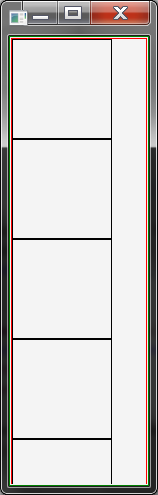
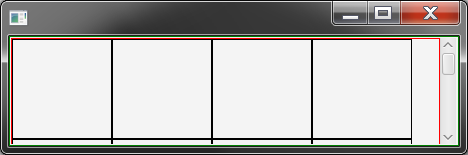
当我垂直于FlowPane的方向收缩时,问题就会发生。当元素开始包装并超出界限时,滚动条就不会出现。当我与方向平行收缩时,这种情况不会发生。我有一个小型Java程序来举例说明这个问题。


import javafx.application.Application;
import javafx.scene.Scene;
import javafx.scene.control.ScrollPane;
import javafx.scene.layout.FlowPane;
import javafx.scene.layout.StackPane;
import javafx.stage.Stage;

public class Main extends Application {

       public static void main(String[] args) {
                    launch(args);
       }

       @Override
       public void start(Stage primaryStage) throws Exception {
             FlowPane flow = new FlowPane();
             flow.setStyle("-fx-border-color: red");
             addPanes(flow, 16);

             ScrollPane scroll = new ScrollPane(flow);
             scroll.setStyle("-fx-border-color: green");
             scroll.setFitToHeight(true);
             scroll.setFitToWidth(true);

             Scene scene = new Scene(scroll, 450, 450);
             primaryStage.setScene(scene);
             primaryStage.show();
       }

       public void addPanes(FlowPane root, int panes) {
             for(int i = 0; i < panes; i++) {
                    StackPane filler = new StackPane();
                    filler.setStyle("-fx-border-color: black");
                    filler.setPrefSize(100, 100);
                    root.getChildren().add(filler);
             }
       }
}回答 3
Stack Overflow用户
发布于 2017-11-03 08:54:33
看看下面的代码,告诉我这是否是你想要实现的。我仍然不知道是什么原因造成了这个问题,我需要查看ScrollPane的文档才能找到答案。我怀疑是在setFitToWidth & setFitToHeight方法公司。尽管我仍然相信这不是个窃听器。
import javafx.application.Application;
import javafx.beans.binding.Bindings;
import javafx.scene.Scene;
import javafx.scene.control.ScrollPane;
import javafx.scene.layout.FlowPane;
import javafx.scene.layout.HBox;
import javafx.stage.Stage;

public class Main extends Application {

    public static void main(String[] args) {
        launch(args);
    }

    @Override
    public void start(Stage primaryStage) throws Exception {
        FlowPane flow = new FlowPane();
        flow.setStyle("-fx-border-color: red");

        addPanes(flow, 16);

        ScrollPane scroll = new ScrollPane(flow);
        scroll.setStyle("-fx-border-color: green");

        // Apparently this cause the issue here.
        // scroll.setFitToHeight(true);
        // scroll.setFitToWidth(true);


        // Instead just make the flow pane take the dimensions of the ScrollPane
        // the -5 is to not show the Bars when both of panes have the same dimensions
        flow.prefWidthProperty().bind(Bindings.add(-5, scroll.widthProperty()));
        flow.prefHeightProperty().bind(Bindings.add(-5, scroll.heightProperty()));

        Scene scene = new Scene(scroll, 450, 450);
        primaryStage.setScene(scene);
        primaryStage.show();

    }

    public void addPanes(FlowPane root, int panes) {
        for (int i = 0; i < panes; i++) {
            HBox filler = new HBox();
            filler.setStyle("-fx-border-color: black");
            filler.setPrefSize(100, 100);
            root.getChildren().add(filler);
        }
    }
}查看ScrollPane的文档,特别是setFitToHeight,您会发现:
属性描述:如果为true,并且所包含的节点是可调整大小的,则该节点将被调整大小以与ScrollPane的视图端口的高度相匹配。如果包含的节点不可调整大小,则忽略此值。
而且由于ScrollPane中的节点将被调整大小以匹配ScrollPane的视图端口的宽度和高度,这就是为什么垂直ScrollBar永远不会出现的原因。
Stack Overflow用户
发布于 2017-11-03 13:50:12
您可以添加下面的代码,以始终显示垂直滚动条。
scroll.setVbarPolicy(ScrollPane.ScrollBarPolicy.ALWAYS);Stack Overflow用户
发布于 2019-08-13 12:15:09
当计算FlowPane在ScrollPane中所需的高度时,将传递-1的宽度值。然后,流窗格将报告当其所有内容都放在一行中时所需的高度。
作为一种解决办法,在这种情况下,您可以从最后一个布局计算中传递宽度。
import javafx.application.Application;
import javafx.scene.Scene;
import javafx.scene.control.ScrollPane;
import javafx.scene.layout.FlowPane;
import javafx.scene.layout.StackPane;
import javafx.stage.Stage;

public class Main extends Application {

       public static void main(String[] args) {
                    launch(args);
       }

       @Override
       public void start(Stage primaryStage) throws Exception {
             FlowPane flow = new FlowPane() {
                @Override protected double computeMinHeight(double width) {
                    double minHeight = super.computeMinHeight(width != -1 ? width :
                        /* When no width is specified, use the current contol size*/
                        getWidth());
                    return minHeight;
                }
             };
             flow.setStyle("-fx-border-color: red");
             addPanes(flow, 16);

             ScrollPane scroll = new ScrollPane(flow);
             flow.maxWidthProperty().bind(scroll.widthProperty());
             scroll.widthProperty().addListener((observable, oldValue, newValue)->{
                 /* clearSizeCache */
                 flow.requestLayout();
             });

             scroll.setStyle("-fx-border-color: green");
             scroll.setFitToHeight(true);
             scroll.setFitToWidth(true);

             Scene scene = new Scene(scroll, 450, 450);
             primaryStage.setScene(scene);
             primaryStage.show();
       }

       public void addPanes(FlowPane root, int panes) {
             for(int i = 0; i < panes; i++) {
                    StackPane filler = new StackPane();
                    filler.setStyle("-fx-border-color: black");
                    filler.setPrefSize(100, 100);
                    root.getChildren().add(filler);
             }
       }
}https://stackoverflow.com/questions/47086697
复制相似问题
腾讯云开发者

Copyright © 2013 - 2026 Tencent Cloud. All Rights Reserved. 腾讯云 版权所有
深圳市腾讯计算机系统有限公司 ICP备案/许可证号:粤B2-20090059  粤公网安备44030502008569号
腾讯云计算(北京)有限责任公司 京ICP证150476号 | 京ICP备11018762号