
Process.Start参数无效
Process.Start参数无效
提问于 2017-09-19 14:07:39
我试图用两个参数启动一个进程,这些参数将从cmd提示窗口运行,很好。当我试图通过process.start启动它时,问题就来了。
在cmd窗口中,它看起来像这样。
D:\Projects\MyProg.exe "D:\Projects\MyScript.txt" "D:\Projects\MyInputData.txt"
当我试图在.NET中构建参数时,它在整个字符串周围放置双引号,它看起来如下所示。程序不会将其解释为两个参数,而只是停止。如果我在每个论点周围加上双引号,它仍然会曲解它。
我知道这是MyProg.exe问题(我无法更改的供应商程序),但是有没有办法发送这个命令,这样它就能工作了?
myProcess.StartInfo.Arguments = "D:\Projects\MyScript.txt D:\Projects\MyInputData.txt"当我添加双引号时,程序就会启动,但会有问题,然后就停止了。
myProcess.StartInfo.Arguments = """D:\Projects\MyScript.txt"" ""D:\Projects\MyInputData.txt"""回答 1
Stack Overflow用户
回答已采纳
发布于 2017-09-19 15:28:37
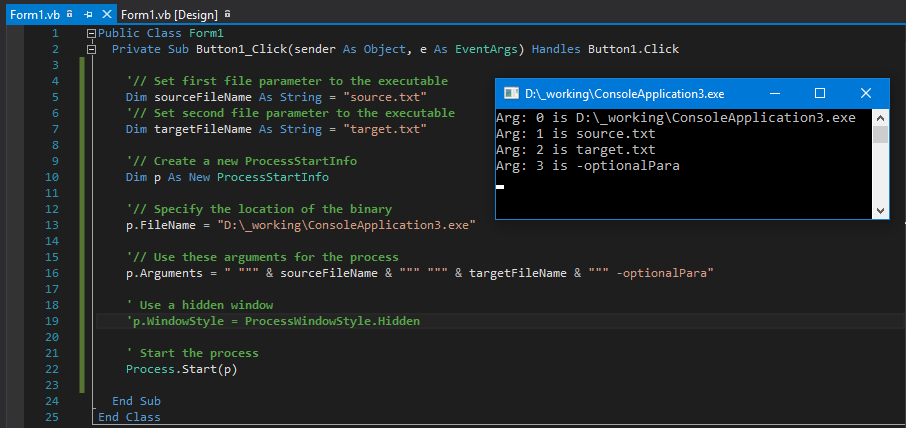
我不太清楚D:\Projects\MyProg.exe在做什么,但是下面的示例是有用的。声明了两个变量字符串。这两个字符串表示我想在可执行文件中使用的两个参数。
Public Class Form1
  Private Sub Button1_Click(sender As Object, e As EventArgs) Handles Button1.Click

    '// Set first file parameter to the executable
    Dim sourceFileName As String = "source.txt"
    '// Set second file parameter to the executable
    Dim targetFileName As String = "target.txt"

    '// Create a new ProcessStartInfo
    Dim p As New ProcessStartInfo

    '// Specify the location of the binary
    p.FileName = "D:\_working\ConsoleApplication3.exe"

    '// Use these arguments for the process
    p.Arguments = " """ & sourceFileName & """ """ & targetFileName & """ -optionalPara"

    ' Use a hidden window
    'p.WindowStyle = ProcessWindowStyle.Hidden

    ' Start the process
    Process.Start(p)

  End Sub
End Class
见结果截图:
页面原文内容由Stack Overflow提供。腾讯云小微IT领域专用引擎提供翻译支持
原文链接:
https://stackoverflow.com/questions/46302649
复制相关文章
相似问题
腾讯云开发者

Copyright © 2013 - 2026 Tencent Cloud. All Rights Reserved. 腾讯云 版权所有
深圳市腾讯计算机系统有限公司 ICP备案/许可证号:粤B2-20090059  粤公网安备44030502008569号
腾讯云计算(北京)有限责任公司 京ICP证150476号 | 京ICP备11018762号