
修复InvalidOperationException时WindowsFormsHost
我有一个程序做以下工作:
- 创建WPF控件
- 用户修复以显示另一个窗口内的控件(记事本)
- 将WindowsFormsHost添加到控件
代码是
UserControl1 control = new UserControl1();
control.AddFormsHostWithDelay(TimeSpan.FromSeconds(2));;
if (this.TryGetHandleFromName("Notepad", out IntPtr handle))
{
   HwndSourceParameters pa = new HwndSourceParameters("WPF Source", 400, 300);
   pa.ParentWindow = handle;
   pa.WindowStyle = 0x40000000 | 0x10000000; // child and visible
   pa.UsesPerPixelOpacity = false;
   pa.SetPosition(5, 5);
   HwndSource src = new HwndSource(pa);
   src.RootVisual = control;
}
这段代码工作了多年,但是自从Windows10 CreatorsUpdate之后,一旦添加了WindowsFormsHost,它就会崩溃。消息和堆栈跟踪是
'CreatorsUpdateCrashDemo.exe' (CLR v4.0.30319:
CreatorsUpdateCrashDemo.exe): Loaded 'C:\Program Files (x86)\Microsoft Visual Studio\2017\Professional\Common7\IDE\PrivateAssemblies\Runtime\Microsoft.VisualStudio.Debugger.Runtime.dll'.

Unhandled Exception: System.InvalidOperationException: Hosted HWND must be a child window of the specified parent.
at System.Windows.Interop.HwndHost.BuildWindow(HandleRef hwndParent)
at System.Windows.Interop.HwndHost.BuildOrReparentWindow()
at System.Windows.Interop.HwndHost.OnSourceChanged(Object sender, SourceChangedEventArgs e)完整的演示可以在http://www.seetec.eu/entwicklung/BRAU/CreatorsUpdateCrash.zip上找到
如何复制:
- 使用Windows10 CreatorsUpdate
- 下载演示
- 启动记事本
- 启动CreatorsUpdateCrashDemo
- 单击崩溃按钮
- 应用程序在2秒后崩溃
有谁知道怎样改变才能避免这次坠机吗?在修复之前添加FormsHost可以解决这个问题,但在实际应用程序中是不可能的。
其他信息:
问题显然出现在WindowsFormsHost中。BuildWindowCore方法中的某些内容随CreatorsUpdate而改变。在调用BuildWindowCore in HwndHost.BuildWindow之后,会进行一些检查,其中一个检查失败。具体来说,这是HwndHost中的代码:
// Make sure the child window is the child of the expected parent window.
if(hwndParent.Handle != UnsafeNativeMethods.GetParent(_hwnd))
{
    throw new InvalidOperationException(SR.Get(SRID.ChildWindowMustHaveCorrectParent));
}
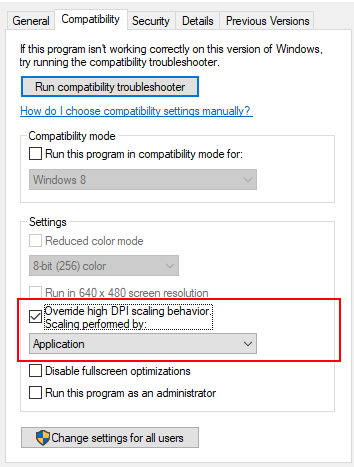
更多的附加信息:我发现在可执行文件的属性中设置“覆盖高dpi缩放行为”可以解决这个问题。这可能是一个解决办法,但我仍然想了解到底发生了什么。我所做的难道根本不受支持吗?有更好的方法吗?
回答 1
Stack Overflow用户
发布于 2017-08-22 07:33:11
在您的机器和解决方案上更新.Net框架,不要忘记NuGet更新。
https://stackoverflow.com/questions/45810610
复制相似问题
腾讯云开发者

Copyright © 2013 - 2026 Tencent Cloud. All Rights Reserved. 腾讯云 版权所有
深圳市腾讯计算机系统有限公司 ICP备案/许可证号:粤B2-20090059  粤公网安备44030502008569号
腾讯云计算(北京)有限责任公司 京ICP证150476号 | 京ICP备11018762号