
XDocument节点中的Foreach
XDocument节点中的Foreach
提问于 2017-08-04 09:18:56
<tests>
  <test id ="1">
    <name> peter </name>
    <age> 23 </age>
    <informations> bla bla </informations>
  </test>
  <test id ="41">
    <name> besd </name>
    <age> 54 </age>
    <informations> some other text </informations>
  </test>
  <test id ="57">
    <name> john </name>
    <age> 61 </age>
    <informations> vintage </informations>
  </test>
  <test id ="67">
    <name> claude </name>
    <age> 11 </age>
    <informations> motivation </informations>
  </test>
</tests>我设法在XDocument xInformations中获取了上述所有信息。
  List<string> testIds = new List<string>();
testIds = xInformations.Descendants("test").Select(x => (string)x.Attribute("id")).ToList();现在,我确实希望使用foreach来读取和保存每个id的所有信息:
foreach (string extId in testIds.Distinct())
{
     /// how can I take step by step the name, age, informations for all test cases ?
}
我怎样才能做到这一点?
回答 3
Stack Overflow用户
回答已采纳
发布于 2017-08-04 09:38:12
创建匿名(或引入自己的类)实例,并在foreach循环中使用它
var tests = xInformations.Descendants("test")
                         .Select(x =>
                         {
                             new
                             {
                                 Id = x.Attribute("id")?.Value,
                                 Name = x.Element("name").Value,
                                 Age = x.Element("age").Value,
                                 Info = x.Element("informations").Value
                             }
                         });

foreach(var test in tests)
{
    // test.Id
    // test.Name
    // test.Age
    // test.Info
}
或者,如果xml文件的架构保持不变,则可以在XmlSerializer中使用更清晰的代码。
[XmlType("tests")]
public class Tests
{
    public List<Test> Tests { get; set; }
}

[XmlType("test")]
public class Test
{
    [XmlAttribute("id")]
    public int Id { get; set; }
    [XmlElement("name")]
    public string Name { get; set; }
    [XmlElement("age")]
    public int Age { get; set; }
    [XmlElement("informations")]
    public string Info { get; set; }
}

var serializer = new XmlSerializer(typeof(Tests));
Tests tests = null;
using (var reader = new StreamReader(pathToXmlFile))
{
    tests = (Tests)serializer.Deserialize(reader);
}

// use tests for your needs
foreach(var test in tests.Tests)
{
    // test.Id
}Stack Overflow用户
发布于 2017-08-04 09:30:55
这是一种你可以做到的方法
        // path to file
        string path = @"C:\t\1.txt";
        XDocument _doc = XDocument.Load(path);

        List<XElement> testIds = new List<XElement>();
        // get all test elements
        testIds = _doc.Descendants("test").ToList();

        // loop true test elements
        foreach (XElement extId in testIds.Distinct())
        {
            // get element values

            string id = extId.Attribute("id").Value;
            string name = extId.Element("name").Value;
            string age = extId.Element("age").Value;
            string info = extId.Element("informations").Value;
            Console.WriteLine(id+ "," + name + ", " + " " + age + ", " + info);
}Stack Overflow用户
发布于 2017-08-04 09:55:30
string path = @"D:\1.txt";
  XDocument _doc = XDocument.Load(path);

  List<XElement> testIds = new List<XElement>();

  testIds = _doc.Descendants("test").ToList();


  foreach (XElement extId in testIds.Distinct())
  {
     // get element values
        string id = extId.Attribute("id").Value;
        string name = extId.Element("name").Value;
        string age = extId.Element("age").Value;
        string info = extId.Element("informations").Value;
        Console.WriteLine(name + ", " + " " + age + ", " + info);
  }
字符串id = extId.Attribute("id").Value;
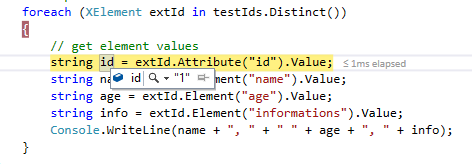
属性值方法用于获取属性值内节点的值。
我被检查过,数据是正确从属性中得到的。
页面原文内容由Stack Overflow提供。腾讯云小微IT领域专用引擎提供翻译支持
原文链接:
https://stackoverflow.com/questions/45502922
复制相关文章
相似问题
腾讯云开发者

Copyright © 2013 - 2026 Tencent Cloud. All Rights Reserved. 腾讯云 版权所有
深圳市腾讯计算机系统有限公司 ICP备案/许可证号:粤B2-20090059  粤公网安备44030502008569号
腾讯云计算(北京)有限责任公司 京ICP证150476号 | 京ICP备11018762号