
当路径和文件名动态加载时,无法显示pdf文件
我正在开发angularjs和java应用程序。下面的html代码用于在browser.Issue中打开pdf文件,当数据属性的值被动态传递时,PDF没有被打开,如下所示。
<div ng-controller="myPDFFileController">
{{pdfName}} <!-- /resources/myFiles/test1.pdf -->
<object data="{{pdfName}}" type="application/pdf" width="100%" height="100%">
<iframe src="{{pdfName}}" width="100%" height="100%" style="border: none;">
    This browser does not support PDFs. Please download the PDF to view it:
</iframe>
</object>
js代码:
    app.controller('myPDFFileController', function ($scope,MyService) {
    $scope.getPDFPathFileName = function () {
    MyService.getPDF().then(
    function (response) {
    $scope.pdfName = "/resources/myFiles/"+response;
    },
    function (errResponse) {
    $rootScope.showError("Internal error" + errResponse);
    });
    }
    $scope.getPDFPathFileName();
    });
    //service call
    myService.getPDF = function(){
     var Url = myURL+'/filesDataLink/getPDF.form';
    $http.get(repUrl)
    .then(
    function (response) {
       //return response
    }
   //return statement
    }
java控制器:
@RequestMapping(value = "/getPDF", method = RequestMethod.GET,produces="text/plain")
public @ResponseBody String getPDF(HttpServletRequest request) throws Exception {
//code to creae a pdf file and return the filename
String filename = "test1";
File f = new File(filename);
//logic to generate pdf file with data
return filename;
}
}
浏览器控制台中注意到的异常:
Failed to load resource: the server responded with a status of 404 () :8080/%7B%7BpdfName%7D%7D请建议如何在运行时动态传递文件名,并在浏览器上打开PDF。当我在html代码中给出文件名而不是动态加载时,下面的代码可以工作。
当将文件名分配给data属性时,工作的html代码:
<object data="/resources/myFiles/test1.pdf" type="application/pdf" width="100%" height="100%">
<iframe src="/resources/myFiles/test1.pdf" width="100%" height="100%" style="border: none;">
This browser does not support PDFs. Please download the PDF to view it:
</iframe>
</object>
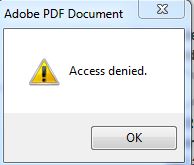
-编辑--现在我可以在IE和chrome的网页上看到pdf图像,但问题是IE在加载pdf之前显示了警报。下面是显示在IE中的警告框图像,当我加载页面时,当我关闭警报框后,会显示pdf。控制台中没有显示错误。
回答 2
Stack Overflow用户
发布于 2017-07-16 20:03:39
更新
只是注意到已经有一个更好的答案了。查看链接:https://stackoverflow.com/a/21752504/5739073
原来的答案。
它不起作用的原因是因为您使用的是src属性而不是ng-src属性。
两者的不同之处在于,当您使用ng-src时,它在将该作用域变量添加到DOM之前一直等待该变量的值,因此HTML认为它是硬编码的。
Stack Overflow用户
发布于 2017-07-16 21:12:41
我的project.See中也有同样的问题,这是否有用。
HTML代码
<object ng-if="!IEBrowser" data="{{content}}" type="application/pdf" style="width: 100%; height: 1200px;overflow-y: hidden; cursor:pointer;"></object>
<iframe ng-if="IEBrowser" id ="pdfIframe" ></iframe>
控制器
 $scope.caseid =$rootScope.finalCeilingValue.caseId;

    $http.get(appConstant.selfDomainName+appConstant.downloadCreditPaper+"?"+"caseid="+$scope.caseid, {responseType: 'arraybuffer'})

          .success(function (data) {
             /* if(data){
          var file = new Blob([data], {type: 'application/pdf'});

            var fileURL = URL.createObjectURL(file);

        //   $scope.content = fileURL;
              }*/

                        if($scope.caseid != null && $scope.caseid != ''){
                                     $scope.content =  appConstant.selfDomainName+appConstant.downloadCreditPaper+"?"+"caseid="+$scope.caseid;
                             if(window.navigator.msSaveOrOpenBlob){
                                     $scope.IEBrowser = true;
                                      $timeout(function() {
                                                 document.querySelector('#pdfIframe').setAttribute('src',$scope.content);
                                                  }, 0);
                             } else {
                                 $scope.IEBrowser = false;
                             }
            ////        $scope.content = appConstant.selfDomainName+appConstant.downloadCreditPaper+"?"+"caseid="+$scope.caseid;


                        }
        else{ $scope.message.code = "Unable to load";
                                   $scope.message.color = genericAPIFactory.amber;
                                   $scope.$emit("approvalFlowWarning",$scope.message);
                                     }
          }).finally(function() {
            $scope.loading = false;
})https://stackoverflow.com/questions/45132615
复制相似问题
腾讯云开发者

Copyright © 2013 - 2026 Tencent Cloud. All Rights Reserved. 腾讯云 版权所有
深圳市腾讯计算机系统有限公司 ICP备案/许可证号:粤B2-20090059  粤公网安备44030502008569号
腾讯云计算(北京)有限责任公司 京ICP证150476号 | 京ICP备11018762号