
在jupyter笔记本内使用tkinter进行nltk绘图
我正在试图在内部绘制nltk的图形(内嵌)。但有错误:
TclError: no display name and no $DISPLAY environment variable我尝试将$DISPLAY设置为不同的值:
$env DISPLAY=0.0
# or
$env DISPLAY=inline
# or
$env DISPLAY=
但是有错误(或类似的):
TclError: couldn't connect to display "0.0"这是我的代码https://github.com/hyzhak/nltk-experiments/blob/master/main.ipynb,最后一个单元格。
环境:正式anaconda3码头-- continuumio/anaconda3:4.4.0 https://github.com/ContinuumIO/docker-images。nltk==3.2.3在里面。
Python 3.6.1 |Anaconda 4.4.0 (64-bit)| (default, May 11 2017, 13:09:58)
Type "copyright", "credits" or "license" for more information.

IPython 5.3.0 -- An enhanced Interactive Python.如何解决这个错误和内联 nltk图在jupyter notebook中的问题?
更新1
trees根据nltk树的来源绘制它使用tkinter。
更新2
我在官方的nltk github存储库https://github.com/nltk/nltk/issues/1765中也问过同样的问题。
更新3
我认为错误的原因可能是无头主机(码头)。我已经安装了xvfb,但似乎已经足够了。
RUN apt-get install -y xvfb解决方案
我认为xvfb是默认启动的,但应该显式运行。所以,在我启动它之后,我可以制作nltk树形图的截图。
回答 2
Stack Overflow用户
发布于 2017-07-03 23:33:30
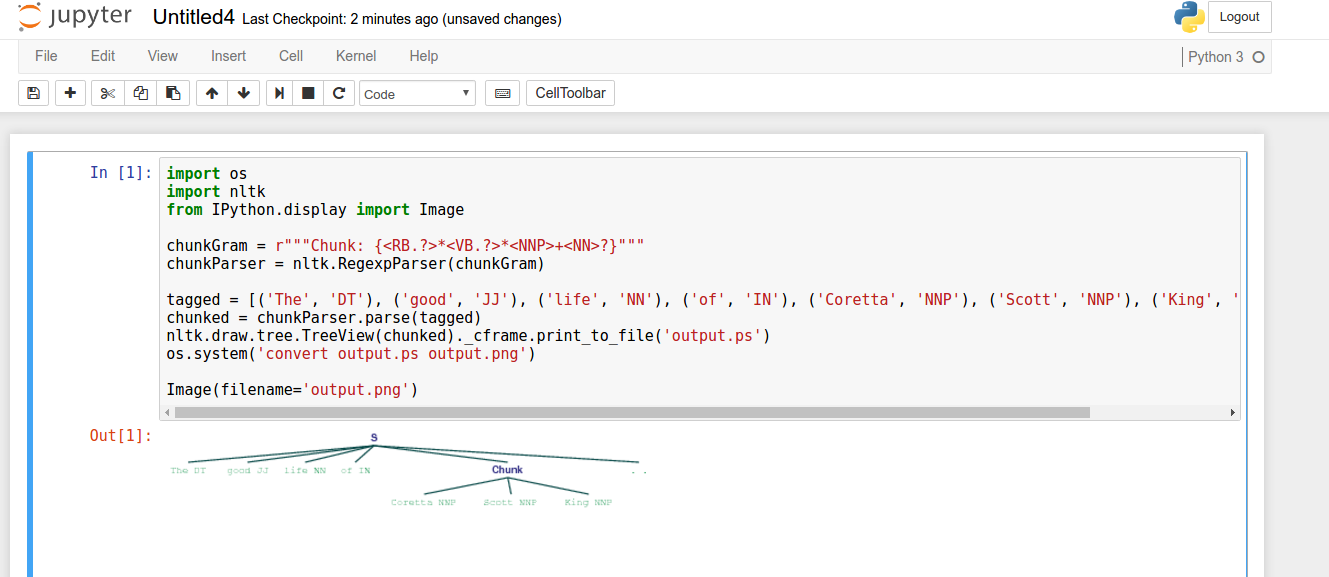
import os
import nltk
from IPython.display import Image

chunkGram = r"""Chunk: {<RB.?>*<VB.?>*<NNP>+<NN>?}"""
chunkParser = nltk.RegexpParser(chunkGram)

tagged = [('Tonight', 'NN'), ('we', 'PRP'), ('are', 'VBP'), ('comforted', 'VBN'), ('by', 'IN'), ('the', 'DT'), ('hope', 'NN'), ('of', 'IN'), ('a', 'DT'), ('glad', 'JJ'), ('reunion', 'NN'), ('with', 'IN'), ('the', 'DT'), ('husband', 'NN'), ('who', 'WP'), ('was', 'VBD'), ('taken', 'VBN'), ('so', 'RB'), ('long', 'RB'), ('ago', 'RB'), (',', ','), ('and', 'CC'), ('we', 'PRP'), ('are', 'VBP'), ('grateful', 'JJ'), ('for', 'IN'), ('the', 'DT'), ('good', 'JJ'), ('life', 'NN'), ('of', 'IN'), ('Coretta', 'NNP'), ('Scott', 'NNP'), ('King', 'NNP'), ('.', '.')]
chunked = chunkParser.parse(tagged)
nltk.draw.tree.TreeView(chunked)._cframe.print_to_file('output.ps')
os.system('convert output.ps output.png')

Image(filename='output.png')
输出
Stack Overflow用户
发布于 2017-07-03 08:19:51
尝试将以下代码片段合并到代码中
import os
import matplotlib as mpl
if os.environ.get('DISPLAY','') == '':
    print('no display found. Using non-interactive Agg backend')
    mpl.use('Agg')
import matplotlib.pyplot as plt不管怎样。您的问题是Matplotlib对x使用后端的默认调用显然会导致问题。这个答案绝不是唯一可能的解决办法,但我认为这将解决你的问题。请记住,在导入pyplot之前切换后端是很重要的。
或者,您可以尝试IPython.core.display.display(分块)
确保您的笔记本服务器启动时设置了-X标志。
def jupyter_draw_nltk_tree(tree):
    from IPython.display import Image, display
    from nltk.draw import TreeWidget
    from nltk.draw.util import CanvasFrame
    import subprocess
    cf = CanvasFrame()
    tc = TreeWidget(cf.canvas(), tree)
    tc['node_font'] = 'arial 13 bold'
    tc['leaf_font'] = 'arial 14'
    tc['node_color'] = '#005990'
    tc['leaf_color'] = '#3F8F57'
    tc['line_color'] = '#175252'
    cf.add_widget(tc, 10, 10)
    cf.print_to_file('tmp_tree_output.ps')
    cf.destroy()

    args = (['convert', 'tmp_tree_output.ps', 'tmp_tree_output.png'])
    subprocess.call(args)
    display(Image(filename='tmp_tree_output.png'))
    os.system('rm tmp_tree_output.ps tmp_tree_output.png')

jupyter_draw_nltk_tree(chunked)https://stackoverflow.com/questions/44880337
复制相似问题
腾讯云开发者

Copyright © 2013 - 2026 Tencent Cloud. All Rights Reserved. 腾讯云 版权所有
深圳市腾讯计算机系统有限公司 ICP备案/许可证号:粤B2-20090059  粤公网安备44030502008569号
腾讯云计算(北京)有限责任公司 京ICP证150476号 | 京ICP备11018762号