
在C#中从两个数据库查询数据
在C#中从两个数据库查询数据
提问于 2017-04-17 19:25:43
目前,我有一个查询,从两个不同的数据库中获取数据,这些数据被附加到一个名为"accountbuys“的列表中。
- 我的第一个表有三个数据输入项(3个想要购买股票的帐户)。
- 下一张有17个数据点的表格( 17只股票需要购买)
我正在合并这些表并获得输出
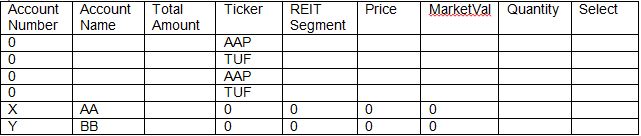
然而,我想要的输出,应该有17个数据点,每次重复三个不同的帐户,以便最终用户可以向下钻和购买任何他想要的股票。

如果我想问的问题不清楚,请礼貌点告诉我。请尽量不要粗鲁,我仍然在学习和新的StackExchange!
这是我的密码:
public List<BuySellModel> GetBuyDataWthAccount()
{
    List<BuySellModel> accountbuys = new List<BuySellModel>();

    using (SqlConnection connectionreit = new SqlConnection(HubConnection))
    using (SqlConnection connection = new SqlConnection(PMConnection))

    {

        connectionhub.Open();
        connection.Open();

        SqlCommand command3 = new SqlCommand(@"SELECT distinct(table1.name) as 'Symbol' ,table2.Segment as 'Segment',table2.AllocationAmount as 'AllocationAmount',table2.PX_LAST as 'Price',
                                                    table1.CUR_MKT_CAP as 'CMC',table1.FCFY_WITH_CUR_MKT_CAP as 'FCMC',table1.ROIC as 'ROIC', table1.ROICDELTA as 'ROICD' FROM View_REIT_Model_And_Holdings as table1
                                                    INNER JOIN [MostRecentlyInModelSelected] as table2
                                                        ON table1.name = table2.Ticker
                                                        WHERE table1.AllocationAmount != -1 AND
                                                        NOT EXISTS (SELECT NULL FROM [ViewPCData] as table3 WHERE table1.name = table3.Symbol AND table2.Segment = table3.SubsectorDescription AND table3.Objective = 'REITS' AND table3.SectorDescription != 'NULL' AND table3.SubsectorDescription != 'NULL')",
                                                    connectionreit);
        command3.CommandType = CommandType.Text;

        SqlCommand command4 = new SqlCommand("SELECT PortfolioAccountNumber, PortfolioDescription, SUM(TotalValue) as 'TotalValue' FROM [ViewPCData] WHERE Objective = 'REITS' GROUP BY PortfolioAccountNumber,PortfolioDescription", connection);
        command4.CommandType = CommandType.Text;

        var reader = command3.ExecuteReader();
        var reader1 = command4.ExecuteReader();

        if (reader1.HasRows)
        {
            while (reader1.Read())
            {
                BuySellModel accountb = new BuySellModel();
                accountb.PortfolioAccount = reader1.GetString(reader1.GetOrdinal("PortfolioAccountNumber"));
                accountb.PortfolioDescription = reader1.GetString(reader1.GetOrdinal("PortfolioDescription"));
                accountb.AccountAmount = reader1.GetDecimal(reader1.GetOrdinal("TotalValue"));
                accountbuys.Add(accountb);

                if (reader.HasRows)
                {
                    //foreach(var account in accountbuys)
                    //{


                    while (reader.Read())
                    {
                        BuySellModel buy = new BuySellModel();
                        buy.Symbol = reader.GetString(reader.GetOrdinal("Symbol"));
                        buy.Segment = reader.GetString(reader.GetOrdinal("Segment"));
                        //if (accountNumber == "soand os")
                        //{
                        //    1/3 of totalaccountvalue
                        buy.AllocationAmount = (reader.GetDouble(reader.GetOrdinal("AllocationAmount")));
                        //}
                        buy.Price = reader.GetDouble(reader.GetOrdinal("Price"));
                        buy.MarketValue = reader.GetDouble(reader.GetOrdinal("CMC"));
                        buy.FCFY = reader.GetDouble(reader.GetOrdinal("FCMC"));
                        buy.ROIC = reader.GetDouble(reader.GetOrdinal("ROIC"));
                        buy.ROICdelta = reader.GetDouble(reader.GetOrdinal("ROICD"));
                        buy.Buy = true;
                        //account1 = account.accountnumber;
                        accountbuys.Add(buy);

                    }
                    //} //for loop


                }


            } // accounts
        } //reader1.hasrows

        connectionhub.Close();
        connection.Close();
    }

    return accountbuys;
}
编辑:
将表分成两个不同的列表,然后合并它们。现在一切都很顺利。看起来也很适合缩放。
public List<BuySellModel> GetBuyDataWthAccount()
    {
        List<BuySellModel> accountbuys = new List<BuySellModel>();

        List<Account> accounts = new List<Account>();


        using (SqlConnection connection = new SqlConnection(PMConnection))

        {

            connection.Open();

            SqlCommand command3 = new SqlCommand(@"SELECT distinct(table1.name) as 'Symbol' ,table2.Segment as 'Segment',table2.AllocationAmount as 'AllocationAmount',table2.PX_LAST as 'Price',
                                                table1.CUR_MKT_CAP as 'CMC',table1.FCFY_WITH_CUR_MKT_CAP as 'FCMC',table1.ROIC as 'ROIC', table1.ROICDELTA as 'ROICD' FROM View_Model_And_Holdings as table1
                                                INNER JOIN [MostRecentlyInModelSelected] as table2
                                                    ON table1.name = table2.Ticker
                                                    WHERE table1.AllocationAmount != -1 AND
                                                    NOT EXISTS (SELECT NULL FROM [ViewPCData] as table3 WHERE table1.name = table3.Symbol AND table2.Segment = table3.SubsectorDescription AND table3.Objective = 'STOCKS' AND table3.SectorDescription != 'NULL' AND table3.SubsectorDescription != 'NULL')",
                                                connectionreit);
          command3.CommandType = CommandType.Text;

          SqlCommand command4 = new SqlCommand("SELECT PortfolioDetail , SUM(TotalValue) as 'TotalValue' FROM [ViewPCData] WHERE Objective = 'STOCKS' GROUP BY PortfolioAccountNumber,PortfolioDescription", connection);
          command4.CommandType = CommandType.Text;

            var reader = command3.ExecuteReader();
            var reader1 = command4.ExecuteReader();
            if (reader1.HasRows)
            {
                while (reader1.Read())
                {
                    Account accountb = new Account();
                    accountb.PortfolioDetail = reader1.GetString(reader1.GetOrdinal("PortfolioDetail"));
                   // accountb.PortfolioDescription = reader1.GetString(reader1.GetOrdinal("PortfolioDescription"));
                    accountb.AccountAmount = reader1.GetDecimal(reader1.GetOrdinal("TotalValue"));

                    accounts.Add(accountb);
                }
            }
            //List<BuyReits> buys = new List<BuyReits>();
            if (reader.HasRows && accounts.Count > 0)
            {
                while (reader.Read())
                {
                    foreach (var acc in accounts)
                    {
                        BuySellModel buy = new BuySellModel();
                        buy.Symbol = reader.GetString(reader.GetOrdinal("Symbol"));
                        buy.Segment = reader.GetString(reader.GetOrdinal("Segment"));
                        buy.AllocationAmount = (reader.GetDouble(reader.GetOrdinal("AllocationAmount")));
                        buy.Price = reader.GetDouble(reader.GetOrdinal("Price"));
                        //buy.Quantity = reader.GetInt32((reader.GetOrdinal("AllocationAmount"))/(reader.GetOrdinal("Price")));
                        buy.MarketValue = reader.GetDouble(reader.GetOrdinal("CMC"));
                        buy.FCFY = reader.GetDouble(reader.GetOrdinal("FCMC"));
                        buy.ROIC = reader.GetDouble(reader.GetOrdinal("ROIC"));
                        buy.ROICdelta = reader.GetDouble(reader.GetOrdinal("ROICD"));
                        buy.Buy = true;
                        buy.PortfolioAccount = acc.PortfolioDetail;
                        buy.AccountAmount = acc.AccountAmount;

                        accountbuys.Add(buy);

                    }

                }
            }

            connection.Close();


        }

        return accountbuys;

}回答 2
Stack Overflow用户
发布于 2017-04-17 20:10:10
下面提供了C#层中的交叉连接(没有说它是最好的解决方案,但它使您更接近于准备就绪):
using (SqlConnection connectionhub = new SqlConnection(HubConnection))
using (SqlConnection connection = new SqlConnection(PMConnection))

{

    connectionhub.Open();
    connection.Open();

    SqlCommand command3 = new SqlCommand(@"
        SELECT distinct(table1.name) as 'Symbol',
               table2.Segment as 'Segment',
               table2.AllocationAmount as 'AllocationAmount',
               table2.PX_LAST as 'Price',
               table1.CUR_MKT_CAP as 'CMC',
               table1.FCFY_WITH_CUR_MKT_CAP as 'FCMC',
               table1.ROIC as 'ROIC',
               table1.ROICDELTA as 'ROICD'
          FROM View_REIT_Model_And_Holdings as table1
                INNER JOIN [MostRecentlyInModelSelected] as table2
                    ON table1.name = table2.Ticker
         WHERE table1.AllocationAmount != -1
           AND NOT EXISTS (SELECT NULL
                             FROM [ViewPCData] as table3
                            WHERE table1.name = table3.Symbol
                              AND table2.Segment = table3.SubsectorDescription
                              AND table3.Objective = 'REITS'
                              AND table3.SectorDescription != 'NULL'
                              AND table3.SubsectorDescription != 'NULL')",
                                                connectionreit);
    command3.CommandType = CommandType.Text;

    SqlCommand command4 = new SqlCommand(@"
        SELECT PortfolioAccountNumber,
               PortfolioDescription,
               SUM(TotalValue) as 'TotalValue'
          FROM [ViewPCData]
         WHERE Objective = 'REITS'
         GROUP BY PortfolioAccountNumber, PortfolioDescription", connection);
    command4.CommandType = CommandType.Text;

    var stocksDS = new DataSet();
    var stocksDA = new System.Data.SqlClient.SqlDataAdapter();
    stocksDA.SelectCommand = command3
    stocksDA.Fill(stocksDS, "stocks");

    var acctsDS = new DataSet();
    var acctsDA = new System.Data.SqlClient.SqlDataAdapter();
    acctsDA.SelectCommand = command4
    acctsDA.Fill(acctsDS, "accts");

    var stocks = stocksDS.Tables["stocks"].AsEnumerable();
    var accts = acctsDS.Tables["accts"].AsEnumerable();

    var results = (from stocksDR in stocks
                   from acctsDR in accts
                   select new BuySellModel {
                        PortfolioAccount = acctsDR["PortfolioAccountNumber"],
                        PortfolioDescription = acctsDR["PortfolioAccountDescription"],
                        AccountAmount = acctsDR["TotalValue"],
                        Symbol = stocksDR["Symbol"],
                        Segment = stocksDR["Segment"],
                        AllocationAmount = stocksDR["AllocationAmount"],
                        Price = stocksDR["Price"],
                        MarketValue = stocksDR["CMC"],
                        FCFY = stocksDR["FCMC"],
                        ROIC = stocksDR["ROIC"],
                        ROICdelta = stocksDR["ROICD"],
                        Buy = true
                    });

    foreach (BySellModel buy in results) {
        accountBuys.Add(buy);
    }

    connectionhub.Close();
    connection.Close();
}
编辑:删除违规括号。
Stack Overflow用户
发布于 2017-04-17 20:01:53
在不更改任何C#代码的情况下,可以通过将SQL从内部联接查询更改为交叉连接查询来获得所需的内容。
不过,有关这种方法的一些注意事项:
- 如果包含WHERE子句,则查询将充当内部联接。
- 交叉联接可能要慢得多,因为查询希望实现所有可能的组合。由于只有51 (3 * 17)个组合,这不是一个大问题,但如果你想把这个规模扩大到更多的客户和股票,它将变得越来越糟糕的表现。
页面原文内容由Stack Overflow提供。腾讯云小微IT领域专用引擎提供翻译支持
原文链接:
https://stackoverflow.com/questions/43458171
复制相关文章
相似问题
腾讯云开发者

Copyright © 2013 - 2026 Tencent Cloud. All Rights Reserved. 腾讯云 版权所有
深圳市腾讯计算机系统有限公司 ICP备案/许可证号:粤B2-20090059  粤公网安备44030502008569号
腾讯云计算(北京)有限责任公司 京ICP证150476号 | 京ICP备11018762号