
在angularjs中的层次结构实现
我对angularjs很陌生,我想要实现一些hierarchy屏幕,用户可以在其中添加一个新的组、子组等等。(父/子层次结构)
就像这样
1行政 1.1 -用户管理 1.1.1 -技术支助行政 1.1.1.1 1.2 1.2.1 1.3 -客户管理 1.3.1 -客户1 1.3.2 -客户2 2个用户 2.1 -用户1 2.2 -用户2 2.3 -用户3
我已经搜索了一些教程,并且找到了与我的问题相关的唯一解决方案是角ui树。
但我对此并不满意,因为我必须添加包含所有节点(父节点/子节点)的图像/化身,然后根据它们的父节点为每个节点分配一些角色。但是ui-tree没有任何过程来添加任何节点的自定义节点或子节点。
是否有更好的方法来做到这一点?任何帮助都将不胜感激。
回答 3
Stack Overflow用户
发布于 2018-01-10 10:00:43
很长时间..。让我发布我的解决方案,here..may --它可以帮助到其他人。
所以基本上,我在角用户界面树的帮助下做了这件事,通过一些定制的更改来添加化身和链接等等,这里是html代码;
<div class="panel-body">
     <div class="col-sm-12">
        <div ui-tree id="tree-root" ng-if="data.length > 0" data-drop-enabled="false" data-drag-enabled="false" data-nodrop-enabled="true">
           <ol ui-tree-nodes ng-model="data">
              <li ng-repeat="node in data" ui-tree-node ng-include="'nodes_renderer.html'" ></li>
           </ol>
        </div>
     </div>
  </div>
这是我的剧本
<script type="text/ng-template" id="nodes_renderer.html">

 <div ui-tree-handle class="tree-node tree-node-content">

   <a class="btn btn-success btn-xs" ng-if="node.nodes && node.nodes.length > 0" data-nodrag ng-click="toggle(this)"><span
   class="glyphicon"
   ng-class="{
     'glyphicon-chevron-right': collapsed,
     'glyphicon-chevron-down': !collapsed
   }"></span></a>

   <a class="btn btn-xs" data-nodrag>
       <img ng-src="{{node.image}}" class="img-avatar" alt="Avatar" height="35" width="35"></a>
   {{node.title}}


   <div class="dropdown pull-right ">
       <a class="btn btn-primary btn-xs dropdown-toggle" data-toggle="dropdown" data-nodrag><span class="glyphicon glyphicon-th-list"></span></a>
       <div class="dropdown-content dropdown-menu" data-nodrag>
           <a ng-show = "flagCreateUserHierarchy" ng-click="btnAddUserClick(this)"><i class="fa fa-user"></i> Add User</a>
           <a ng-show = "flagUpdateUserHierarchy" ng-click="btnEditClick(this)"><i class="fa fa-folder-open"></i> Edit</a>
           <a ng-show="{{node.type}} <2 && flagUpdateUserHierarchy" ng-click="btnEditGroupClick(this)"><i class="fa fa-folder-open"></i> Edit Group Name</a>
           <a ng-show = "flagUpdateUserHierarchy" ng-click="btnDeleteHierarchy(this)"><i class="fa fa-ban"></i> Delete</a>
       </div>
   </div>
就像这样..。
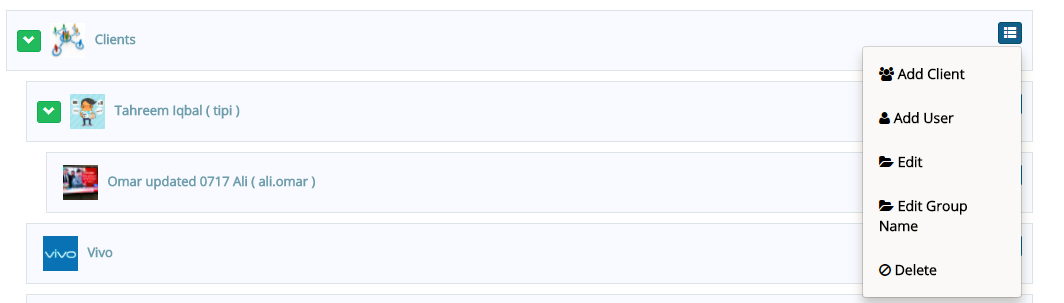
如果有人需要理解的话,我可以进一步解释整个过程。
Stack Overflow用户
发布于 2018-01-05 07:21:49
为了实现以下结构,添加了属性名$parentNodesScope以获取父索引,因此我添加了{{this.$parentNodesScope.$parentNodesScope.$index+1}}. {{this.$parentNodesScope.$index+1}}. {{$index+1}} {{node.title}}
1行政
1.1 -用户管理
1.1.1 -技术支助行政
1.1.1.1
1.2
1.2.1
1.3 -客户管理
1.3.1 -客户1
1.3.2 -客户2
2个用户
2.1 -用户1
2.2 -用户2
2.3 -用户3
这是我的jsfiddle链接小提琴
Stack Overflow用户
发布于 2017-01-27 12:24:32
我用类似的方法解决了问题。我不记得为什么不使用ui树了。我需要的是一种递归创建视图的方法,以便能够模拟文件系统。这是我在校对的时候发出的响声。,这对您来说应该更简单,因为您没有像我一样尝试拆分文件和文件夹。
使用递归助手,我能够像这样声明我的数据结构:
$scope.items = [
  new File('item1', '/item1', 11, false),
  new File('item2', '/item2', 22, true),
  new File('item3', '/item3', 33, false),
  new File('A Really Long File Name Should Go Here', '/item4', 44, false),
  new Folder('Folder 1', '/folder1', [new File('item5', '/item5', 55, false)], false)
];
我可以用这个来渲染
<table class="table table-condensed table-responsive">
<tbody>
    <tr>
      <th></th>
      <th>Name</th>
      <th>Size</th>
      <th></th>
    </tr>
    <tr ng-repeat="item in getFiles()">
      <td class="minWidth4px">
        <input type="checkbox" ng-model="item.isSelected" />
      </td>
      <td class="truncateName">
        {{item.name}}
      </td>
      <td class="minWidth4px">{{item.size}}mb</td>
      <td ng-show="item.canPreview()" class="minWidth4px">
        <button class="btn" ng-click="openPreview(item)">Preview</button>
      </td>
    </tr>
    <tr ng-repeat="item in getFolders()" ng-click="openFolder(item)">
      <td class="minWidth4px">
        <i ng-show="item.isOpen" class="fa fa-folder-open-o"></i>
        <i ng-hide="item.isOpen" class="fa fa-folder-o"></i>
      </td>
      <td colspan="3">
        <label>{{item.name}}</label>
        <attachments ng-show="item.isOpen" items="item.items"></attachments>
      </td>
    </tr>
  </tbody>
</table>
这是关于攻击的指令:
var attachmentsLink = function($scope) {
  $scope.openFolder = function(folder) {
    folder.isOpen = !folder.isOpen;
    console.log(folder);
  };

  $scope.getFiles = function() {
    return $scope.items.filter(function(x) {
      return x instanceof File;
    });
  };

  $scope.getFolders = function() {
    return $scope.items.filter(function(x) {
      return x instanceof Folder;
    });
  };
};

var attachmentsController = function($scope, previewService){
  $scope.openPreview = function(file) {
    previewService.preview = file;
    previewService.showPreview = true;
  };
};

var attachments = function(RecursionHelper) {
  return {
    compile: function(element) {
      return RecursionHelper.compile(element, attachmentsLink);
    },
    controller: attachmentsController,
    restrict: 'E',
    scope: {
      items:'=',
    },
    templateUrl: 'attachments.html'
  };
};

angular.module("app").directive("attachments", attachments);我不能把递归助手的作用归功于它。递归助手是这里希望,这很有帮助。
https://stackoverflow.com/questions/41873982
复制相似问题
腾讯云开发者

Copyright © 2013 - 2026 Tencent Cloud. All Rights Reserved. 腾讯云 版权所有
深圳市腾讯计算机系统有限公司 ICP备案/许可证号:粤B2-20090059  粤公网安备44030502008569号
腾讯云计算(北京)有限责任公司 京ICP证150476号 | 京ICP备11018762号