
角度ui-网格列下拉选择筛选器
角度ui-网格列下拉选择筛选器
提问于 2016-12-13 18:54:05
我正在尝试为角用户界面网格制作一个下拉过滤器。我最初找到了“如何操作”(How)的文章“这里”,在无法工作的情况下,我回到了来源,尝试使用它。我仍然没有成功。列过滤器看起来就像一个普通的过滤器,没有任何下拉列表。有人能帮我修一下吗?
栏def:
{
 field: 'sex'
 , displayName: 'SEX'
 , width: '120'
 , type: uiGridConstants.filter.SELECT
 , filter: { selectOptions: [ { value: 'male', label: 'male' }, { value: 'female', label: 'female' } ]  }
}
这就是它的外观(如果我单击输入,它只接受文本)
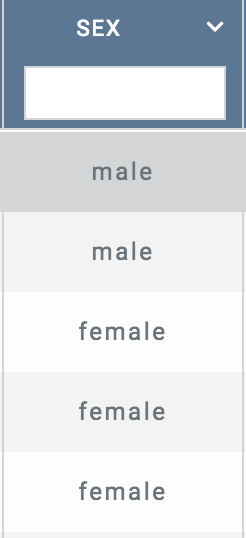
还有什么东西我遗漏了吗?
-更新我的整个装置
//options for the main grid
      $scope.gridOptions = {
        enableFiltering: true,
        multiSelect: false,
        onRegisterApi: function(gridApi){
          $scope.gridApi = gridApi; //so we can use gridapi functions of ui-grid

          //handler for clicking rows and getting row object
          gridApi.selection.on.rowSelectionChanged($scope, function(row){
            thisRow = gridApi.selection.getSelectedRows() //gets the clicked row object
            console.log(thisRow[0].uniqueId)

          });
        },
        data: 'myData'
        , rowTemplate: rowTemplate()
        , columnDefs: [
          {
            field: 'alert'
            , displayName: 'ALERTS'
            , width: '70'
            , headerCellClass: $scope.highlightFilteredHeader
            ,sort: {
                direction: uiGridConstants.DESC,
                priority: 1
              }

          },
          {
            field: 'firstName'
            , displayName: 'FIRST NAME'
            ,  width: '130'
            , headerCellClass: $scope.highlightFilteredHeader

          },
          {

            field: 'lastName'
            , displayName: 'LAST NAME'
            ,  width: '130'
            , headerCellClass: $scope.highlightFilteredHeader
          },
          {
            field: 'dob'
            , displayName: 'DOB'
            ,  width: '130'
            , headerCellClass: $scope.highlightFilteredHeader
          },
          {

            field: 'careCoordinatorName'
            , displayName: 'Care Coordinator Name'
            , width: '130'
            , headerCellClass: $scope.highlightFilteredHeader
          },
          {
            field: 'userStatus'
            , displayName: 'STATUS'
            , width: '130'
            , headerCellClass: $scope.highlightFilteredHeader
          },
          {
            field: 'homeNum'
            , displayName: 'PATIENT HOME #'
            , width: '130'
            , headerCellClass: $scope.highlightFilteredHeader
          },
          {
            field: 'cellNum'
            , displayName: 'PATIENT CELL #'
            , width: '130'
            , headerCellClass: $scope.highlightFilteredHeader
          },
          {
            field: 'mi'
            , displayName: 'MI'

            , width: '60'
            , headerCellClass: $scope.highlightFilteredHeader
          },
          {
            field: 'sex'
            , displayName: 'SEX'
            , width: '120'
            , type: uiGridConstants.filter.SELECT
            , filter: { selectOptions: [ { value: 'male', label: 'male' }, { value: 'female', label: 'female' } ]  }
          }

        ]

      };
行模板(如果相关):
function rowTemplate() {
        return '<div ng-dblclick="grid.appScope.rowDblClick(row)" ng-repeat="(colRenderIndex, col) in colContainer.renderedColumns track by col.uid" ui-grid-one-bind-id-grid="rowRenderIndex + \'-\' + col.uid + \'-cell\'" class="ui-grid-cell" ng-class="{ \'ui-grid-row-header-cell\': col.isRowHeader }" role="{{col.isRowHeader ? \'rowheader\' : \'gridcell\'}}" ui-grid-cell></div>';
      }
网格HTML
<div id="grid1" ui-grid="gridOptions" ui-grid-importer class="grid" ui-grid-resize-columns ui-grid-move-columns ui-grid-auto-resize ui-grid-edit ui-grid-selection ui-grid-cellNav ui-grid-paging external-scopes="gridHandlers"></div>-更新2-更新2-更新2
{
field: 'sex',
displayName: 'SEX',
width: '120',
//type: uiGridConstants.filter.SELECT,
filter: {
    type: uiGridConstants.filter.SELECT, // <- move this to here
    selectOptions: [
        { value: 'male', label: 'male' },
        { value: 'female', label: 'female' }
    ]
}
}
这就是我的专栏现在的样子(左边是另一列供比较)。
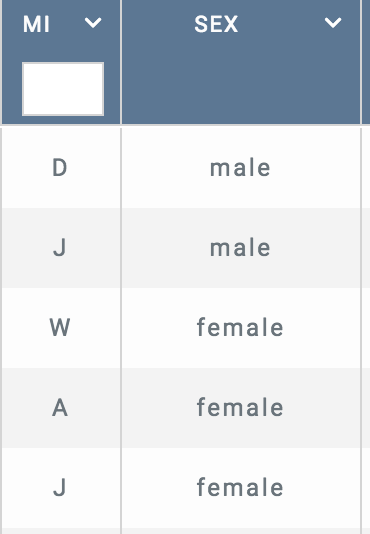
--更新3-更新3所以不,我们知道它在那里,它只是没有表现出来
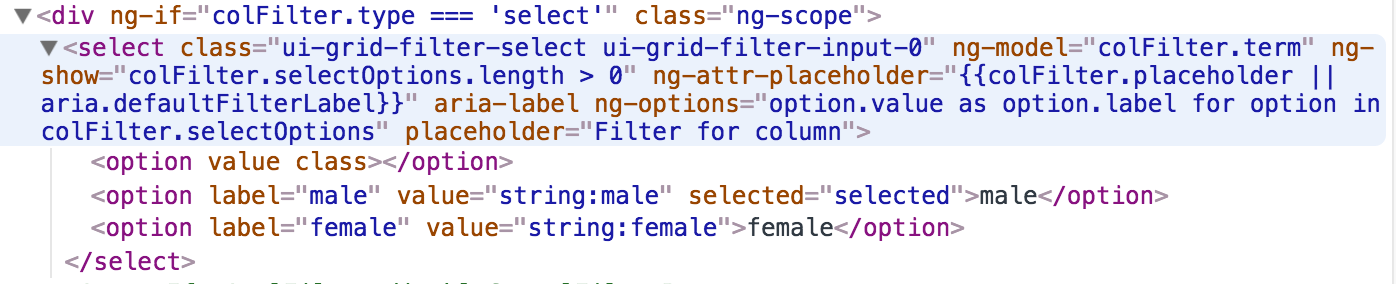
--更新4-4它一直都在那里
  select {
display: inline !important;
height: 15px !important;
}
解决了这个问题
回答 1
Stack Overflow用户
回答已采纳
发布于 2016-12-14 12:26:24
啊,我想你的问题是,这种类型的选择是在错误的位置。为了提高可读性,我对代码做了一些扩展;如果对象太压缩,您很容易就会迷失在其中。
你所拥有的:
{
    field: 'sex',
    displayName: 'SEX',
    width: '120',
    type: uiGridConstants.filter.SELECT,
    filter: {
        selectOptions: [
            { value: 'male', label: 'male' },
            { value: 'female', label: 'female' }
        ]
    }
}
它应该是什么:
{
    field: 'sex',
    displayName: 'SEX',
    width: '120',
    //type: uiGridConstants.filter.SELECT,
    filter: {
        type: uiGridConstants.filter.SELECT, // <- move this to here
        selectOptions: [
            { value: 'male', label: 'male' },
            { value: 'female', label: 'female' }
        ]
    }
}页面原文内容由Stack Overflow提供。腾讯云小微IT领域专用引擎提供翻译支持
原文链接:
https://stackoverflow.com/questions/41128531
复制相关文章
相似问题
腾讯云开发者

Copyright © 2013 - 2026 Tencent Cloud. All Rights Reserved. 腾讯云 版权所有
深圳市腾讯计算机系统有限公司 ICP备案/许可证号:粤B2-20090059  粤公网安备44030502008569号
腾讯云计算(北京)有限责任公司 京ICP证150476号 | 京ICP备11018762号