
无法使VisualStateGroup.Transitions在模板化控件中工作
我正在创建一个模板控件。其想法是创建一个扩展的控制。它将有一个头部和一个Details属性,每个属性对应于一个ContentPresenter。用户将能够点击标题和细节部分将展开一个动画。当用户再次点击标题时,Details部分将使用另一个动画进行还原。
我正在使用Visual和VisualTransitions来实现这一点。这是我的密码。
[TemplatePart(Name ="Header", Type=typeof(ContentPresenter))]
[TemplatePart(Name = "Details", Type = typeof(ContentPresenter))]
[TemplateVisualState(GroupName ="ExpandStates",Name ="Expanded")]
[TemplateVisualState(GroupName = "ExpandStates", Name = "Compact")]
public sealed class ExpandingItem : Control
{

    private ContentPresenter header;
    private bool isExpanded;

    public ExpandingItem()
    {
        this.DefaultStyleKey = typeof(ExpandingItem);
    }

    public FrameworkElement Header
    {
        get { return (FrameworkElement)GetValue(HeaderProperty); }
        set { SetValue(HeaderProperty, value); }
    }

    // Using a DependencyProperty as the backing store for Header.  This enables animation, styling, binding, etc...
    public static readonly DependencyProperty HeaderProperty =
        DependencyProperty.Register("Header", typeof(FrameworkElement), typeof(ExpandingItem), new PropertyMetadata(default(FrameworkElement)));


    public FrameworkElement Details
    {
        get { return (FrameworkElement)GetValue(DetailsProperty); }
        set { SetValue(DetailsProperty, value); }
    }

    // Using a DependencyProperty as the backing store for Details.  This enables animation, styling, binding, etc...
    public static readonly DependencyProperty DetailsProperty =
        DependencyProperty.Register("Details", typeof(FrameworkElement), typeof(ExpandingItem), new PropertyMetadata(default(FrameworkElement)));


    protected override void OnApplyTemplate()
    {
        if (header != null)
        {
            header.Tapped -= HeaderTapped;
        }

        base.OnApplyTemplate();

        header = (ContentPresenter)GetTemplateChild("Header");
        header.Tapped += HeaderTapped;
    }

    private void HeaderTapped(object sender, TappedRoutedEventArgs e)
    {
        if (isExpanded)
        {
            Retract();
            OnStateChanged(new ExpandItemEventArgs(false));
        }
        else
        {
            Expand();
            OnStateChanged(new ExpandItemEventArgs(true));
        }
        isExpanded = !isExpanded;
    }


    public void Expand()
    {
        VisualStateManager.GoToState(this, "Expanded", true);
    }

    public void Retract()
    {
        VisualStateManager.GoToState(this, "Compact", true);
    }

    public EventHandler<ExpandItemEventArgs> StateChanged;
    private void OnStateChanged(ExpandItemEventArgs e)
    {
        // Make a temporary copy of the event to avoid possibility of
        // a race condition if the last subscriber unsubscribes
        // immediately after the null check and before the event is raised.
        EventHandler<ExpandItemEventArgs> handler = StateChanged;

        // Event will be null if there are no subscribers
        if (handler != null)
        {
            handler(this, e);
        }
    }
}
和模板
<Style TargetType="controls:ExpandingItem" >
    <Setter Property="Template">
        <Setter.Value>
            <ControlTemplate TargetType="controls:ExpandingItem">
                <Grid>
                    <Grid.RowDefinitions>
                        <RowDefinition Height="Auto"/>
                        <RowDefinition Height="Auto"/>
                    </Grid.RowDefinitions>
                    <VisualStateManager.VisualStateGroups>
                        <VisualStateGroup x:Name="ExpandStates">
                            <VisualStateGroup.Transitions>
                                <VisualTransition From="Compact" To="Expanded">
                                    <VisualTransition.Storyboard>
                                        <Storyboard>
                                            <FadeInThemeAnimation
                                                TargetName="Details"/>
                                        </Storyboard>
                                    </VisualTransition.Storyboard>
                                </VisualTransition>
                                <VisualTransition From="Expanded" To="Compact">
                                    <VisualTransition.Storyboard>
                                        <Storyboard>
                                            <FadeOutThemeAnimation
                                                TargetName="Details"/>
                                        </Storyboard>
                                    </VisualTransition.Storyboard>
                                </VisualTransition>
                            </VisualStateGroup.Transitions>
                            <VisualState x:Name="Compact"/>

                            <VisualState x:Name="Expanded">
                                <VisualState.Setters>
                                    <Setter Target="Details.Visibility" Value="Visible"/>
                                </VisualState.Setters>
                                <Storyboard>
                                    <FadeInThemeAnimation
                                                TargetName="Details"/>
                                </Storyboard>
                            </VisualState>

                        </VisualStateGroup>
                    </VisualStateManager.VisualStateGroups>


                    <ContentPresenter
                        x:Name="Header"
                        Grid.Row="0"
                        Content="{TemplateBinding Header}"/>

                    <ContentPresenter
                        x:Name="Details"
                        Grid.Row="1"
                        Content="{TemplateBinding Details}"
                        Visibility="Collapsed"/>

                </Grid>

            </ControlTemplate>
        </Setter.Value>
    </Setter>
</Style>
我使用fadein/fadeout动画,因为它是一个简单的动画,但理想的情况下,我想使用像分裂打开/分割关闭动画。
问题是,即使各州之间的过渡正常进行。动画片永远不会发生。你能帮我找出问题吗?
编辑:这是ExpandItemEventArgs的代码
 public class ExpandItemEventArgs : EventArgs
{
    private readonly bool isExpanded;

    public ExpandItemEventArgs(bool isExpanded)
    {
        this.isExpanded = isExpanded;
    }

    public bool IsExpanded => isExpanded;
}回答 1
Stack Overflow用户
发布于 2016-11-16 13:28:16
问题是,即使各州之间的过渡正常进行。动画片永远不会发生。你能帮我找出问题吗?
这是因为您的VisualTransition From="Compact" To="Expanded",最初您没有让您的控件进入名为Compact的VisualState。当您<VisualTransition From="Expanded" To="Compact">时,由于您没有为您的Details设置Visibility属性,它将擦除最后一个VisualState并直接返回到折叠状态,动画将不会显示。
在这里,我修改了您的代码,为了更明显地使动画淡入和淡出,我还修改了动画:
<Style TargetType="local:ExpandingItem">
    <Setter Property="Template">
        <Setter.Value>
            <ControlTemplate TargetType="local:ExpandingItem">
                <Grid Name="RootGrid">
                    <Grid.RowDefinitions>
                        <RowDefinition Height="Auto" />
                        <RowDefinition Height="Auto" />
                    </Grid.RowDefinitions>
                    <VisualStateManager.VisualStateGroups>
                        <VisualStateGroup x:Name="ExpandStates">
                            <VisualStateGroup.Transitions>
                                <VisualTransition To="Expanded" GeneratedDuration="0:0:3">
                                    <Storyboard x:Name="FadeIn">
                                        <DoubleAnimation From="0.1" To="1" Storyboard.TargetProperty="Opacity"
                                            Storyboard.TargetName="Details" Duration="0:0:3">
                                            <DoubleAnimation.EasingFunction>
                                                <CubicEase />
                                            </DoubleAnimation.EasingFunction>
                                        </DoubleAnimation>
                                    </Storyboard>
                                </VisualTransition>
                                <VisualTransition From="Expanded" To="Compact" GeneratedDuration="0:0:2.5">
                                    <VisualTransition.Storyboard>
                                        <Storyboard x:Name="FadeOut">
                                            <DoubleAnimation From="1" To="0.1" Storyboard.TargetProperty="Opacity"
                                                Storyboard.TargetName="Details" Duration="0:0:3">
                                                <DoubleAnimation.EasingFunction>
                                                    <CubicEase />
                                                </DoubleAnimation.EasingFunction>
                                            </DoubleAnimation>
                                        </Storyboard>
                                    </VisualTransition.Storyboard>
                                </VisualTransition>
                            </VisualStateGroup.Transitions>

                            <VisualState x:Name="Normal">
                                <VisualState.Setters>
                                    <Setter Target="Details.Visibility" Value="Visible" />
                                </VisualState.Setters>
                            </VisualState>

                            <VisualState x:Name="Compact">
                                <VisualState.Setters>
                                    <Setter Target="Details.Visibility" Value="Collapsed" />
                                </VisualState.Setters>
                            </VisualState>

                            <VisualState x:Name="Expanded">
                                <VisualState.Setters>
                                    <Setter Target="Details.Visibility" Value="Visible" />
                                </VisualState.Setters>
                            </VisualState>
                        </VisualStateGroup>
                    </VisualStateManager.VisualStateGroups>

                    <ContentPresenter
                    x:Name="Header"
                    Grid.Row="0"
                    Content="{TemplateBinding Header}" />

                    <ContentPresenter
                    x:Name="Details"
                    Grid.Row="1"
                    Content="{TemplateBinding Details}" />
                </Grid>
            </ControlTemplate>
        </Setter.Value>
    </Setter>
</Style>
我在后面修改的代码:
protected override void OnApplyTemplate()
{
    if (header != null)
    {
        header.Tapped -= HeaderTapped;
    }

    base.OnApplyTemplate();

    VisualStateManager.GoToState(this, "Compact", true); //Go to compact state at first

    header = (ContentPresenter)GetTemplateChild("Header");
    header.Tapped += HeaderTapped;
}

public void Expand()
{
    VisualStateManager.GoToState(this, "Normal", true); //Go to Normal state firstly when it expanded, in order to make it visible.
    VisualStateManager.GoToState(this, "Expanded", true);
}
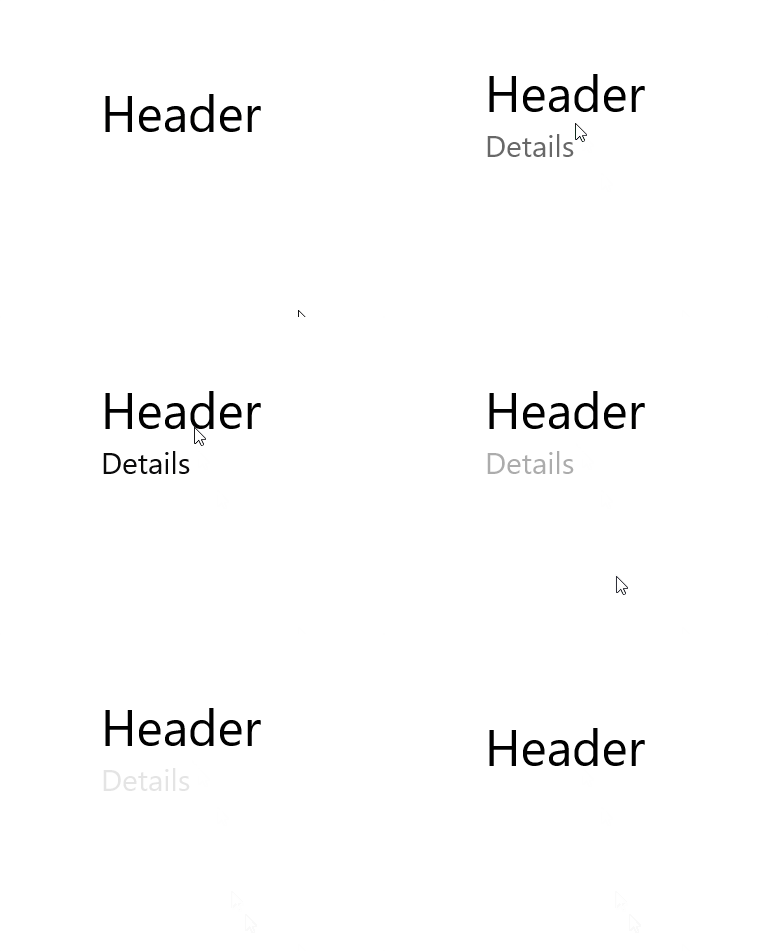
绘制图像:
https://stackoverflow.com/questions/40615285
复制相似问题
腾讯云开发者

Copyright © 2013 - 2026 Tencent Cloud. All Rights Reserved. 腾讯云 版权所有
深圳市腾讯计算机系统有限公司 ICP备案/许可证号:粤B2-20090059  粤公网安备44030502008569号
腾讯云计算(北京)有限责任公司 京ICP证150476号 | 京ICP备11018762号