
iOS10,相机许可-用于“相机应用程序”的黑色屏幕
当然,对于iOS 10,您现在必须这样做。

用手机的摄像头。在第一次启动时,用户会得到一个问题,例如,
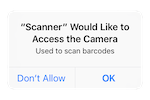
一切都很好。
但我们有一个客户端应用程序,它是一个“相机应用程序”:当你启动应用程序,它只是立即启动相机,当应用程序运行,相机运行,并显示全屏。这样做的代码是通常的方式,如下所示。
问题是--第一次在手机上发布应用程序时,用户会被问到这个问题;用户说是的。但是,在我们尝试过的设备上,摄像头是黑色的。它不会崩溃(如果你忘记了这个项目,它就会崩溃),但它会变黑,并保持黑色。
如果用户退出该应用程序并再次启动它--这很好,一切都正常。
,“相机应用程序”的工作流程到底是什么?我看不出一个好的解决方案,但必须有一个适用于各种相机应用程序的解决方案--当你启动该应用程序时,它会立即进入全屏摄像头。
class CameraPlane:UIViewController
    {
    ...
    func cameraBegin()
        {
        captureSession = AVCaptureSession()
        captureSession!.sessionPreset = AVCaptureSessionPresetPhoto

        let backCamera = AVCaptureDevice.defaultDevice(withMediaType: AVMediaTypeVideo)

        var error: NSError?
        var input: AVCaptureDeviceInput!
        do {
            input = try AVCaptureDeviceInput(device: backCamera)
            } catch let error1 as NSError
                {
                error = error1
                input = nil
                }

        if ( error != nil )
            {
            print("probably on simulator? no camera?")
            return;
            }

        if ( captureSession!.canAddInput(input) == false )
            {
            print("capture session problem?")
            return;
            }

        captureSession!.addInput(input)

        stillImageOutput = AVCaptureStillImageOutput()
        stillImageOutput!.outputSettings = [AVVideoCodecKey: AVVideoCodecJPEG]

        if ( captureSession!.canAddOutput(stillImageOutput) == false )
            {
            print("capture session with stillImageOutput problem?")
            return;
            }

        captureSession!.addOutput(stillImageOutput)
        previewLayer = AVCaptureVideoPreviewLayer(session: captureSession)
        previewLayer!.videoGravity = AVLayerVideoGravityResizeAspectFill
                                        // or, AVLayerVideoGravityResizeAspect

        fixConnectionOrientation()

        view.layer.addSublayer(previewLayer!)
        captureSession!.startRunning()
        previewLayer!.frame = view.bounds
}回答 2
Stack Overflow用户
发布于 2016-10-03 20:10:41
注意:--很可能OP的代码在新的ISO10权限字符串方面是正确工作的,并且OP还有另一个导致黑屏幕的问题。
从你发布的代码来看,我不知道你为什么会有这种行为。我只能告诉你对我有用的代码。
这段代码也运行在iOS 9上。请注意,我正在viewDidAppear中加载摄像机,以确保设置了所有约束。
import AVFoundation

class ViewController : UIViewController {

    //the view where the camera feed is shown
    @IBOutlet weak var cameraView: UIView!

    var captureSession: AVCaptureSession = {
        let session = AVCaptureSession()
        session.sessionPreset = AVCaptureSessionPresetPhoto
        return session
    }()
    var sessionOutput = AVCaptureStillImageOutput()
    var previewLayer = AVCaptureVideoPreviewLayer()

    override func viewDidAppear(_ animated: Bool) {
        super.viewDidAppear(animated)

        let devices = AVCaptureDevice.devices(withMediaType: AVMediaTypeVideo) as? [AVCaptureDevice]
        guard let backCamera = (devices?.first {    $0.position == .back    }) else {
            print("The back camera is currently not available")
            return
        }

        do {
            let input = try AVCaptureDeviceInput(device: backCamera)
            if captureSession.canAddInput(input){
                captureSession.addInput(input)
                sessionOutput.outputSettings = [AVVideoCodecKey: AVVideoCodecJPEG]

                if captureSession.canAddOutput(sessionOutput) {
                    captureSession.addOutput(sessionOutput)
                    captureSession.startRunning()

                    previewLayer = AVCaptureVideoPreviewLayer(session: captureSession)
                    previewLayer.videoGravity = AVLayerVideoGravityResizeAspectFill
                    previewLayer.connection.videoOrientation = .portrait
                    cameraView.layer.addSublayer(previewLayer)

                    previewLayer.position = CGPoint(x: cameraView.frame.width / 2, y: cameraView.frame.height / 2)
                    previewLayer.bounds = cameraView.frame
                }
            }
        } catch {
            print("Could not create a AVCaptureSession")
        }
    }
}如果你想让相机显示全屏,你可以用view代替cameraView。在我的相机实现中,相机馈送没有覆盖整个视图,仍然有一些导航内容。
Stack Overflow用户
发布于 2016-10-03 16:34:24
正在发生的事情是,在第一次发射时,您正在激活相机,然后它才能检查权限,并显示适当的UIAlertController。您想要做的是在if语句中包含此代码,以检查相机权限(AVAuthorizationStatus)的状态。如果不允许在显示相机之前请求许可,请确保。有关更多帮助,请参见this question。
https://stackoverflow.com/questions/39836138
复制相似问题
腾讯云开发者

Copyright © 2013 - 2026 Tencent Cloud. All Rights Reserved. 腾讯云 版权所有
深圳市腾讯计算机系统有限公司 ICP备案/许可证号:粤B2-20090059  粤公网安备44030502008569号
腾讯云计算(北京)有限责任公司 京ICP证150476号 | 京ICP备11018762号