
Spring 4+嵌入式Tomcat 7
我尝试使用Spring 4.3.2和嵌入式Tomcat 7.0.64构建一个web应用程序。
我没有成功地编写正确的主方法来启动嵌入式Tomcat。它适用于Spring发送@ResponseBody内容(JSON),但对JSP失败。
public static void main(String[] args) throws Exception {

    String appBase = ".";// What to put here ?

    Tomcat tomcat = new Tomcat();
    String contextPath = "";
    String port = System.getProperty("server.port");
    tomcat.setPort(port == null ? 8080 : Integer.valueOf(port));

    tomcat.getHost().setAppBase(appBase);
    Context context = tomcat.addWebapp(contextPath, appBase);

    // So that it works when in it's launched from IntelliJ or Eclipse
    // Also need that a folder named "META-INF" exists in build/classes/main
    // https://bz.apache.org/bugzilla/show_bug.cgi?id=52853#c19
    ((StandardJarScanner) context.getJarScanner()).setScanAllDirectories(true);

    tomcat.start();
    tomcat.getServer().await();
}
对于JSP视图,它写着:请求的资源不可用(WEB/ view / HTTP .JSP)HTTP 404
如果我将appBase变量设置为JSP所在的绝对路径,它就能工作。但是,当然,这不是一个解决方案,因为它不会在另一台机器上工作。我需要一条相对路径。
如果我将appBase varibale设置为"src/main/webapp",那么Tomcat无法从以下错误开始:java.lang.IllegalArgumentException: Document base C:\blabla\spring-jsp-embedded-tomcat\tomcat.8080\src\main\webapp\src\main\webapp does not exist or is not a readable directory。
此外,使用Gradle fat jar技术构建的jar不包含WEB dir。
如何使一个简单的Spring应用程序与嵌入式Tomcat和JSP一起工作(将与java -cp path/to/my/jar com.app.Launcher一起启动)?
build.gradle :
apply plugin: 'java'

sourceCompatibility = 1.7
version = '1.0'

jar {
    from { configurations.compile.collect { it.isDirectory() ? it : zipTree(it) } }
}

repositories {
    maven { url "http://repo1.maven.org/maven2" }
}

dependencies {

    compile group: 'org.apache.logging.log4j', name: 'log4j-api', version: '2.6.2'
    compile group: 'org.apache.logging.log4j', name: 'log4j-core', version: '2.6.2'
    compile group: 'org.apache.logging.log4j', name: 'log4j-slf4j-impl', version: '2.6.2'

    compile 'org.springframework:spring-webmvc:4.3.2.RELEASE'

    compile 'com.fasterxml.jackson.core:jackson-databind:2.7.0'

    compile 'javax.servlet:javax.servlet-api:3.0.1'
    compile 'javax.servlet.jsp:jsp-api:2.2'
    compile 'javax.servlet:jstl:1.2'

    // Embedded Tomcat
    // 2 mandatory libs
    compile 'org.apache.tomcat.embed:tomcat-embed-core:7.0.64'
    compile 'org.apache.tomcat.embed:tomcat-embed-logging-juli:7.0.64'
    // To enable JSPs
    compile 'org.apache.tomcat.embed:tomcat-embed-jasper:7.0.64'

    testCompile group: 'junit', name: 'junit', version: '4.+'

}
Tomcat发射器:
public class Launcher {

    public static void main(String[] args) throws Exception {
        String contextPath = "";
        // String appBase = "C:/absolute/path/to/webapp/dir"; // It works but of course I need a relative path
        // String appBase = "."; // Works only for Controller sending back ResponseBody (JSON) but fail to find jsp files
        String appBase = "src/main/webapp"; // Tomcat does not start properly

        Tomcat tomcat = new Tomcat();

        String port = System.getProperty("server.port");
        tomcat.setPort(port == null ? 8080 : Integer.valueOf(port));

        tomcat.getHost().setAppBase(appBase);
        Context context = tomcat.addWebapp(contextPath, appBase);

        // So that it works when in it's launched from IntelliJ or Eclipse
        // Also need that a folder named "META-INF" exists in build/classes/main
        // https://bz.apache.org/bugzilla/show_bug.cgi?id=52853#c19
        ((StandardJarScanner) context.getJarScanner()).setScanAllDirectories(true);

        tomcat.start();
        tomcat.getServer().await();
    }

}
Spring应用程序初始化器:
public class MyWebAppInitializer extends AbstractAnnotationConfigDispatcherServletInitializer {

    @Override
    protected String[] getServletMappings() {
        return new String[] { "/" };
    }
    @Override
    protected Class<?>[] getRootConfigClasses() {
        return new Class<?>[] { RootConfig.class };
    }
    @Override
    protected Class<?>[] getServletConfigClasses() {
        return new Class<?>[] { WebConfig.class };
    }

}
WebConfig :
@Configuration
@EnableWebMvc
@ComponentScan("com.app")
public class WebConfig extends WebMvcConfigurerAdapter {

    @Bean
    public ViewResolver viewResolver() {
        InternalResourceViewResolver resolver = new InternalResourceViewResolver();
        resolver.setPrefix("/WEB-INF/views/");
        resolver.setSuffix(".jsp");
        resolver.setExposeContextBeansAsAttributes(true);
        return resolver;
    }

    @Override
    public void configureDefaultServletHandling(DefaultServletHandlerConfigurer configurer) {
        configurer.enable();
    }

}
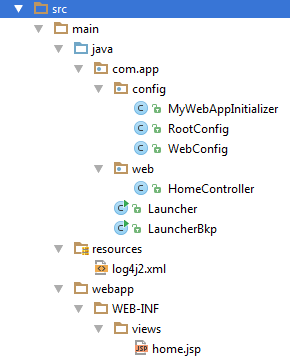
文件夹结构:
回答 1
Stack Overflow用户
发布于 2016-09-01 08:42:23
显然,嵌入式Tomcat期望静态资源位于META-INF/resources目录中。我遵循以下步骤:教程和我检查了最后一个jar是如何构造的。
因此,我修改了Gradle构建脚本,将JSP放在那里。
sourceSets {
    main {
        resources.srcDirs = ["src/main/webapp"]
        output.resourcesDir = "$buildDir/classes/main/META-INF/resources"
    }
}
现在起作用了。然而,我觉得这是一份临时的工作。如果有人有一个更令人满意和教育的答案,我会很高兴得到它。
https://stackoverflow.com/questions/39253813
复制相似问题
腾讯云开发者

Copyright © 2013 - 2026 Tencent Cloud. All Rights Reserved. 腾讯云 版权所有
深圳市腾讯计算机系统有限公司 ICP备案/许可证号:粤B2-20090059  粤公网安备44030502008569号
腾讯云计算(北京)有限责任公司 京ICP证150476号 | 京ICP备11018762号