
不能初始化Git Bash。
不能初始化Git Bash。
提问于 2016-07-21 04:35:32
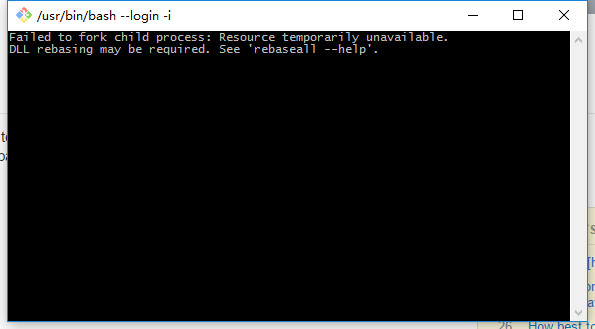
当我使用git时,它说:“未能分叉子进程:可能需要临时重新设置unavailable.DLL资源。请参见'rebaseall --帮助‘。”我怎样才能解决这个问题?
当我使用tortoiseGit存储时,我收到了这样的消息
> git.exe stash save -- "12"

0 [main] sh (7224) D:\Program Files (x86)\Git\usr\bin\sh.exe: *** fatal error - cygheap base mismatch detected - 0x1360400/0x12F0400.
This problem is probably due to using incompatible versions of the cygwin DLL.
Search for cygwin1.dll using the Windows Start->Find/Search facility
and delete all but the most recent version.  The most recent version *should*
reside in x:\cygwin\bin, where 'x' is the drive on which you have
installed the cygwin distribution.  Rebooting is also suggested if you
are unable to find another cygwin DLL.
0 [main] sh 13140 fork: child -1 - forked process 7224 died unexpectedly, retry 0, exit code 0xC0000142, errno 11
D:\Program Files (x86)\Git\mingw32/libexec/git-core\git-stash: fork: retry: No child processes 回答 4
Stack Overflow用户
回答已采纳
发布于 2016-07-21 06:10:50
尝试使用可移植版本的Git for Windows 2.9.2:
- 在您想要的任何地方解压缩
PortableGit-2.9.2-64-bit.7z.exe(比如D:\git\git2.9.2), - 从路径中删除与
D:\Program Files (x86)\Git相关的路径 - 添加到您的路径
D:\git\git2.9.2;D:\git\git2.9.2\bin;D:\git\git2.9.2\cmd;D:\git\git2.9.2\usr\bin
然后,在CMD会议上:
- cd到git回购
- 键入
bash -i --login并检查bash是否正常工作
Stack Overflow用户
发布于 2017-01-19 08:52:19
一天早上,我也遇到了同样的问题。我试图卸载Git,只是为了查看它是否损坏,它指示我关闭一些像任务管理器中的sh.exe这样的进程。在我杀了他们之后,我成功地打开了Git bash。
干杯!
Stack Overflow用户
发布于 2018-01-29 16:03:52
这是解决办法。
- 转到Windows维护者安全中心设置
- 点击App & Browser控件
- 在底部单击“利用保护设置”链接
- 转到“程序设置”并单击“添加程序以自定义”->“选择确切的文件路径”
- 添加“C:\ProgramFiles\Git\usr\bin\sh.exe”和“C:\ProgramFiles\Git\usr\bin\bash.exe”
- 覆盖并关闭以下内容:强制ASLR、随机内存分配(自下而上的ASLR)
- 点击“应用”,现在一切都会正常工作。
还从同一个文件夹中添加这些其他二进制文件: expr.exe、uname.exe、grep.exe、rm.exe
祝好运,
加布里埃尔
页面原文内容由Stack Overflow提供。腾讯云小微IT领域专用引擎提供翻译支持
原文链接:
https://stackoverflow.com/questions/38494951
复制相关文章
相似问题
腾讯云开发者

Copyright © 2013 - 2026 Tencent Cloud. All Rights Reserved. 腾讯云 版权所有
深圳市腾讯计算机系统有限公司 ICP备案/许可证号:粤B2-20090059  粤公网安备44030502008569号
腾讯云计算(北京)有限责任公司 京ICP证150476号 | 京ICP备11018762号