
如何通过API调用- Laravel 5在URL中加载播放机名称
我想在我的URL中显示一个玩家游戏标签。我遇到的麻烦是,我不知道如何在搜索框中请求游戏标记,因为我是通过API调用请求玩家标记的。
现在我就是这样称呼这条路线的:
    Route::post('/Player/Stats', [
        'as' => 'player-stats',
        'uses' => 'StatsController@index'
    ]);
/-----------------------
// this is how I set up my search box for home page
<form action="{{ route('player-stats') }}" method="POST">
      {!! csrf_field() !!}
      <input type="text" name="gamertag" id="gamertag" class="form-control" title="Gamer-tag" style="width:40%" required>
      <button class="btn btn-lg btn-primary" type="submit">Find</button>
 </form>
这就是它的样子:

我想要的是这样:
Route::post('/Player/Stats/{gamertag}', [
   'as' => 'player-stats',
   'uses' => 'StatsController@index'
]);
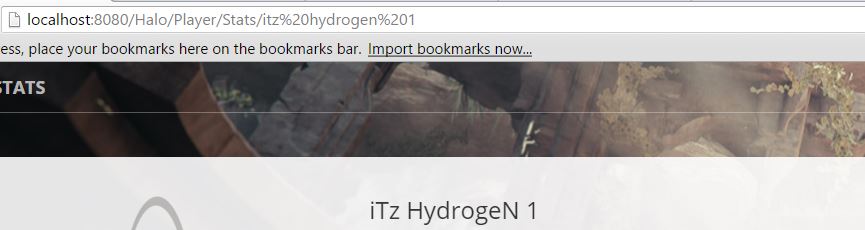
我不能在我的动作中这样做:
Action=“{路由(‘player-stats’,$gamertag })”
因为$gamertag不在任何地方存储
回答 1
Stack Overflow用户
发布于 2016-05-14 06:47:37
这里的麻烦与其说与PHP有关,不如说与JavaScript有关。
您需要使用由history API提供的HTML5。这将允许您将states推送/弹出历史记录。这最终意味着您将能够修改URL地址。
让我们来看看这意味着什么。我们将假设您通过从搜索输入的表单提交中触发的ajax请求从控制器返回一个JSON对象。
public function MyController(Request $request){
    $model = Models::where('key', $request->get('value'))->first();
    return response()->json($model);
}
当然,相关的Ajax和jQuery。
$('form').on('submit', function(e){
    e.preventDefault();
    $.ajax({
         //props
         dataType: 'json'
    }).done(function(response){
        //magic
        history.pushState(null, null, 'Player/stats/'+response.gamertag);
    });
});history.pushState将在这里做的是修改pushState并根据pushState函数的第三个参数修改它。备注您不能更改域名,因此只有在FQDN (如http://example.com )之后才会对URL进行操作。但是,您确实需要在FQDN之后提供full path作为第三个参数。
.pushState()的第一个参数是data。然后,您可以将ajax response object存储在这个状态中。当用户在浏览器中单击back时,popState事件会触发,允许我们访问状态。让我们来看看这个。
$(window).on('popState', function(e){
    //e.state contains the data, otherwise e.originalEvent.state will.
});最常见的用例是将ajax response存储在状态中,所以当单击浏览器中的返回时,只需重新执行在.done()响应中所做的任何操作。让我们看看
var $results_container = $('.results-container');
function showResults(response){
    //parsing and logic here to handle the ajax response and "Show Results"

    $results_container.empty();
    $.each(response.row, function(i, row){
        $results_container.append(row);
    });
}现在,在您的ajax .done()函数中,您可以将响应传递给我们的函数。
.done(function(response){
    showResults(response);
});但是,我们现在也可以在我们的popState()函数中这样做。
$(window).on('popstate', function(e){
    showResults(e.state);

    //or maybe it's showResults(e.originalEvent.state)
    //honestly can't remember
});
希望这能让你朝正确的方向走。
https://stackoverflow.com/questions/37222314
复制相似问题
腾讯云开发者

Copyright © 2013 - 2026 Tencent Cloud. All Rights Reserved. 腾讯云 版权所有
深圳市腾讯计算机系统有限公司 ICP备案/许可证号:粤B2-20090059  粤公网安备44030502008569号
腾讯云计算(北京)有限责任公司 京ICP证150476号 | 京ICP备11018762号