
如何改变UIImage/UIImageView单个像素的颜色
我有一个应用过滤器的UIImageView:
testImageView.layer.magnificationFilter = kCAFilterNearest;所以单个像素是可见的。这个UIImageView在一个UIScrollView中,图像本身是1000x1000。我使用了以下代码来检测哪个像素已被窃听:
我首先设置了一个点击手势识别器:
UITapGestureRecognizer *scrollTap = [[UITapGestureRecognizer alloc] initWithTarget:self action:@selector(singleTapGestureCaptured: )];
scrollTap.numberOfTapsRequired = 1;
[mainScrollView addGestureRecognizer:scrollTap];
然后使用抽头的位置来生成点击UIImageView像素的抽头的坐标:
- (void)singleTapGestureCaptured:(UITapGestureRecognizer *)gesture
{
    CGPoint touchPoint = [gesture locationInView:testImageView];

    NSLog(@"%f is X pixel num, %f is Y pixel num ; %f is width of imageview", (touchPoint.x/testImageView.bounds.size.width)*1000, (touchPoint.y/testImageView.bounds.size.width)*1000, testImageView.bounds.size.width);

}
我希望能够点击一个像素,并有它的颜色变化。然而,我发现的StackOverflow帖子中没有一篇给出了有用或不过时的答案。然而,对于技术熟练的编码人员,您可能可以帮助我破译旧的帖子,使其工作,或者使用我上面的代码自行生成一个简单的修复程序,以检测UIImageView的哪个像素已经被窃听。
所有的帮助都是感激的。
编辑originaluser2:
在跟踪原始用户2的文章之后,当我在物理设备上运行他的示例GitHub项目时,代码运行的非常好。但是,当我在自己的应用程序中运行相同的代码时,会遇到被替换为空白的图像,以及以下错误:
<Error>: Unsupported pixel description - 3 components, 16 bits-per-component, 64 bits-per-pixel
<Error>: CGBitmapContextCreateWithData: failed to create delegate.
<Error>: CGContextDrawImage: invalid context 0x0. If you want to see the backtrace, please set CG_CONTEXT_SHOW_BACKTRACE environmental variable.
<Error>: CGBitmapContextCreateImage: invalid context 0x0. If you want to see the backtrace, please set CG_CONTEXT_SHOW_BACKTRACE environmental variable.
代码显然是有效的,正如我在手机上测试它所显示的那样。但是,相同的代码在我自己的项目中产生了一些问题。虽然我怀疑它们都是由一两个简单的中心问题引起的。我如何解决这些错误?
回答 2
Stack Overflow用户
发布于 2016-04-12 19:46:39
您将希望将此问题分解为多个步骤。
- 获取图像坐标系中接触点的坐标。
- 获取像素的x和y位置以更改
- 创建位图上下文并用新颜色的组件替换给定像素的组件。
首先,要获取图像坐标系中接触点的坐标,可以使用我在UIImageView上编写的类别方法。这将返回一个CGAffineTransform,它将一个点从视图坐标映射到图像坐标--取决于视图的内容模式。
@interface UIImageView (PointConversionCatagory)

@property (nonatomic, readonly) CGAffineTransform viewToImageTransform;
@property (nonatomic, readonly) CGAffineTransform imageToViewTransform;

@end

@implementation UIImageView (PointConversionCatagory)

-(CGAffineTransform) viewToImageTransform {

    UIViewContentMode contentMode = self.contentMode;

    // failure conditions. If any of these are met – return the identity transform
    if (!self.image || self.frame.size.width == 0 || self.frame.size.height == 0 ||
        (contentMode != UIViewContentModeScaleToFill && contentMode != UIViewContentModeScaleAspectFill && contentMode != UIViewContentModeScaleAspectFit)) {
        return CGAffineTransformIdentity;
    }

    // the width and height ratios
    CGFloat rWidth = self.image.size.width/self.frame.size.width;
    CGFloat rHeight = self.image.size.height/self.frame.size.height;

    // whether the image will be scaled according to width
    BOOL imageWiderThanView = rWidth > rHeight;

    if (contentMode == UIViewContentModeScaleAspectFit || contentMode == UIViewContentModeScaleAspectFill) {

        // The ratio to scale both the x and y axis by
        CGFloat ratio = ((imageWiderThanView && contentMode == UIViewContentModeScaleAspectFit) || (!imageWiderThanView && contentMode == UIViewContentModeScaleAspectFill)) ? rWidth:rHeight;

        // The x-offset of the inner rect as it gets centered
        CGFloat xOffset = (self.image.size.width-(self.frame.size.width*ratio))*0.5;

        // The y-offset of the inner rect as it gets centered
        CGFloat yOffset = (self.image.size.height-(self.frame.size.height*ratio))*0.5;

        return CGAffineTransformConcat(CGAffineTransformMakeScale(ratio, ratio), CGAffineTransformMakeTranslation(xOffset, yOffset));
    } else {
        return CGAffineTransformMakeScale(rWidth, rHeight);
    }
}

-(CGAffineTransform) imageToViewTransform {
    return CGAffineTransformInvert(self.viewToImageTransform);
}

@end
这里没有什么太复杂的,只是一些额外的逻辑,规模方面适合/填充,以确保图像的中心被考虑在内。如果您在屏幕上显示图像1:1,则可以完全跳过此步骤。
接下来,您需要更改像素的x和y位置。这很简单--您只想使用上面的类别属性viewToImageTransform来获取图像坐标系中的像素,然后使用floor对值进行积分。
UITapGestureRecognizer *tapGesture = [[UITapGestureRecognizer alloc] initWithTarget:self action:@selector(imageViewWasTapped:)];
tapGesture.numberOfTapsRequired = 1;
[imageView addGestureRecognizer:tapGesture];

...

-(void) imageViewWasTapped:(UIGestureRecognizer*)tapGesture {

    if (!imageView.image) {
        return;
    }

    // get the pixel position
    CGPoint pt = CGPointApplyAffineTransform([tapGesture locationInView:imageView], imageView.viewToImageTransform);
    PixelPosition pixelPos = {(NSInteger)floor(pt.x), (NSInteger)floor(pt.y)};

    // replace image with new image, with the pixel replaced
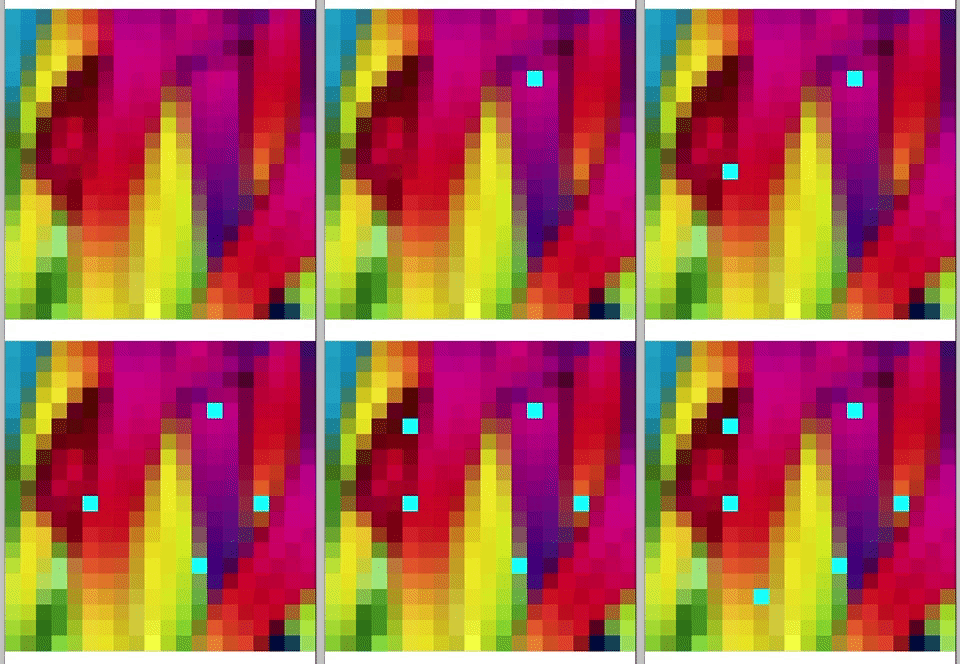
    imageView.image = [imageView.image imageWithPixel:pixelPos replacedByColor:[UIColor colorWithRed:0 green:1 blue:1 alpha:1.0]];
}
最后,您需要使用我的另一个分类方法- imageWithPixel:replacedByColor:来获得新的图像,用给定的颜色替换像素。
/// A simple struct to represent the position of a pixel
struct PixelPosition {
    NSInteger x;
    NSInteger y;
};

typedef struct PixelPosition PixelPosition;

@interface UIImage (UIImagePixelManipulationCatagory)

@end

@implementation UIImage (UIImagePixelManipulationCatagory)

-(UIImage*) imageWithPixel:(PixelPosition)pixelPosition replacedByColor:(UIColor*)color {

    // components of replacement color – in a 255 UInt8 format (fairly standard bitmap format)
    const CGFloat* colorComponents = CGColorGetComponents(color.CGColor);
    UInt8* color255Components = calloc(sizeof(UInt8), 4);
    for (int i = 0; i < 4; i++) color255Components[i] = (UInt8)round(colorComponents[i]*255.0);

    // raw image reference
    CGImageRef rawImage = self.CGImage;

    // image attributes
    size_t width = CGImageGetWidth(rawImage);
    size_t height = CGImageGetHeight(rawImage);
    CGRect rect = {CGPointZero, {width, height}};

    // image format
    size_t bitsPerComponent = 8;
    size_t bytesPerRow = width*4;

    // the bitmap info
    CGBitmapInfo bitmapInfo = kCGImageAlphaPremultipliedLast | kCGBitmapByteOrder32Big;

    // data pointer – stores an array of the pixel components. For example (r0, b0, g0, a0, r1, g1, b1, a1 .... rn, gn, bn, an)
    UInt8* data = calloc(bytesPerRow, height);

    // get new RGB color space
    CGColorSpaceRef colorSpace = CGColorSpaceCreateDeviceRGB();

    // create bitmap context
    CGContextRef ctx = CGBitmapContextCreate(data, width, height, bitsPerComponent, bytesPerRow, colorSpace, bitmapInfo);

    // draw image into context (populating the data array while doing so)
    CGContextDrawImage(ctx, rect, rawImage);

    // get the index of the pixel (4 components times the x position plus the y position times the row width)
    NSInteger pixelIndex = 4*(pixelPosition.x+(pixelPosition.y*width));

    // set the pixel components to the color components
    data[pixelIndex] = color255Components[0]; // r
    data[pixelIndex+1] = color255Components[1]; // g
    data[pixelIndex+2] = color255Components[2]; // b
    data[pixelIndex+3] = color255Components[3]; // a

    // get image from context
    CGImageRef img = CGBitmapContextCreateImage(ctx);

    // clean up
    free(color255Components);
    CGContextRelease(ctx);
    CGColorSpaceRelease(colorSpace);
    free(data);

    UIImage* returnImage = [UIImage imageWithCGImage:img];
    CGImageRelease(img);

    return returnImage;
}

@end
首先,以255 UInt8格式获取要写入其中一个像素的颜色的分量。接下来,它使用输入图像的给定属性创建一个新的位图上下文。
这种方法的重要之处是:
// get the index of the pixel (4 components times the x position plus the y position times the row width)
NSInteger pixelIndex = 4*(pixelPosition.x+(pixelPosition.y*width));

// set the pixel components to the color components
data[pixelIndex] = color255Components[0]; // r
data[pixelIndex+1] = color255Components[1]; // g
data[pixelIndex+2] = color255Components[2]; // b
data[pixelIndex+3] = color255Components[3]; // a
这样做是获取给定像素的索引(基于像素的x和y坐标),然后使用该索引将该像素的分量数据替换为替换颜色的颜色分量。
最后,我们从位图上下文中提取一个图像并执行一些清理。
完成结果:
Stack Overflow用户
发布于 2016-04-12 19:10:35
您可以尝试以下几种方法:
UIImage *originalImage = [UIImage imageNamed:@"something"];

CGSize size = originalImage.size;

UIGraphicsBeginImageContext(size);

[originalImage drawInRect:CGRectMake(0, 0, size.width, size.height)];

// myColor is an instance of UIColor
[myColor setFill];
UIRectFill(CGRectMake(someX, someY, 1, 1);

UIImage *newImage = UIGraphicsGetImageFromCurrentImageContext();

UIGraphicsEndImageContext();https://stackoverflow.com/questions/36576326
复制相似问题
腾讯云开发者

Copyright © 2013 - 2026 Tencent Cloud. All Rights Reserved. 腾讯云 版权所有
深圳市腾讯计算机系统有限公司 ICP备案/许可证号:粤B2-20090059  粤公网安备44030502008569号
腾讯云计算(北京)有限责任公司 京ICP证150476号 | 京ICP备11018762号