
导航视图项目的ActionLayout显示在右侧
我正在开发一个应用程序,其中我使用新的设计支持库的导航视图控制器的抽屉菜单。一切都很好。我已经使用app:menu属性为导航视图设置了项。物品的展示很完美。现在,我为这些项目添加了app:actionLayout,它也被添加了,但是问题是它被显示在视图的右侧。
我的活动XML
<?xml version="1.0" encoding="utf-8"?>
<RelativeLayout
    android:layout_width="match_parent"
    android:layout_height="wrap_content">

    <android.support.v7.widget.Toolbar
        android:id="@+id/toolbar"
        android:layout_width="match_parent"
        android:layout_height="wrap_content"
        android:background="?attr/colorPrimary"
        android:minHeight="?attr/actionBarSize"
        app:popupTheme="@style/AppTheme.PopupOverlay">

        <afour.com.uniapp.customwidgets.CustomTextView
            android:id="@+id/text_toolbarTitle"
            android:layout_width="match_parent"
            android:layout_height="wrap_content"
            android:layout_gravity="center"
            android:gravity="start"
            android:text="@string/app_name"
            android:textColor="@android:color/white"
            android:textSize="20sp"
            app:FontName="@string/type_face_splash" />
    </android.support.v7.widget.Toolbar>


    <FrameLayout
        android:id="@+id/frame_content"
        android:layout_width="match_parent"
        android:layout_height="match_parent"
        android:layout_below="@id/toolbar" />

        </RelativeLayout>

<android.support.design.widget.NavigationView
    android:id="@+id/navigation_view"
    android:layout_width="wrap_content"
    android:layout_height="match_parent"
    android:layout_gravity="start"
    android:background="@android:color/holo_green_dark"
    android:paddingTop="20dp"
    app:headerLayout="@layout/navigation_header_layout"
    app:paddingStart="0dp"
    app:itemBackground="@android:color/holo_green_light"
    app:itemTextColor="@android:color/white"
    app:menu="@menu/main_menu" />

</android.support.v4.widget.DrawerLayout>
我的菜单文件
<?xml version="1.0" encoding="utf-8"?>
<item
    android:id="@+id/nav_about"
    android:title="@string/aboutus"
    app:showAsAction="never" />

<item
    android:id="@+id/nav_logout"
    app:actionLayout="@layout/logout_item_layout"
    app:showAsAction="collapseActionView" />

</menu>
我的操作布局文件
<?xml version="1.0" encoding="utf-8"?>
<ImageButton
    android:layout_width="60dp"
    android:layout_height="60dp"
    android:layout_marginLeft="10dp"
    android:layout_marginStart="10dp"
    android:background="@android:color/transparent"
    android:contentDescription="@string/aboutus"
    android:padding="05dp"
    android:src="@android:drawable/ic_menu_help" />

<afour.com.uniapp.customwidgets.CustomTextView
    android:id="@+id/text_logout"
    android:layout_width="wrap_content"
    android:layout_height="wrap_content"
    android:layout_marginLeft="20dp"
    android:layout_marginStart="20dp"
    android:gravity="start"
    android:text="@string/logout"
    android:textColor="@android:color/white"
    android:textSize="20sp"
    app:FontName="@string/type_face_regular" />

</LinearLayout>
PFA的问题
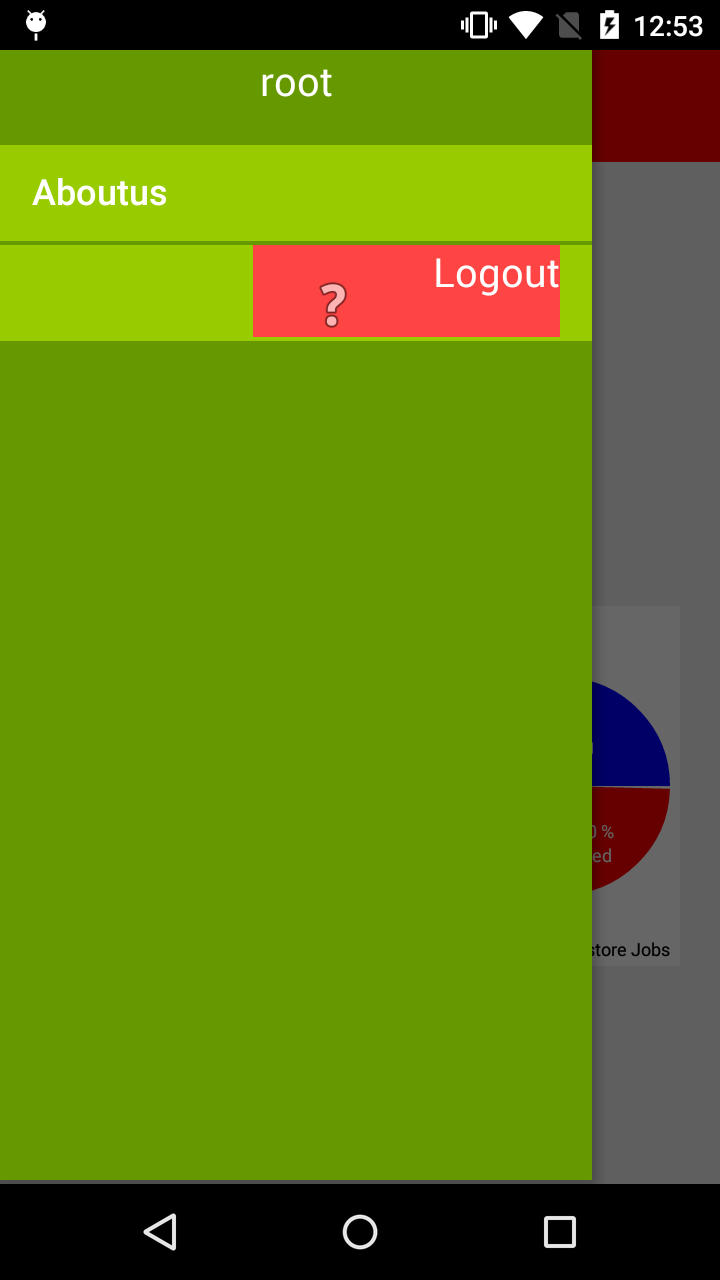
回答 2
Stack Overflow用户
发布于 2021-08-01 14:21:01
在您的代码中,我看到您在带有actionLayout的条目中没有标题,但是现在安卓需要它。我将其设置为@null,并修正了设计:
<item
    android:id="@+id/nav_logout"
    title:"@null"
    app:actionLayout="@layout/logout_item_layout"
app:showAsAction="collapseActionView" />Stack Overflow用户
发布于 2017-07-12 19:16:17
在操作布局xml文件中,可以将以下属性添加到根视图(在本例中为LinearLayout )中修复问题:
<LinearLayout
   ...
   android:layout_gravity="start">
但是请注意文档中对actionLayout的说明:
android:actionLayout:布局资源。用作操作视图的布局。https://developer.android.com/guide/topics/resources/menu-resource.html
和一个actionView:
动作视图是在应用程序栏中提供丰富功能的动作。例如,搜索操作视图允许用户在应用程序栏中键入搜索文本,而不必更改活动或片段。https://developer.android.com/training/appbar/action-views.html
因此,这可能不是在MenuItem中显示自定义视图的最佳方式。
看到您的代码,为什么不直接将图标和文本添加到item元素中?
<item
    android:id="@+id/nav_logout"
    android:icon="@android:drawable/ic_menu_help"
    android:text="@string/logout" />
但是,如果您确实需要它,则显示自定义视图的正确方法是使用ListView模式实现ViewHolder。
https://stackoverflow.com/questions/34893872
复制相似问题
腾讯云开发者

Copyright © 2013 - 2026 Tencent Cloud. All Rights Reserved. 腾讯云 版权所有
深圳市腾讯计算机系统有限公司 ICP备案/许可证号:粤B2-20090059  粤公网安备44030502008569号
腾讯云计算(北京)有限责任公司 京ICP证150476号 | 京ICP备11018762号