
用NSCollectionView设置标题
用NSCollectionView设置标题
提问于 2016-01-15 00:52:00
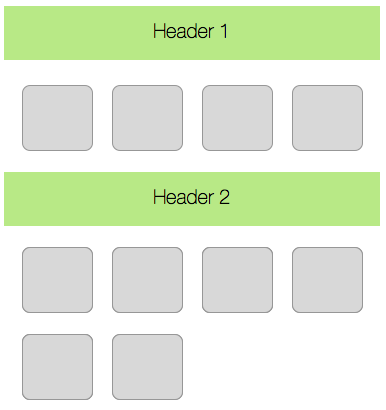
我正在使用NSCollectionView,CollectionView有标题。我需要为每个标题设置一个特定的标题。
我的代码:
func collectionView(collectionView: NSCollectionView, viewForSupplementaryElementOfKind kind: String, atIndexPath indexPath: NSIndexPath) -> NSView {
        var view: NSView?
        if kind == NSCollectionElementKindSectionHeader {
            view = collectionView.makeSupplementaryViewOfKind(kind, withIdentifier: "Header", forIndexPath: indexPath)
        }
        ...
        return view!
}Header是NSCollectionViewItem
import Cocoa

class Header: NSCollectionViewItem {

    var title: String!
    ...
    //Write title value in a textField
    ...
}我的问题是:如何从viewForSupplementaryElementOfKind设置标题值
我需要这样的东西:
回答 2
Stack Overflow用户
回答已采纳
发布于 2016-01-15 02:31:19
这里有点棘手,我希望苹果能尽快通过更好地利用NSCollectionViewItem来改进它的API
实际上,从示例代码CocoaSlideCollection中,显示带有可变文本的标题的方法是查看标题视图的子视图并获得对NSTextField的引用,然后设置stringValue。
与Swift合作:
- 创建一个
HeaderView,它是NSView的一个子类 - 将
HeaderView设置为查看报头nib - 在
HeaderView中,实现这个变量titleTextField惰性变量titleTextField: NSTextField?={ self.subviews中的视图{ if视图是NSTextField {返回视图为?NSTextField }}返回nil }() - 在
viewForSupplementaryElementOfKind委托方法中,执行以下操作 如果让视图= collectionView.makeSupplementaryViewOfKind(kind,withIdentifier: nibName!,forIndexPath: indexPath?HeaderView { view.titleTextField?.stringValue =“报头自定义值”}返回视图
Stack Overflow用户
发布于 2016-04-25 11:46:08
我就是这样用的:
func collectionView(collectionView: CollectionView,viewForSupplementaryElementOfKind kind: String, atIndexPath indexPath: NSIndexPath) -> CollectionHeaderView!
{
    switch kind
    {
        case NSCollectionElementKindSectionHeader:  let contactsCollectionHeaderView                            = collectionView.makeSupplementaryViewOfKind(kind,withIdentifier:"ContactsCollectionHeader",forIndexPath:indexPath) as! ContactsCollectionHeaderView
                                                    contactsCollectionHeaderView.titleTextField?.stringValue    = self.collectionView(collectionView, titleForHeaderInSection:indexPath.section) ?? ""
                                                    return contactsCollectionHeaderView

        case "NSCollectionElementKindSelectionRectIndicator": return nil

        default:                                    return nil
    }
请注意,当前委托的方法签名是错误的,返回的视图实际上是可选的,否则您无法返回像上面的矩形指示符那样的特殊defind类型。
页面原文内容由Stack Overflow提供。腾讯云小微IT领域专用引擎提供翻译支持
原文链接:
https://stackoverflow.com/questions/34802573
复制相关文章
相似问题
腾讯云开发者

Copyright © 2013 - 2026 Tencent Cloud. All Rights Reserved. 腾讯云 版权所有
深圳市腾讯计算机系统有限公司 ICP备案/许可证号:粤B2-20090059  粤公网安备44030502008569号
腾讯云计算(北京)有限责任公司 京ICP证150476号 | 京ICP备11018762号