
办公室365,oauth2,我在哪里找到Key+Secret?
办公室365,oauth2,我在哪里找到Key+Secret?
提问于 2015-12-09 21:03:21
我第一次尝试使用oauth2访问365,这是我的本地应用程序。我已经在Azure AD注册了我的申请。文档中写着:"...In Azure Management,选择您的应用程序并选择顶部菜单中的配置。向下滚动到键。“
但是在(我的) Azure应用程序中,配置属性,我只有名称、客户机ID、URL和Logo,以及权限区域--没有“键”区域。
我是不是遗漏了什么?
回答 1
Stack Overflow用户
回答已采纳
发布于 2015-12-10 00:47:59
Web应用程序和/或Web API
由于tou正在寻找密钥,您需要在AD中将应用程序创建为Web应用程序或web
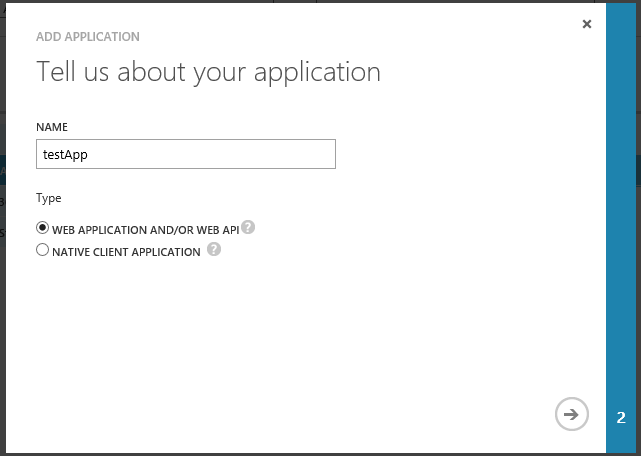
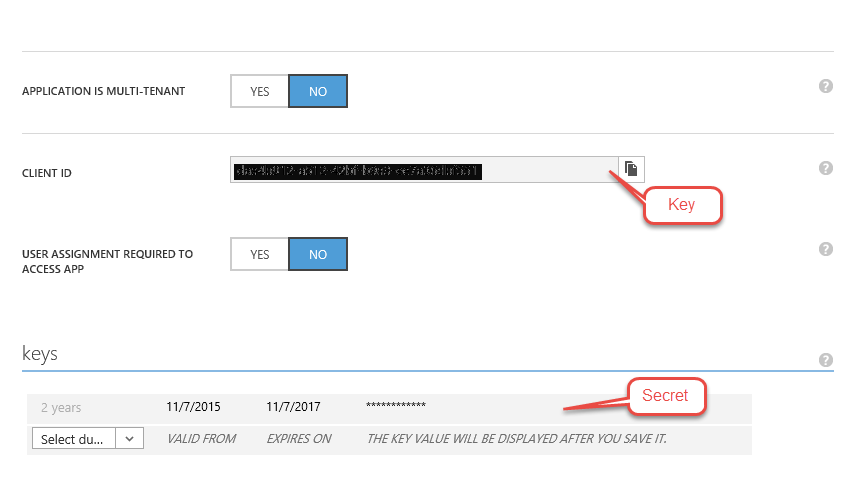
然后你就能找到钥匙和秘密。
本地客户端应用程序
如果您正在开发一个本地客户端应用程序,您不需要密钥,因为这个流程不需要它们。
因此,首先,您需要使用阿达尔 (Active Directory Library),为您的客户端程序使用正确的版本。
然后,您应该参考您的应用程序的AD配置,注意不需要键。
// Native client configuration in AzureAD
private string clientID = "3dfre985df0-b45640-443-a8e5-f4bd23e9d39f368";
private Uri redirectUri = new Uri("http://myUrl.webapi.client");
然后准备AD权限URL并创建Auth上下文。
private const string authority = "https://login.windows.net/cloudalloc.com";
private AuthenticationContext authContext = new AuthenticationContext(authority);
在此之后,您需要根据要访问的资源请求访问令牌。
AuthenticationResult result = null;
    try
    {
        result = authContext.AcquireToken(resource, clientId, redirectUri, PromptBehavior.Never);
    }
    catch (AdalException ex)
    {
        if (ex.ErrorCode != "user_interaction_required")
        {
            // An unexpected error occurred.
            MessageBox.Show(ex.Message);
        }
}resource可以是webapi或office 365资源URI。
页面原文内容由Stack Overflow提供。腾讯云小微IT领域专用引擎提供翻译支持
原文链接:
https://stackoverflow.com/questions/34188933
复制相关文章
相似问题
腾讯云开发者

Copyright © 2013 - 2026 Tencent Cloud. All Rights Reserved. 腾讯云 版权所有
深圳市腾讯计算机系统有限公司 ICP备案/许可证号:粤B2-20090059  粤公网安备44030502008569号
腾讯云计算(北京)有限责任公司 京ICP证150476号 | 京ICP备11018762号