
如何设置Sitecore 8默认登录重定向/start页面?
也许我已经用尽了我的谷歌魔力,但我搞不懂这一点:
在Sitecore 8用户设置中,我可以为每个用户设置一个"Start URL“,换句话说,就是页面/url,用户在登录成功后被定向到这个页面/url。设置此值的接口如下所示:
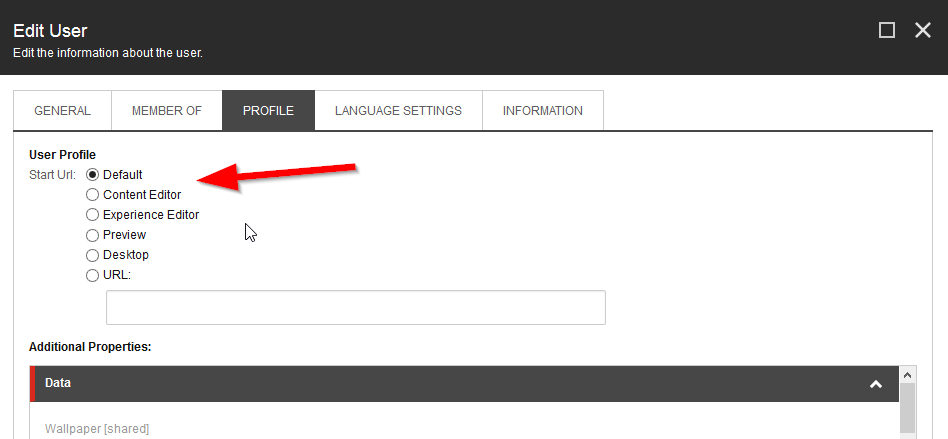
如果单击“关闭桌面”并单击“保存”,StartUrl字段的值将设置为/sitecore/shell/default.aspx,用户将被重定向到经典的“灯塔”桌面。
如果我单击“关闭内容编辑器”并单击“保存”,StartUrl字段的值将设置为/sitecore/shell/applications/clientusesoswindows.aspx,用户将被重定向到内容编辑器,实际上是/sitecore/shell/Applications/Content editor.aspx (发生了额外的重定向)。
如果我单击“关闭默认值”并单击“保存”,StartUrl字段的值将设置为空字符串,并且用户将被重定向到Launchpad,实际上是/sitecore/shell/sitecore/client/Applications/Launchpad.aspx。
我的问题是:如何更改默认行为,即,如果用户选择默认,如何决定用户被重定向到何处?我希望他们在默认情况下转到Content,他们并不喜欢Launchpad。
回答 1
Stack Overflow用户
发布于 2015-09-28 14:26:52
在用户管理器中选择默认值时,它有效地将用户配置文件StartUrl值设置为空。这只是将用户引导到您的站点上的/sitecore在他们登录后。
/sitecore有一个302重定向到发射台。我还没弄清楚那是在什么地方。
一个选项是自定义loggingin管道。它的默认设置是:
<loggingin argsType="Sitecore.Pipelines.LoggingIn.LoggingInArgs">
    <processor mode="on" type="Sitecore.Pipelines.LoggingIn.ClearCache, Sitecore.Kernel" />
    <processor mode="on" type="Sitecore.Pipelines.LoggingIn.CheckClientUser, Sitecore.Kernel" />
    <processor mode="on" type="Sitecore.Pipelines.LoggingIn.CheckStartUrl, Sitecore.Kernel" />
</loggingin>您可以在CheckStartUrl处理器中添加一个新处理器,如果StartUrl为空,则从设置等将其更新为默认值。
就像这样*
public class CustomCheckStartUrl : CheckStartUrl
{
    protected override bool ValidateStartUrl(LoggingInArgs args)
    {
        var isValid = base.ValidateStartUrl(args);

        // override the default start url
        if (string.IsNullOrWhiteSpace(args.StartUrl))
        {
            args.StartUrl = Sitecore.Configuration.Settings.GetSetting("MyDefaultStartPage", string.Empty);
        }

        return isValid;
    }
}
把它插到管道里。
*未经测试的代码
https://stackoverflow.com/questions/32824047
复制相似问题
腾讯云开发者

Copyright © 2013 - 2026 Tencent Cloud. All Rights Reserved. 腾讯云 版权所有
深圳市腾讯计算机系统有限公司 ICP备案/许可证号:粤B2-20090059  粤公网安备44030502008569号
腾讯云计算(北京)有限责任公司 京ICP证150476号 | 京ICP备11018762号