
JavaFX FlowPane自动大小
JavaFX FlowPane自动大小
提问于 2015-04-09 11:27:08
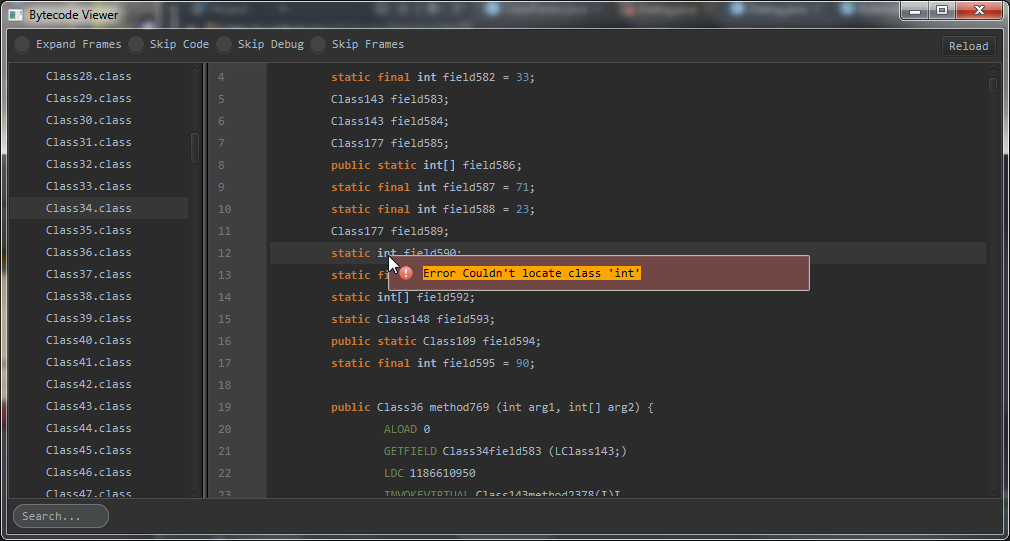
我遇到的问题是,FlowPane留下了很多多余的空间,可能是弹出窗口,尽管我认为弹出的大小是内容的大小。
为了调试起见,我将文本包装在一个BorderPane中,以显示文本的界限。
我关注的组件是错误弹出。
CSS
.warning-popup {
    -fx-padding: 10px;
    -fx-hgap: 10px;
    -fx-vgap: 10px;
    -fx-background-color: #704745;
    -fx-border-color: #C8C8C8;
    -fx-background-radius: 2px;
    -fx-border-radius: 2px;
}


.warning-popup .text {
    -fx-fill: #000000;
}
Java代码
public static void showWarningPopup(Node owner, String message, double screenX, double screenY) {
    // create message text
    Text text = new Text(message);
    text.getStyleClass().add("text");
    // wrap text in container
    Pane textContainer = new BorderPane(text);
    textContainer.setStyle("-fx-background-color: orange;");
    // create error image
    ImageView image = new ImageView("/resources/error-14.png");
    image.getStyleClass().add("image-view");
    // create content
    FlowPane content = new FlowPane(image, textContainer);
    content.getStyleClass().add("warning-popup");
    content.autosize();
    // create and show the popup
    Popup popup = new Popup();
    popup.setHideOnEscape(true);
    popup.setAutoHide(true);
    popup.setAutoFix(true);
    popup.getContent().add(content);
    popup.show(owner, screenX, screenY);
}
(谢谢你预先提供的帮助:)
回答 2
Stack Overflow用户
回答已采纳
发布于 2015-04-09 12:38:16
背景
您所面临的问题是因为默认的WrapLength of FlowPane,它设置为400。此属性还将FlowPane的FlowPane设置为400。
从医生那里:
FlowPane的prefWrapLength属性建立它的首选宽度(对于水平的)或首选的高度(对于垂直的)。
溶液
可以将wrapLength降到所需的值。
flowPane.setPrefWrapLength(YOUR_VALUE);Stack Overflow用户
发布于 2015-04-09 13:02:06
除了@ItachiUchiha的答案之外,您还可以去掉所有窗格,并在简单的用例中使用Label:
public static void showWarningPopup( Node owner, String message, double screenX, double screenY )
{
    // create error image
    ImageView image = new ImageView( "/resources/error-14.png" );
    image.getStyleClass().add( "image-view" );

    // create content
    Label label = new Label( message, image );
    label.setBackground(
            new Background(
                    new BackgroundFill(
                            Color.ORANGE,
                            new CornerRadii( 10 ),
                            new Insets( -10 )
                    )
            )
    );

    // create and show the popup
    Popup popup = new Popup();
    popup.setHideOnEscape( true );
    popup.setAutoHide( true );
    popup.setAutoFix( true );
    popup.getContent().add( label );
    popup.show( owner, screenX, screenY );
}
当然,您可以更喜欢使用css样式类而不是基于代码的样式。
页面原文内容由Stack Overflow提供。腾讯云小微IT领域专用引擎提供翻译支持
原文链接:
https://stackoverflow.com/questions/29537264
复制相关文章
相似问题
腾讯云开发者

Copyright © 2013 - 2026 Tencent Cloud. All Rights Reserved. 腾讯云 版权所有
深圳市腾讯计算机系统有限公司 ICP备案/许可证号:粤B2-20090059  粤公网安备44030502008569号
腾讯云计算(北京)有限责任公司 京ICP证150476号 | 京ICP备11018762号