
FlowPane中内容的调整
FlowPane中内容的调整
提问于 2015-03-30 15:44:21
我的中间有一个花格,我应用了一个滑块效果,它可以在点击右边的按钮时被调用(因此滑块在展开时会从右向左移动)。我遵循了这里提到的JewelSea滑块教程,滑块
现在,在两个不同的节点上有两个不同的流窗格。两个流窗格都包含标签数组,但唯一的区别是,一个流程包含滚动条,包含在titlepane中,而另一个没有滚动条,也没有标题栏。
因此,如果单击滑块,则会自动调整流窗格中的内容(没有滚动条和标题窗格),但与包含滚动条的流窗格情况不同。
这里是带滚动条-的流窗格的相关代码。
public void loadCase() {
    ScrollPane s = null;
    if (!homeController.mainTabPane.getTabs().contains(testTab)) {
        int app = 0;
        if (appareaList.size() > 0) {
            FlowPane fpTestmoduleContainer = new FlowPane();
            FlowPane example = new FlowPane();
            for (ApplicationAreas appttribute : appareaList) {
                appTestTitledPane[app] = new TitledPane();
                appTestTitledPane[app].setText(appttribute.getApplication_name());
                appTestTitledPane[app].setPrefSize(Control.USE_COMPUTED_SIZE, Control.USE_COMPUTED_SIZE);

                /*Module loop start*/
                fpTestmoduleContainer.setHgap(10);
                fpTestmoduleContainer.setVgap(10);
               // fpTestmoduleContainer.setPrefSize(Control.USE_COMPUTED_SIZE, Control.USE_COMPUTED_SIZE);

                List<TestModuleAttribute> testmoduleList = WSData.getTestingModuleList(appttribute.getApplication_id());
                ArrayList<Label> listTestlbs = new ArrayList<Label>(testmoduleList.size());
                System.out.println("testmoduleList.size()" + testmoduleList.size());
                int i = 0;
                for (TestModuleAttribute testmattribute : testmoduleList) {
                    listTestlbs.add(new Label());
                    listTestlbs.get(i).setText(testmattribute.getModule_name());

                    listTestlbs.get(i).setAlignment(Pos.CENTER);
                    listTestlbs.get(i).setTextAlignment(TextAlignment.CENTER);
                    listTestlbs.get(i).setWrapText(true);
                    listTestlbs.get(i).setPrefSize(Control.USE_COMPUTED_SIZE, Control.USE_COMPUTED_SIZE);
                    listTestlbs.get(i).setId(testmattribute.getFxnode_css());
                    Image imgInstalled = new Image(getClass().getResourceAsStream("/upgradeworkbench/View/Icons/ok.png"));
                    listTestlbs.get(i).setGraphic(new ImageView(imgInstalled));
                    listTestlbs.get(i).setContentDisplay(ContentDisplay.BOTTOM);
                    Tooltip testtp = new Tooltip();
                    testtp.setText("Total No. Of test Cases :" + testmattribute.getTest_case());
                    testtp.setWrapText(true);

                    listTestlbs.get(i).setTooltip(testtp);
                    addModuleMouseClickListener(listTestlbs.get(i), testmattribute.getModule_name(), testmattribute.getFxnode_css(), testmattribute.getTest_case());
                    i = i + 1;
                }
               s = new ScrollPane();
                s.setContent(fpTestmoduleContainer);
                fpTestmoduleContainer.setPrefWidth(1500);
                fpTestmoduleContainer.getChildren().addAll(listTestlbs);
                //appTestTitledPane[app].setContent(fpTestmoduleContainer[app]);
                listTestlbs.clear();
                app = app + 1;
            }
            appareaTestmoduleContainer.getPanes().addAll(appTestTitledPane);
            appareaTestmoduleContainer.setExpandedPane(appTestTitledPane[0]);
            testTab.setText("Test Cases Wizard");
            testTab.setText("Testing Application Foot Print");
        //mainTab.setClosable(true);

            // testTab.getContent().setVisible(true);
            HBox hb = new HBox();

            testTab.setContent(s);

            }
    }
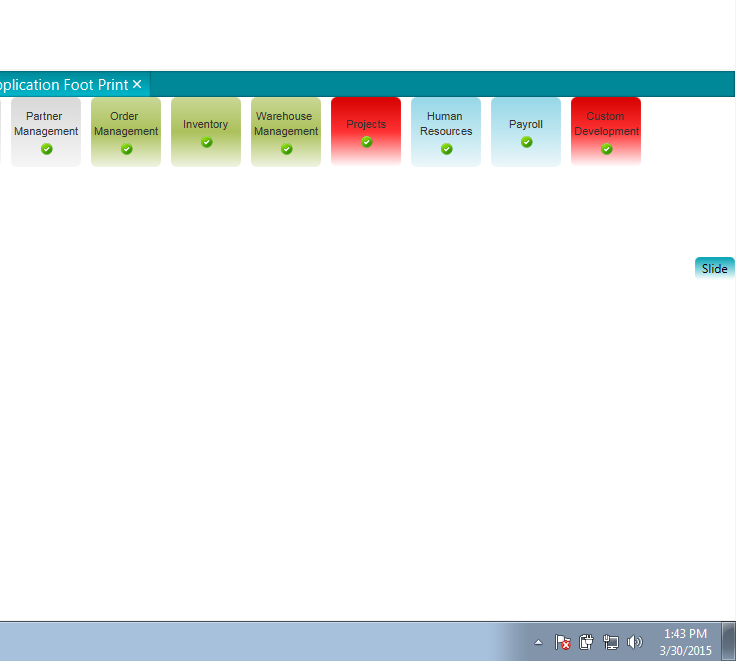
}滑块按预期工作的图像-滑动前的
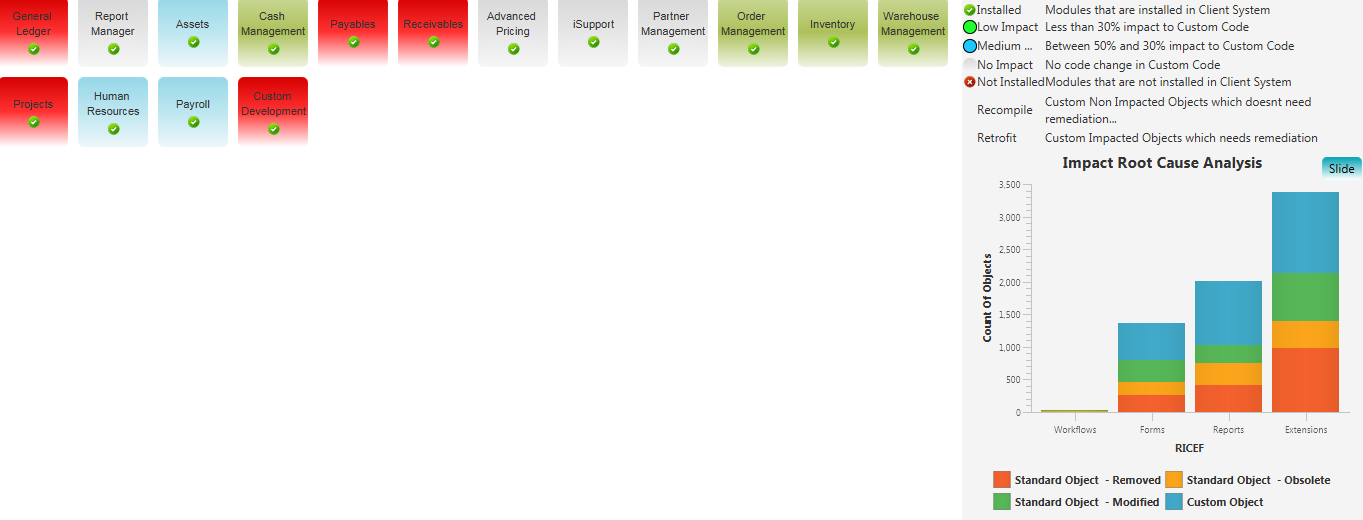
在滑动(没有滚动条)之后,4个模块进入下一行,因为滑块占用了空间。
在它中添加滚动窗格和嵌入流窗格之后。滑块与如图所示的流窗格内容重叠
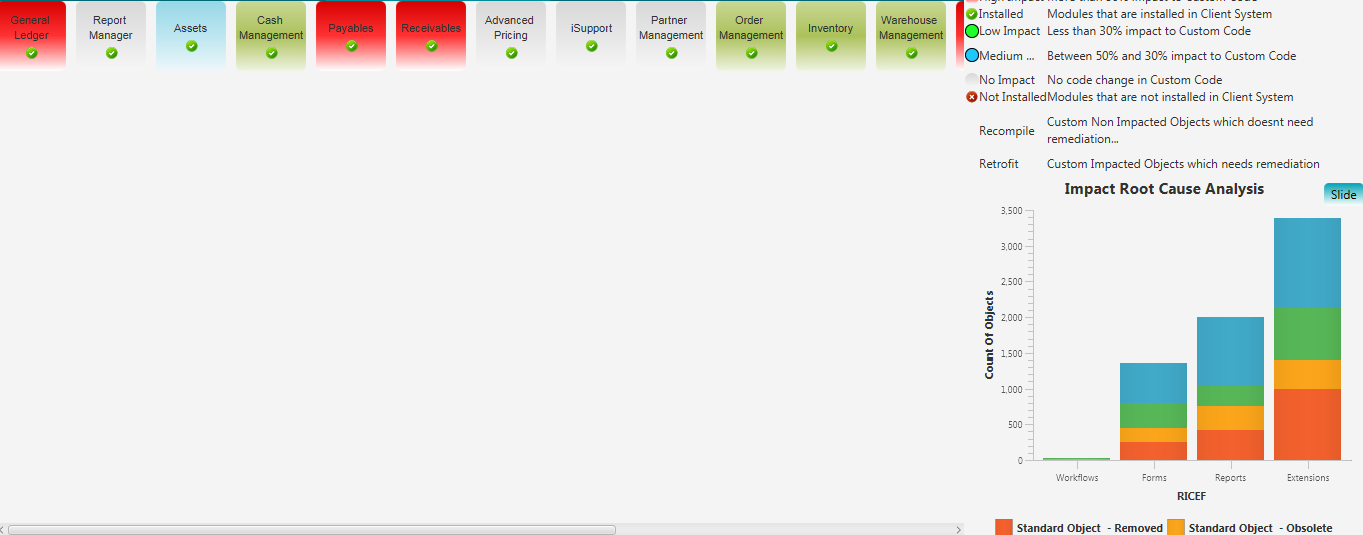
我想知道为什么滚动条会在自动调整流窗格中的内容时引起问题,以及如何修复它?
回答 1
Stack Overflow用户
回答已采纳
发布于 2015-03-31 07:14:00
在这里,滚动窗格的宽度是固定的。然后,流的宽度也是如此,pane.You需要更改滚动窗格的大小,以便将其内容重置。使用以下代码。
scroll[app].setFitToHeight(true);
scroll[app].setFitToWidth(true);
此代码将根据视图设置滚动窗格的大小。然后,花格也会相应地调整。
页面原文内容由Stack Overflow提供。腾讯云小微IT领域专用引擎提供翻译支持
原文链接:
https://stackoverflow.com/questions/29350525
复制相关文章
相似问题
腾讯云开发者

Copyright © 2013 - 2026 Tencent Cloud. All Rights Reserved. 腾讯云 版权所有
深圳市腾讯计算机系统有限公司 ICP备案/许可证号:粤B2-20090059  粤公网安备44030502008569号
腾讯云计算(北京)有限责任公司 京ICP证150476号 | 京ICP备11018762号